WATCHING TV / CHANNEL CONTROL
REMOTECONTROL FUNCTIONS
When using the remote control, aim it at the remote control sensor on the TV.
-1-
Z
Ch
-q
-r"
Z
Z
r_
N
O
Z
-q
O
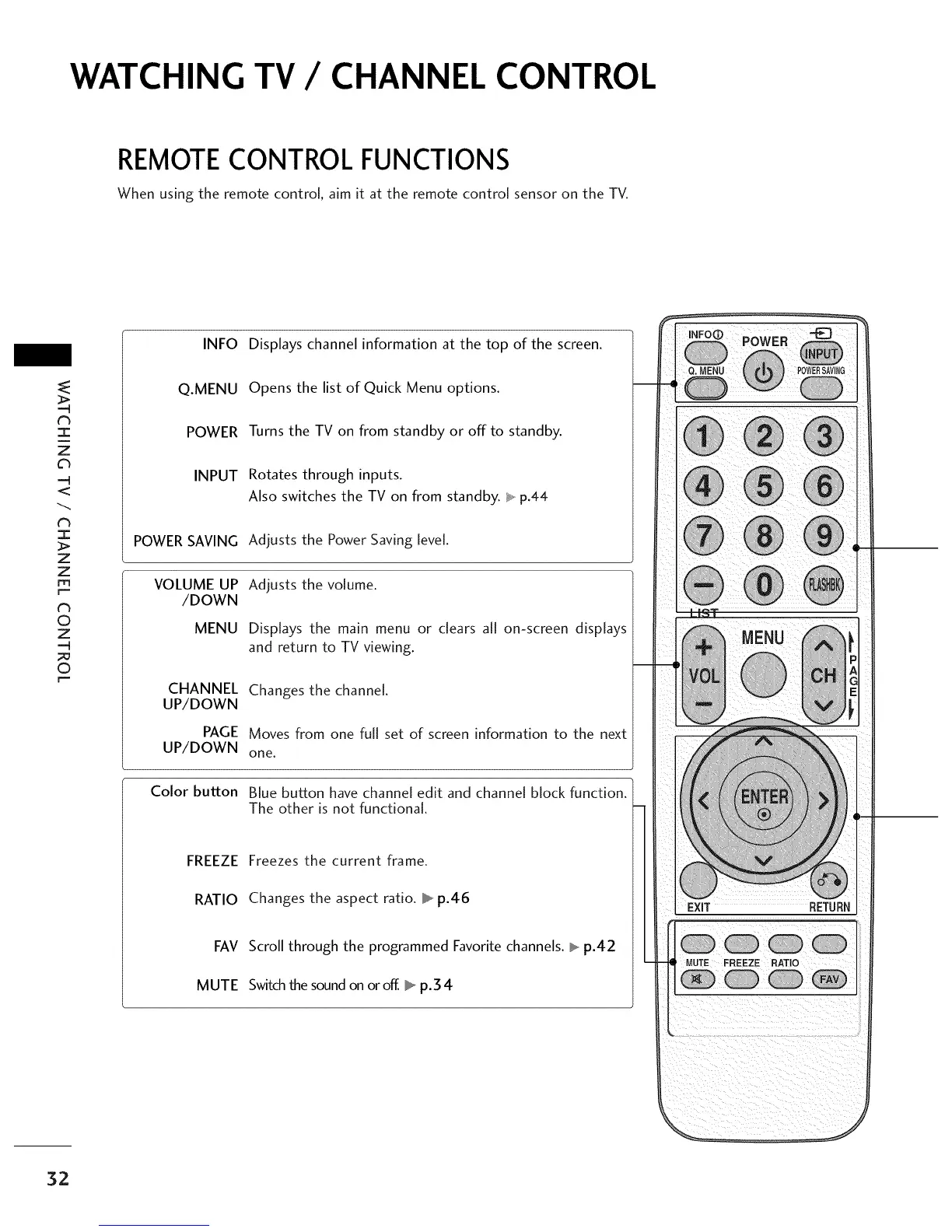
INFO
Q.MENU
POWER
INPUT
POWERSAVING
VOLUME UP
/DOWN
MENU
CHANNEL
UP/DOWN
PAGE
UP/DOWN
Color button
Displays channel information at the top of the screen.
Opens the list of Quick Menu options.
Turns the TV on from standby or off to standby.
Rotates through inputs.
Also switches the TV on from standby. _ p.44
Adiusts the Power Saving level.
Adiusts the volume.
Displays the main menu or clears all on-screen displays
and return to TV viewing.
Changes the channel.
Moves from one full set of screen information to the next
one.
Blue button have channel edit and channel block function.
The other is not functional.
FREEZE
RATIO
FAV
MUTE
Freezes the current frame.
Changes the aspect ratio. _ p.46
Scroll through the programmed Favoritechannels. _ p.42
Switchthe soundon oroff. _ p.34
MUTE FREEZE RATIO
32



 To Next Page