WATCHING TV / CHANNEL CONTROL
FAVORITECHANNEL SETUP
Your TV's OSD (On Screen Display) may differ slightly from what is shown in this manual.
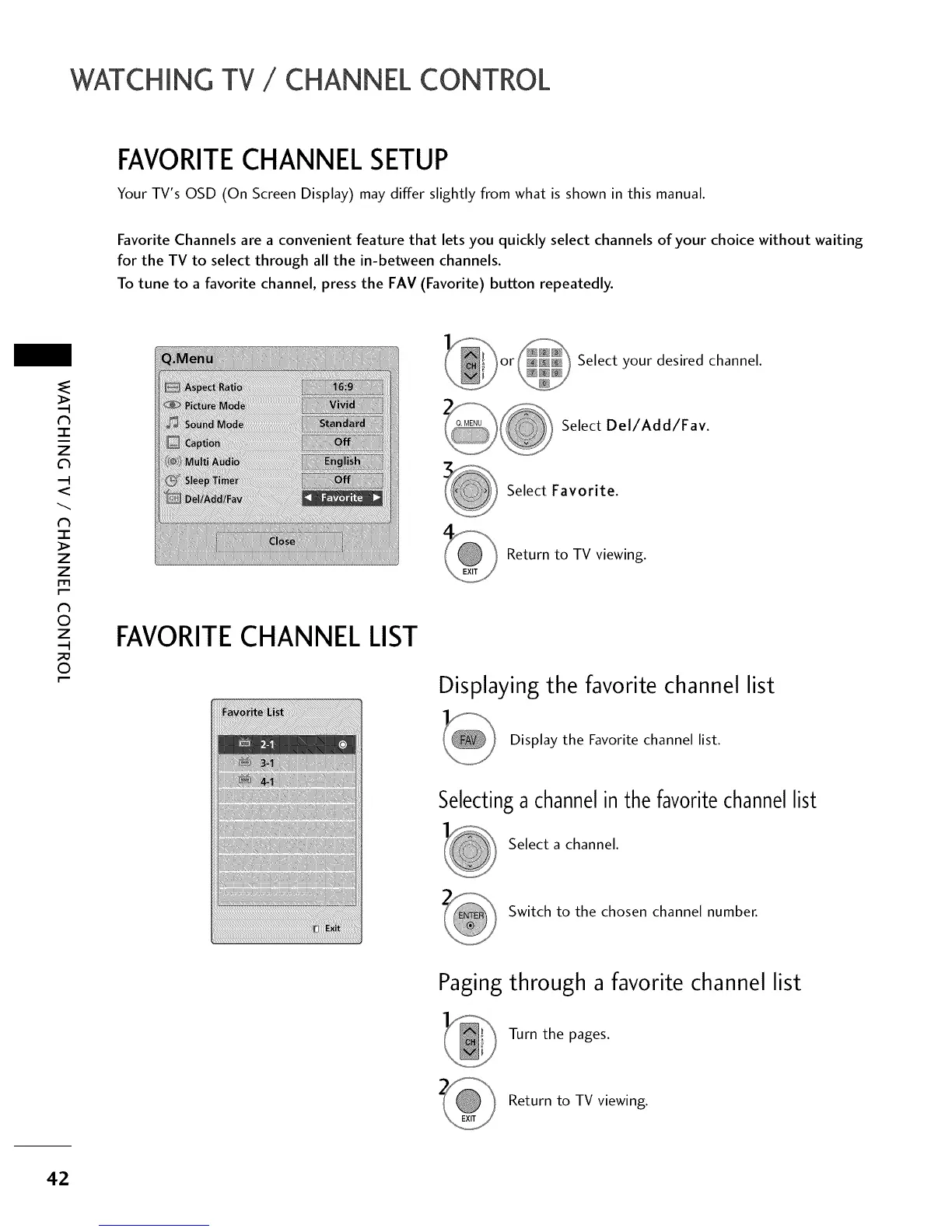
Favorite Channels are a convenient feature that lets you quickly select channels of your choice without waiting
for the TV to select through all the in-between channels.
To tune to a favorite channel, press the FAV (Favorite) button repeatedly.
N
-r"
z
<
N
-r
>
Z
Z
fT1
N
©
Z
©
FAVORITECHANNEL LIST
_or_ Select desired channel.
your
Select Del/Add/Fav.
Select Favorite.
Return to TV viewing.
Displaying the favorite channel list
Display the Favorite channel list.
Selectinga channelin the favoritechannellist
Select a channel.
Switch to the chosen channel number.
Paging through a favorite channel list
Turn the pages.
Return to TV viewing.
42



 To Next Page