IMAGESTICKING MINIMIZATION (ISM) METHOD
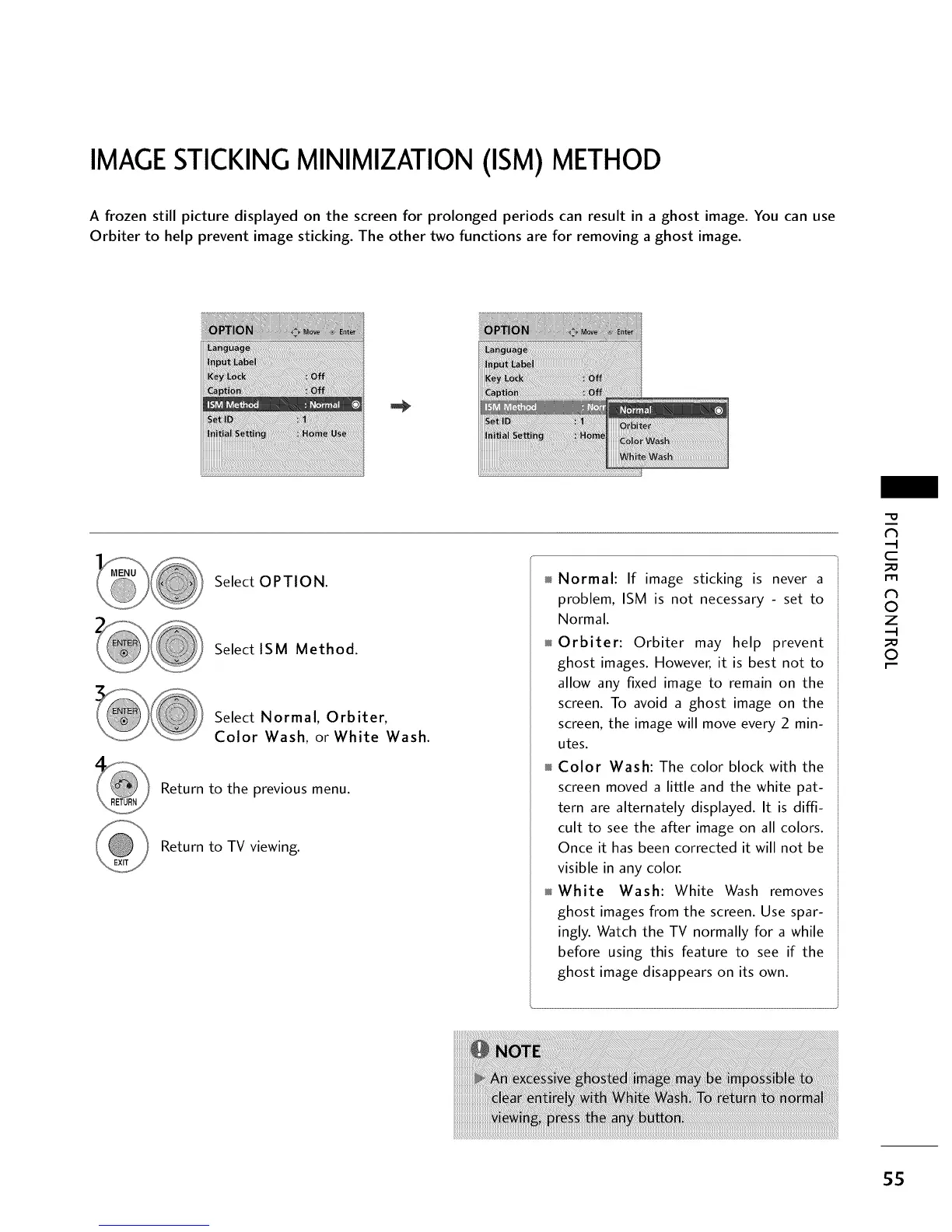
A frozen still picture displayed on the screen for prolonged periods can result in a ghost image. You can use
Orbiter to help prevent image sticking. The other two functions are for removing a ghost image.
Select OPTION.
Select ISM Method.
Select Normal, Orbiter,
Color Wash, or White Wash.
Return to the previous menu.
Return to TV viewing.
Normal: If image sticking is never a
problem, ISM is not necessary - set to
Normal.
Orbiter: Orbiter may help prevent
ghost images. However, it is best not to
allow any fixed image to remain on the
screen. To avoid a ghost image on the
screen, the image will move every 2 min-
utes.
Color Wash: The color block with the
screen moved a little and the white pat-
tern are alternately displayed. It is diffi-
cult to see the after image on all colors.
Once it has been corrected it will not be
visible in any color.
White Wash: White Wash removes
ghost images from the screen. Use spar-
ingly. Watch the TV normally for a while
before using this feature to see if the
ghost image disappears on its own.
"O
N
C
m
N
©
Z
©
55



 To Next Page