PICTURECONTROL
POWERSAVING
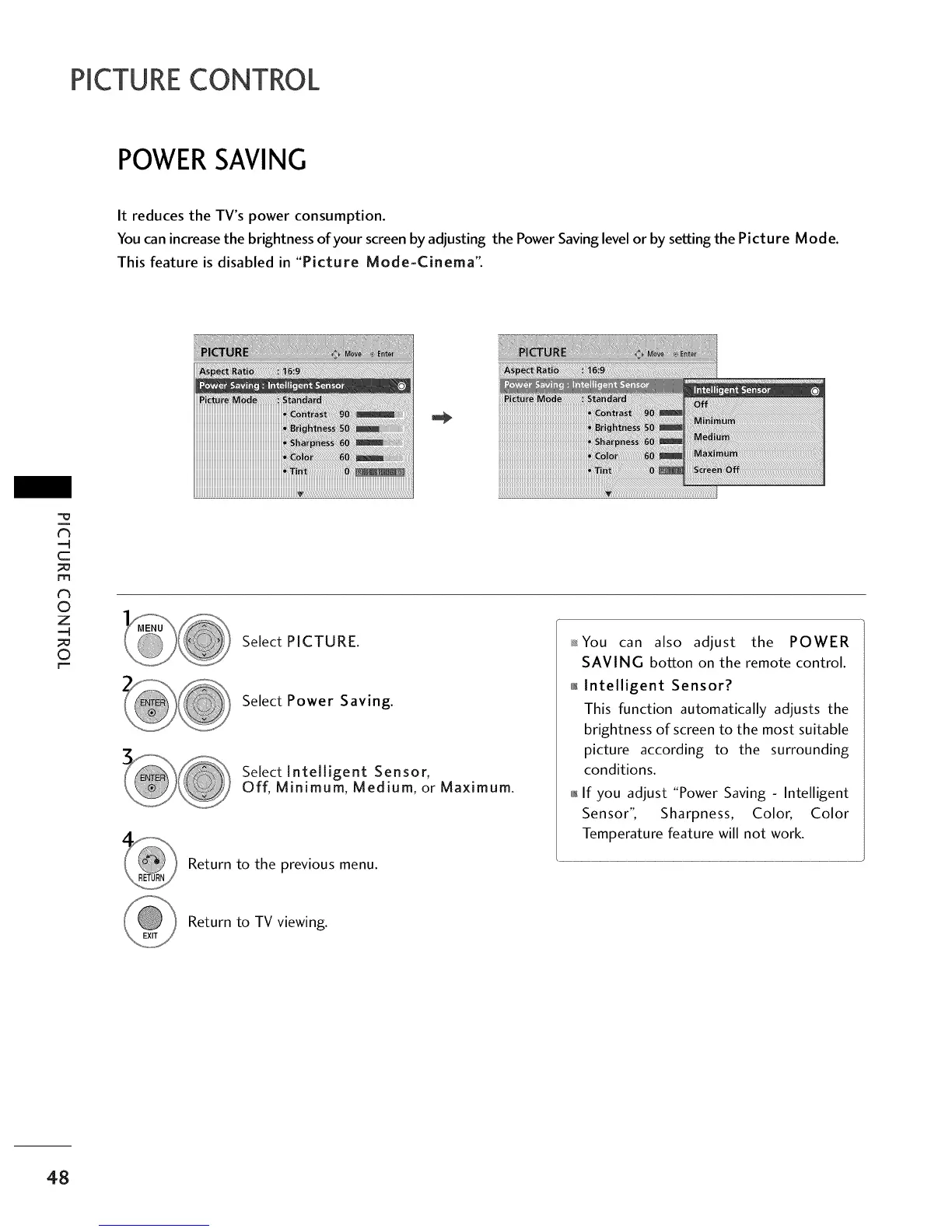
It reduces the TV's power consumption.
You can increase the brightness of your screen by adjusting the Power Saving level or by setting the Picture Mode.
This feature is disabled in "Picture Mode-Cinema".
_h
-q
c
m
0
z
-q
0
r"
iiiiiiiiiiiiiiiiiiiiiiiiiiiiiiiiiiiiiiiiiiiiiiiiiiiiiiiiiiiiiiiiiiiiiiiiiiiiii_i_i_!i!_!_i_!i_!i_!i_!i_!i_i_!i_i_!i_!i_!iiiiii!iiii!iii¸ !iiiiiiii'!i_ii_ii,ii,li_:ii_
iiiiiiiiiiiiiiiiiiiiiiiiiiiiiiiiiiiiiiiiiiiiiiiiiiiiiiiiiiiiiiiiiiiiiiiiiiiii!_ii_!_!_!_!_!_!_!_!_!_!_!_!_!_!_!_!_!_!_!_!_i!i@i_!_ii_i_!ii¸ iiiiiiiii_iiiiiiiii_i'ii'i_iiiiii
iiiii iiiiiiiiiiiiiii ii ii ii ii il'ii!ii!ii!ii!iiii
Select PICTURE.
Select Power Saving.
Select Intelligent Sensor,
Off, Minimum, Medium, or Maximum.
Return to the previous menu.
_You can also adjust the POWER
SAVING botton on the remote control.
_ Intelligent Sensor?
This function automatically adjusts the
brightness of screen to the most suitable
picture according to the surrounding
conditions.
_ If you adjust "Power Saving - Intelligent
Sensor", Sharpness, Color, Color
Temperature feature will not work.
Return to TV viewing.
48



 To Next Page