PRESETSOUND SETTINGS (SOUND MODE)
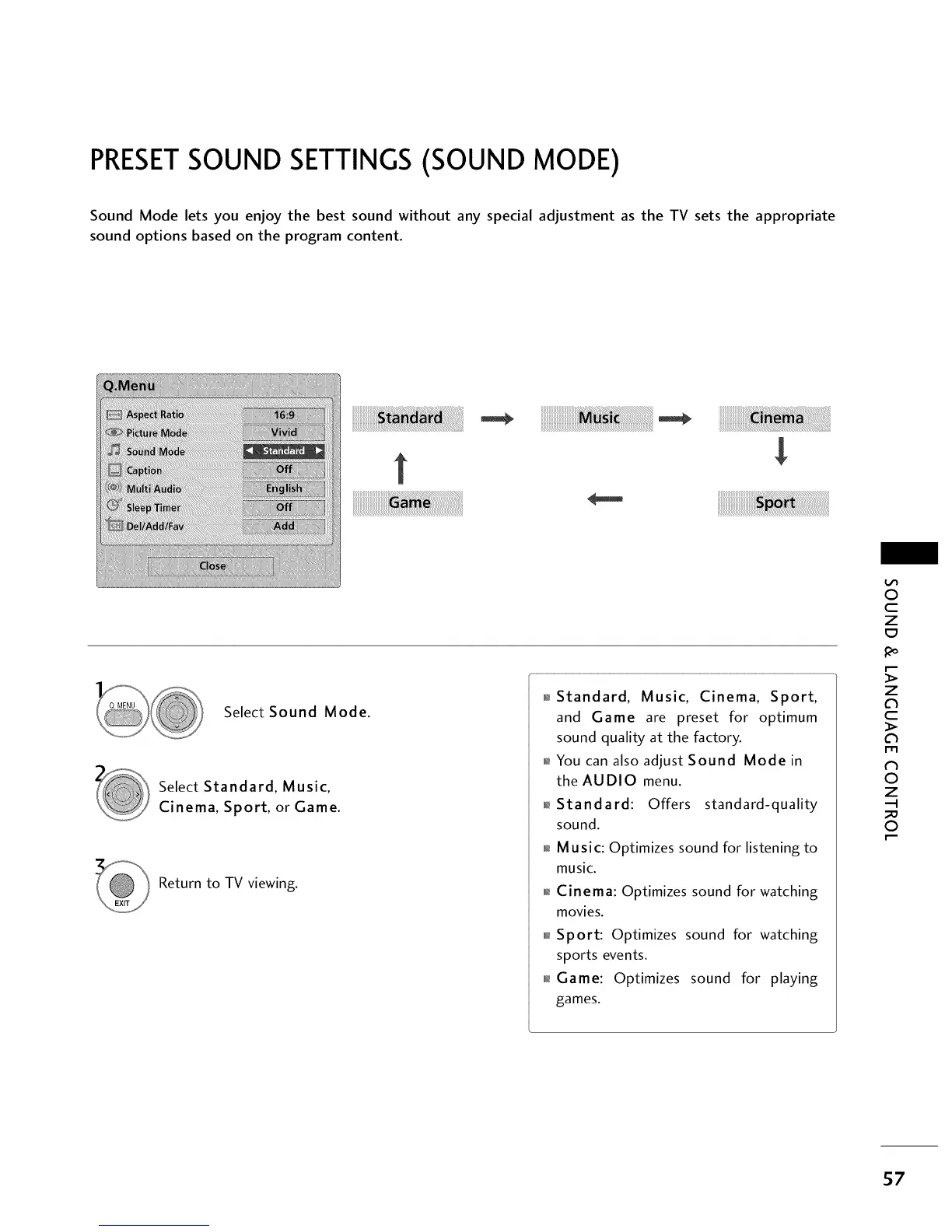
Sound Mode lets you enjoy the best sound without any special adjustment as the TV sets the appropriate
sound options based on the program content.
t
i!i!i!i!i!i!i!i!i!i!i!i!i!i!i!i!i!i!i!i!i!i!i!i!i!i!i!i!i!i!i!i!_i!__i!_i!_i!_i!_i!_i!_i!_i!_i!_i!_i!_i!_i!_i!_i!_i!_i!_i!_i!_i!_i!_i!_i!_i!_i!_!i_!_!
Select Sound Mode.
Select Standard, Music,
Cinema, Sport, or Game.
Return to TV viewing.
_ Standard, Music, Cinema, Sport,
and Game are preset for optimum
sound quality at the factory.
_ You can also adjust Sound Mode in
the AUDIO menu.
_l_Standard: Offers standard-quality
sound.
_i_Music: Optimizes sound for listening to
music.
Cinema: Optimizes sound for watching
movies.
_ Sport: Optimizes sound for watching
sports events.
_ Game: Optimizes sound for playing
games.
0
c
Z
z
l'rl
_h
0
Z
.-I
0
57



 To Next Page