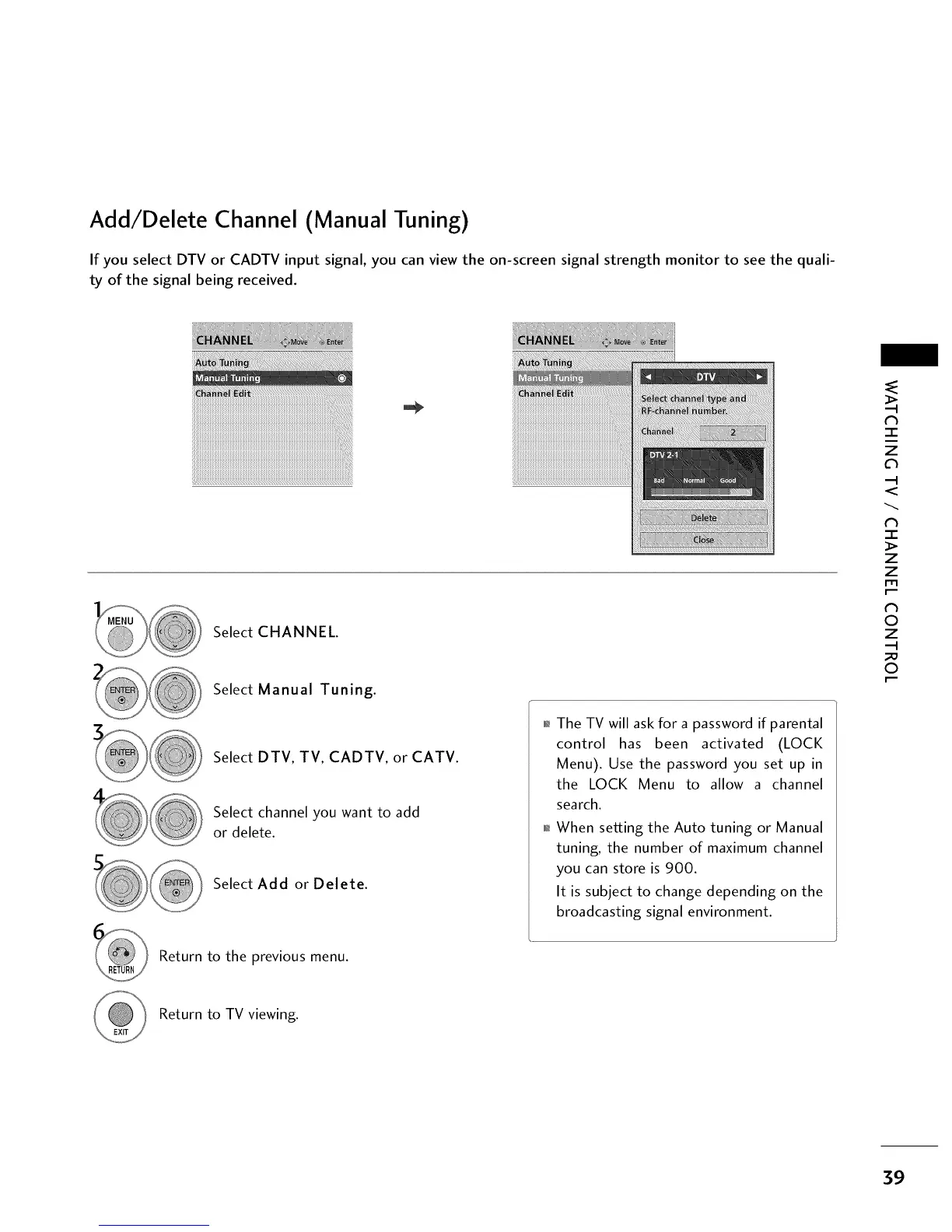
Add/Delete Channel (Manual Tuning)
If you select DTV or CADTV input signal, you can view the on-screen signal strength monitor to see the quali-
ty of the signal being received.
_iiii_ii!ii_iiiI!_i!i_iiii!i_iiiii_i_iii_ii_iiii!!i_ii!i!_i!_i_iii!!iiiii_iiiiiiiii!i_iiii!iiiiiii!iii_ii_iiiiiiIii!iiiiii_ii!i_iiiiIii!i!_i_!iiiiii!iii_i_iiiiiiiii_iiiiiii_
Select CHANNEL.
Select Manual Tuning.
Select DTV, TV, CADTV, or CATV.
Select channel you want to add
or delete.
Select Add or Delete.
01_The TV will ask for a password if parental
control has been activated (LOCK
Menu). Use the password you set up in
the LOCK Menu to allow a channel
search.
01_When setting the Auto tuning or Manual
tuning, the number of maximum channel
you can store is 900.
It is subject to change depending on the
broadcasting signal environment.
N
-r"
z
c_
<
N
-r"
>
Z
Z
fT1
N
0
Z
0
Return to the previous menu.
Return to TV viewing.
39



 To Next Page