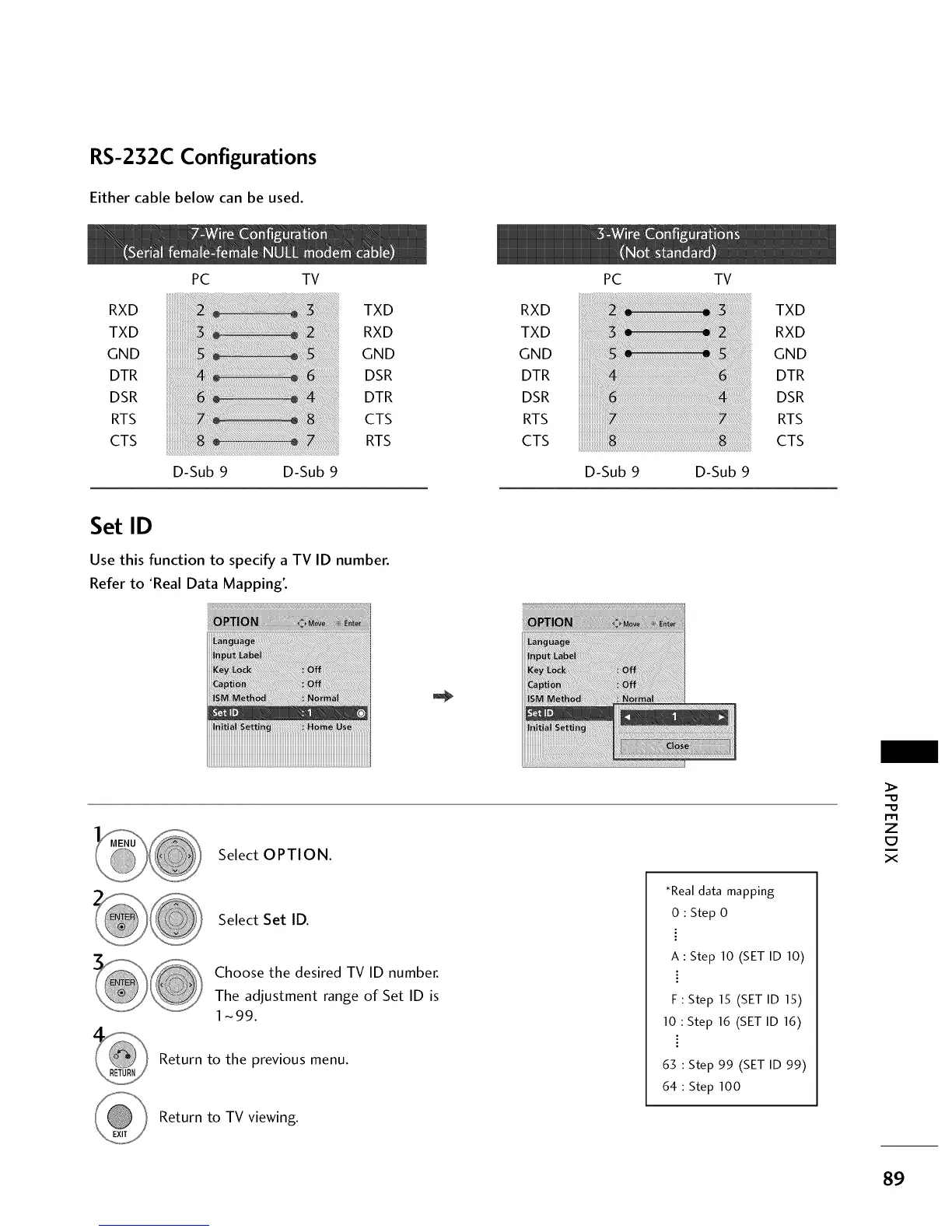
RS-232C Configurations
Either cable below can be used.
RXD
TXD
GND
DTR
DSR
RTS
CTS
PC TV
D-Sub 9 D-Sub 9
TXD
RXD
GND
DSR
DTR
CTS
RTS
RXD
TXD
GND
DTR
DSR
RTS
CTS
PC TV
D-Sub 9 D-Sub 9
TXD
RXD
GND
DTR
DSR
RTS
CTS
Set ID
Use this function to specify a TV ID number.
Refer to 'Real Data Mapping'.
Select OPTION.
Select Set ID.
Choose the desired TV ID number.
The adjustment range of Set ID is
1-99.
Return to the previous menu.
Return to TV viewing.
*Real data mapping
0 : Step 0
A : Step 10 (SET ID 10)
F : Step 15 (SET ID 15)
10 : Step 16 (SET ID 16)
63 Step 99 (SET ID 99)
64 Step 100
m
z
X
89



 To Next Page