27
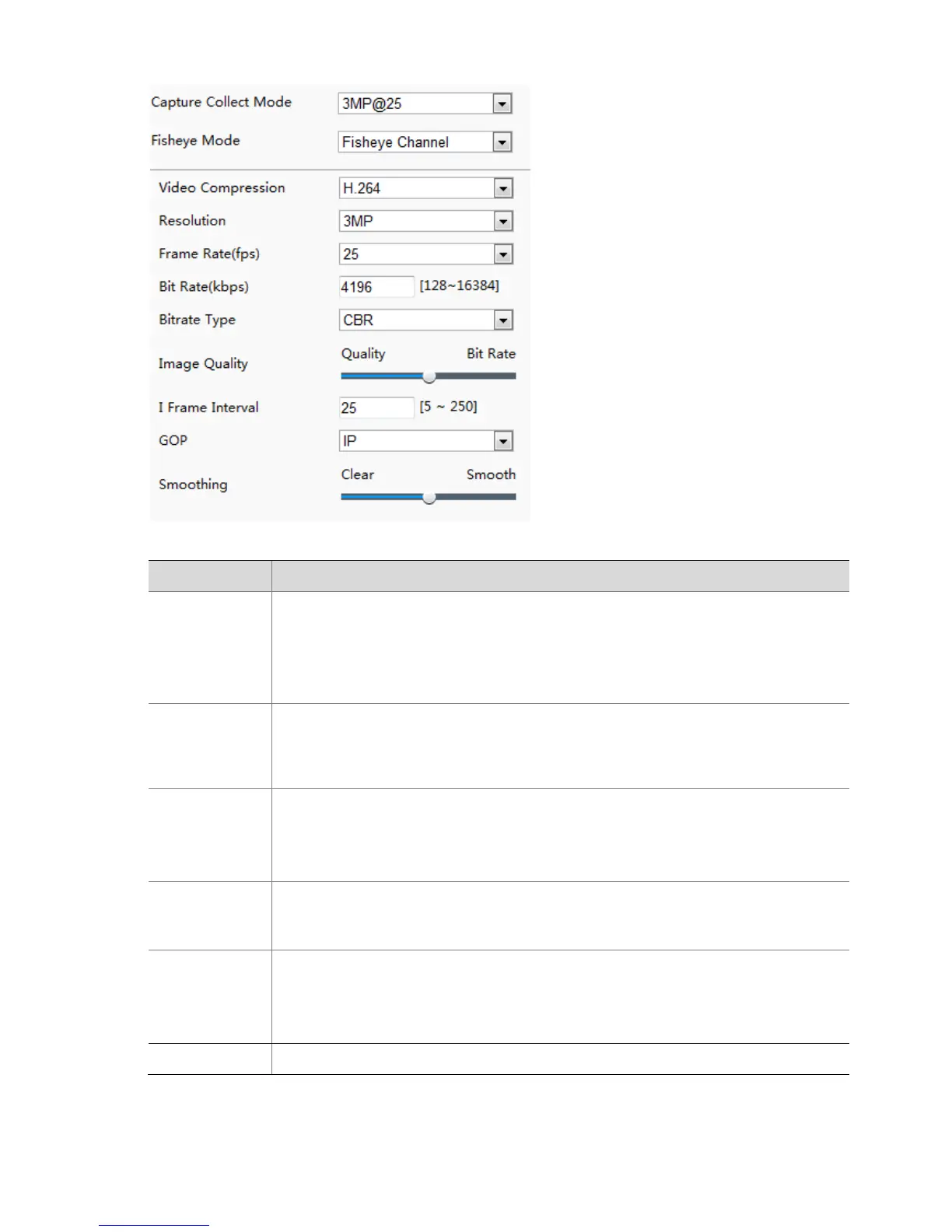
2. Modify the settings as required. The following table describes some major parameters.
Fisheye Channel: Set the stream parameters in fisheye preview mode.
Panorama Channel: Set the stream parameters in panorama preview mode.
PTZ Channel 1/2/3/4: Set the stream parameters in 4PTZ preview mode.
Note:
This parameter is only available for the fisheye cameras.
CBR: Constant Bit Rate, which means that the camera transmits data at a constant
data rate.
VBR: Variable Bit Rate, which means that the camera adjusts the bit rate dynamically
according to image quality.
Frame rate for encoding images. Unit: FPS (frame per second).
Note:
To ensure image quality, note that the frame rate should not be greater than the
reciprocal of shutter speed.
When Encoding Mode is VBR, you can move the slider to adjust quality level for images.
Moving the slider toward Bit Rate decreases the bit rate and may affect image quality.
Moving the slider toward Quality increases the bit rate and improves image quality.
Set the extent of smoothing. Choosing Clear means disabling Smoothing. Moving the
slider toward Smooth increases the level of smoothing but will affect image quality.
Note:
In a poor network environment, you can enable smoothing to get more fluent video.
BNC output supports NTSC and PAL.



 To Next Page