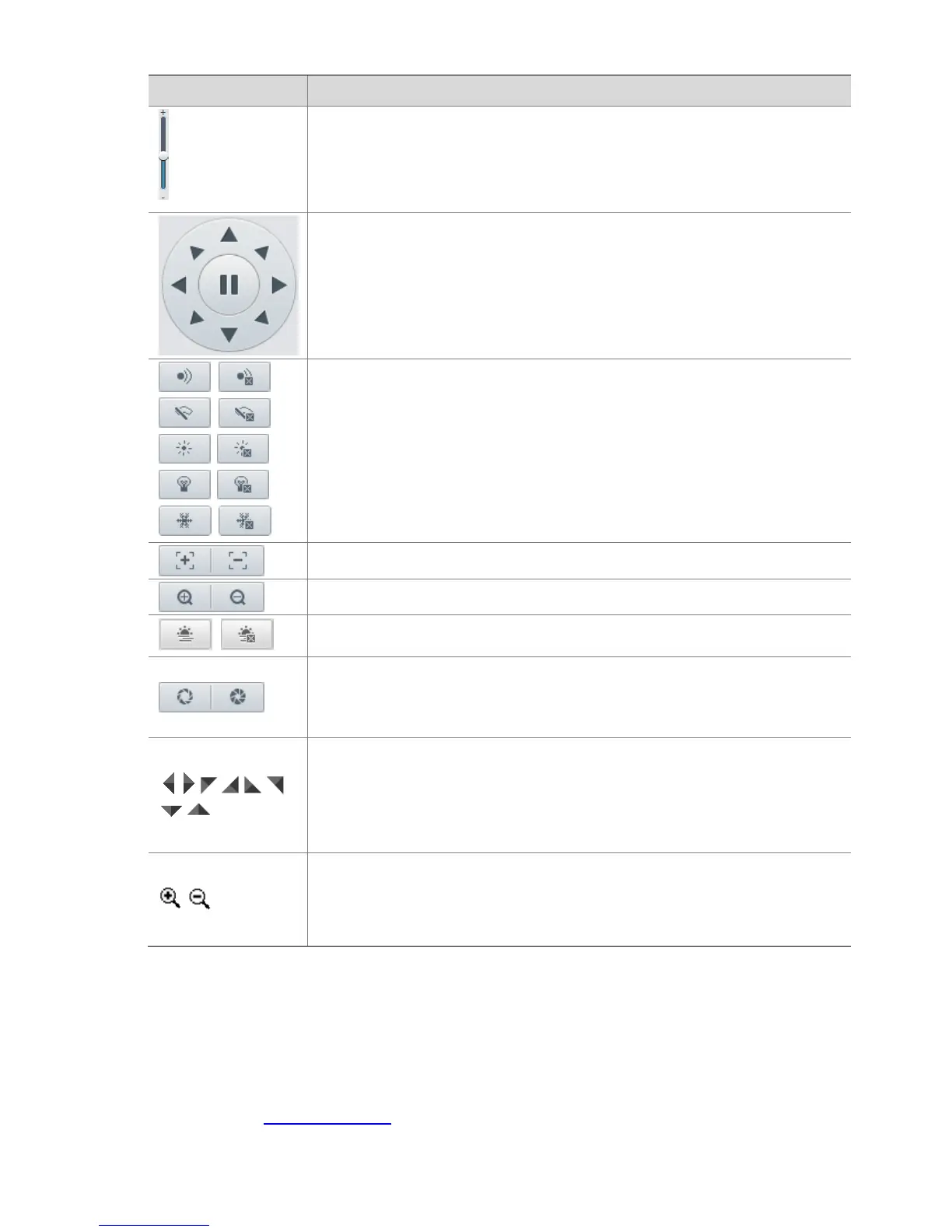
Adjust the moving speed of the PTZ camera.
Control the direction of the PTZ camera and release the control.
Turn on or off IR.
Turn on or off the wiper.
Turn on or off the heater.
Turn on or off the illuminator.
Turn on or off snow control.
Increase or decrease iris diameter.
Note:
For certain scenes, this button can be used to control the laser spot size.
Shortcut keys for PTZ control. After the mouse cursor changes to one of these
shapes in live view, click and hold the left mouse button to operate the PTZ camera.
Note:
Only PTZ dome cameras and PTZ cameras support this function.
These buttons are unusable when you are using 3D positioning or digital zoom.
Shortcut keys for zooming in or out in live view. Scroll the wheel forward to zoom in
or backward to zoom out.
Note:
Only cameras with motorized zoom lens support this function.
Setting Patrol by Presets
Setting Presets
On the Preset tab, you can manage presets or perform certain control operations to the PTZ camera. For
more details, see PTZ Control Toolbar.



 To Next Page