EasyManua.ls Logo

Zhejiang IPC2322EBRP - Configuring Parameters

Default Icon
74 pages
Print Icon
To Next Page IconTo Next Page
To Previous Page IconTo Previous Page
Loading...
5
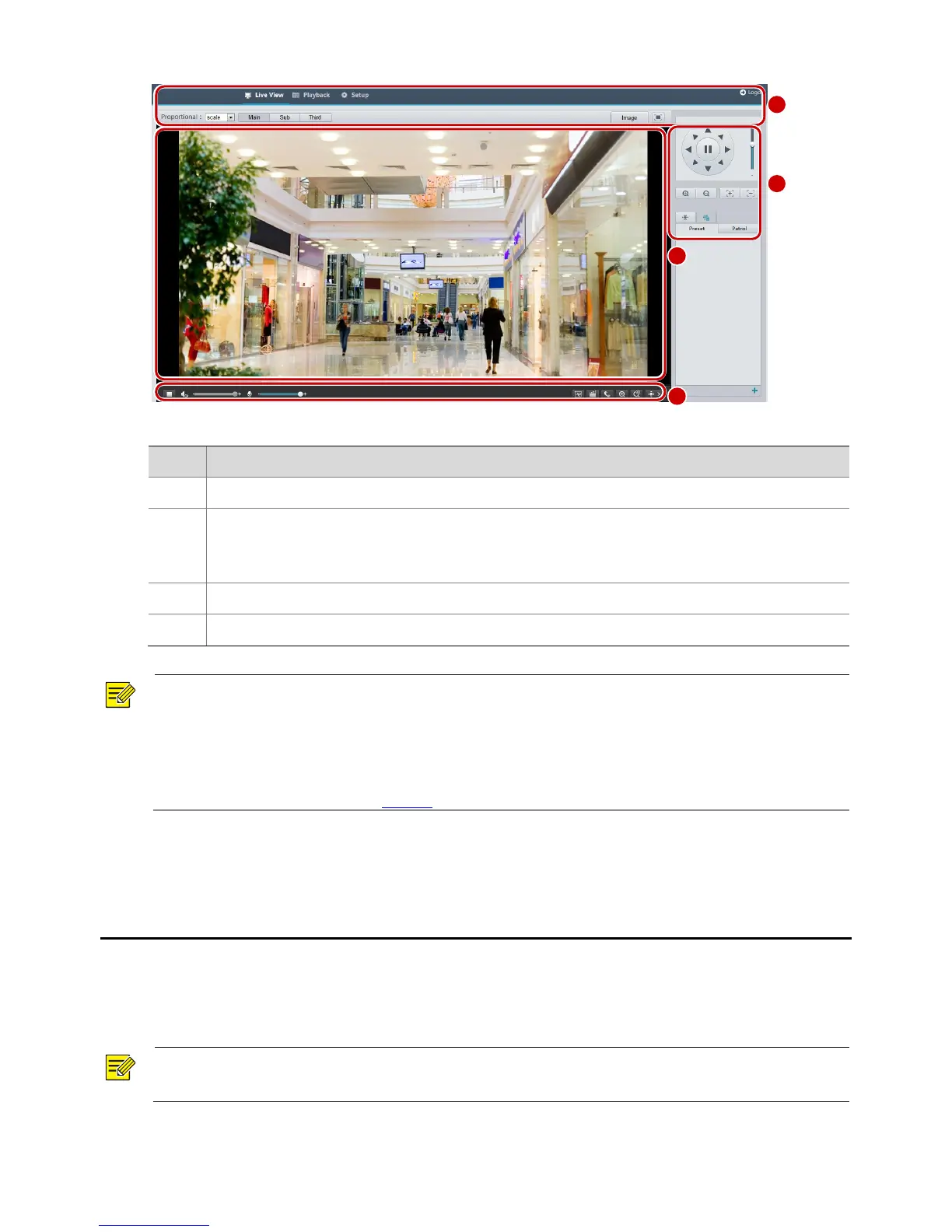
No.
Description
1
Menu
2
PTZ control area
Note:
This area is available for PTZ dome cameras and PTZ cameras.
3
Live view window
4
Live view toolbar
NOTE!
The displayed live view interface, parameters displayed and value ranges may vary with models. Please
see the actual Web interface for details.
The parameters that are grayed out cannot be modified. For the actual settings, see the Web interface.
It is recommended that you change the password when you are logged in the first time. For details about
how to change a password, see Security.

3 Configuring Parameters
Local Parameters
Set local parameters for your PC.
NOTE!
The local parameters may vary with models, please see the actual Web interface for details.
1. Select Setup > Common > Local Settings.
1
2
3
4

Table of Contents

Related product manuals