NOTE!
To query recordings in the memory card, see Video Playback and Download with Edge Storage.
NOTE!
This function is not supported by some models, please see the actual model for details.
Security
User Management
There are two types of users in the system:
Administrator: referred to as “admin” in this manual. The default name of the administrator is admin,
which cannot be modified. Admin has full permission and can manage all users and devices. Only one
admin user is allowed in the system.
Common user: referred to as “user” in this manual. User only has permission to play live and recorded
video. Up to 31 common users are allowed in the system.
You can add a user on the user management interface (under Setup > System > Security).
After the user is added successfully, you can change the password by entering the new password or delete
the user by clearing the username.
NOTE!
Only admin can change passwords. Changing the username or password for a user when the user is still
logged in will force the user to log out. The user must use the new username or password to log in.
Only admin can add and delete users. Deleting a user when the user is still logged in will force the user to
log out. A deleted user cannot log in.
Setting Secure Data Transmission
Set a secure channel for data transmission to ensure security.
NOTE!
This function is not supported by some models, please see the actual model for details.
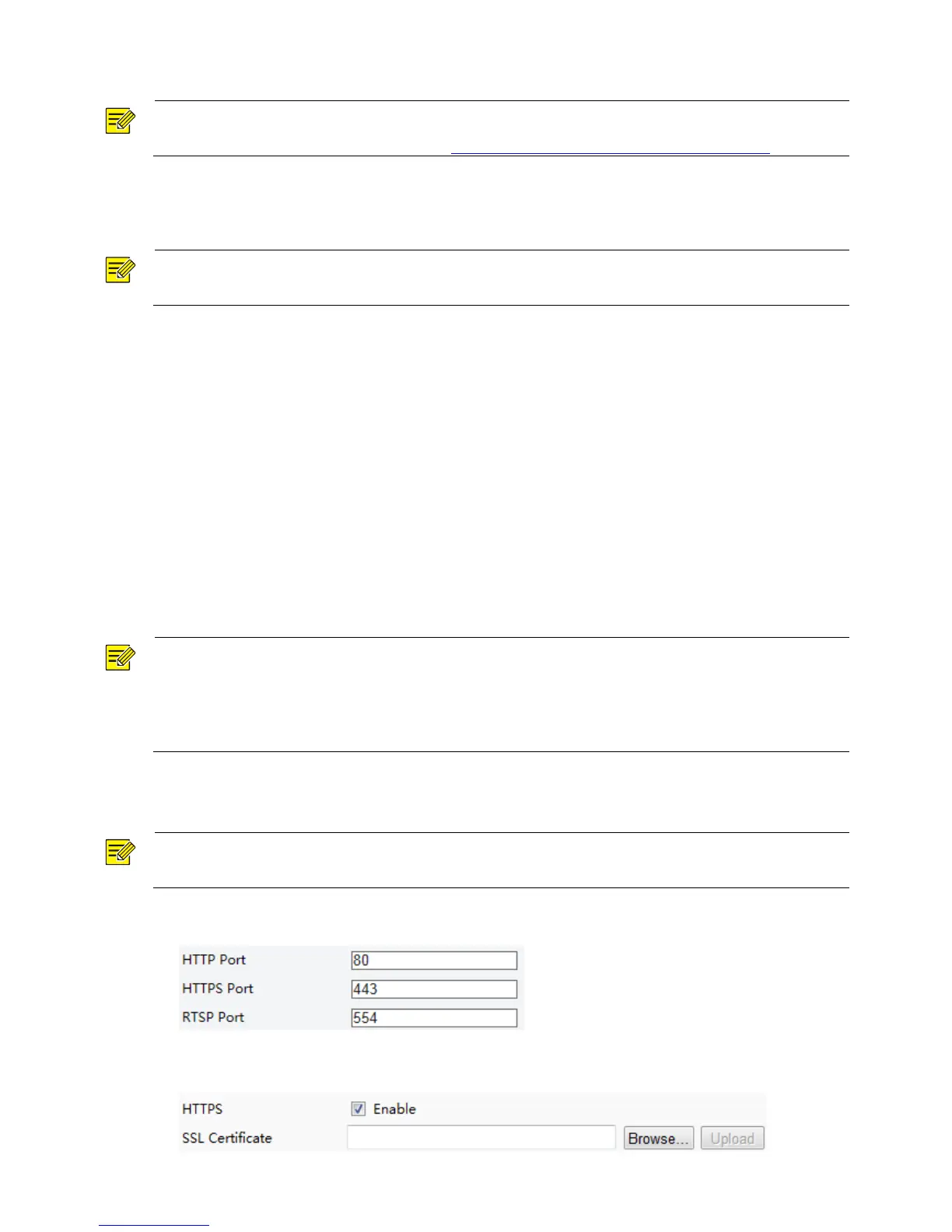
1. Click Setup > Network > Port.
2. Enter the port number in the HTTPS Port text box and then click Save.
3. Click Setup > System > Security.



 To Next Page