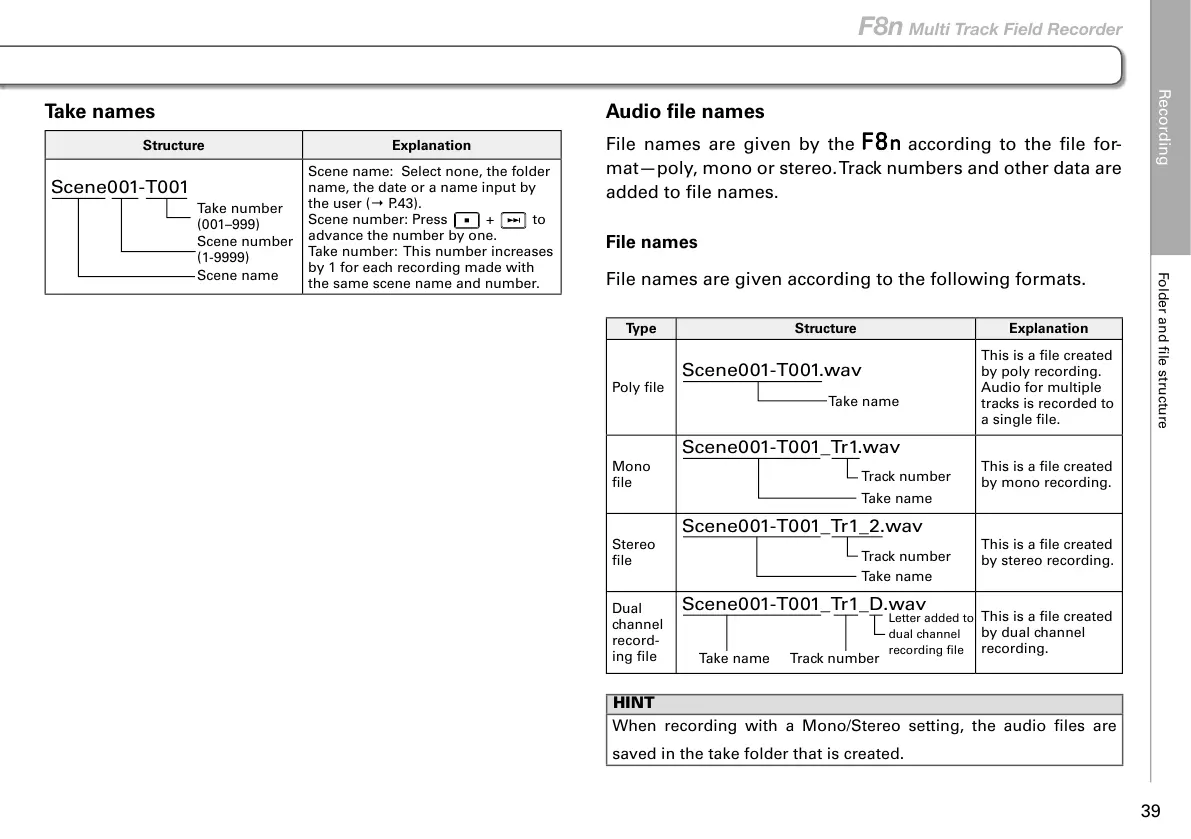
Take names
Structure Explanation
Scene001-T001
Take number
(001–999)
Scene number
(1-9999)
Scene name
Scene name: Select none, the folder
name, the date or a name input by
the user (→ P.43).
Scene number: Press
+ to
advance the number by one.
Take number: This number increases
by 1 for each recording made with
the same scene name and number.
Audio file names
File names are given by the according to the file for-
mat—poly, mono or stereo. Track numbers and other data are
added to file names.
File names
File names are given according to the following formats.
Type Structure Explanation
Poly file
Scene001-T001.wav
Take name
This is a file created
by poly recording.
Audio for multiple
tracks is recorded to
a single file.
Mono
file
Scene001-T001_Tr1.wav
Take name
Track number
This is a file created
by mono recording.
Stereo
file
Scene001-T001_Tr1_2.wav
Take name
Track number
This is a file created
by stereo recording.
Dual
channel
record-
ing file
Scene001-T001_Tr1_D.wav
Take name
Track number
Letter added to
dual channel
recording file
This is a file created
by dual channel
recording.
HINT
When recording with a Mono/Stereo setting, the audio files are
saved in the take folder that is created.
Recording
Folder and file structure
39
F8n Multi Track Field Recorder



 To Next Page