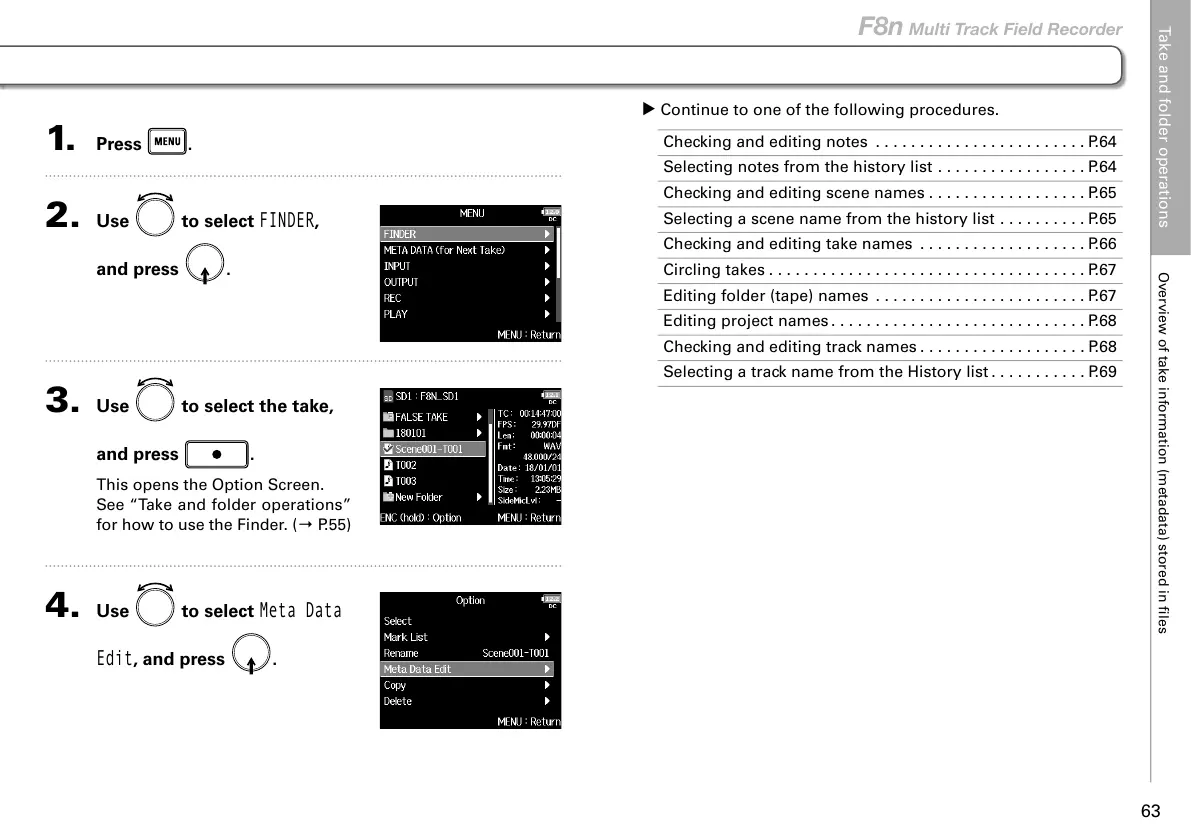
1. Press .
2. Use to select
FINDER
,
and press
.
3. Use to select the take,
and press
.
This opens the Option Screen.
See “Take and folder operations”
for how to use the Finder. (→ P.55)
4. Use to select
Meta Data
Edit
, and press .
▶ Continue to one of the following procedures.
Checking and editing notes ........................P.64
Selecting notes from the history list . . . . . . . . . . . . . . . . . P.64
Checking and editing scene names ..................P.65
Selecting a scene name from the history list . . . . . . . . . . P.65
Checking and editing take names ...................P.66
Circling takes ....................................P.67
Editing folder (tape) names . . . . . . . . . . . . . . . .. . . . . . . .P.67
Editing project names .............................P.68
Checking and editing track names ...................P.68
Selecting a track name from the History list ...........P.69
Take and folder operations
Overview of take information (metadata) stored in files
63
F8n Multi Track Field Recorder



 To Next Page