Connecting mics/other devices to Inputs 1–8
08
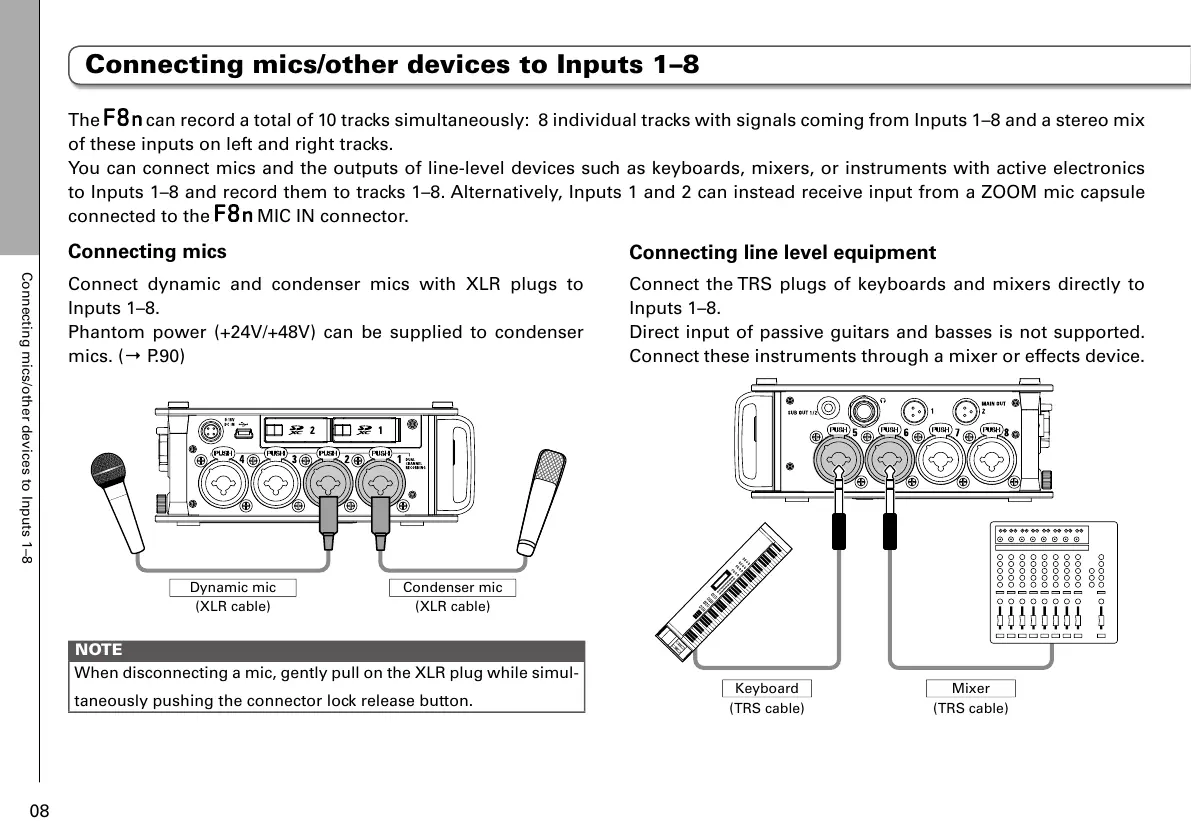
Connecting mics
Connect dynamic and condenser mics with XLR plugs to
Inputs 1–8.
Phantom power (+24V/+48V) can be supplied to condenser
mics. (→ P.90)
Dynamic mic
NOTE
When disconnecting a mic, gently pull on the XLR plug while simul-
taneously pushing the connector lock release button.
Connecting line level equipment
Connect the TRS plugs of keyboards and mixers directly to
Inputs 1–8.
Direct input of passive guitars and basses is not supported.
Connect these instruments through a mixer or effects device.
(TRS cable)
Keyboard
(TRS cable)
Mixer
The can record a total of 10 tracks simultaneously: 8 individual tracks with signals coming from Inputs 1–8 and a stereo mix
of these inputs on left and right tracks.
You can connect mics and the outputs of line-level devices such as keyboards, mixers, or instruments with active electronics
to Inputs 1–8 and record them to tracks 1–8. Alternatively, Inputs 1 and 2 can instead receive input from a ZOOM mic capsule
connected to the
MIC IN connector.
Connecting mics/other devices to Inputs 1–8



 To Next Page