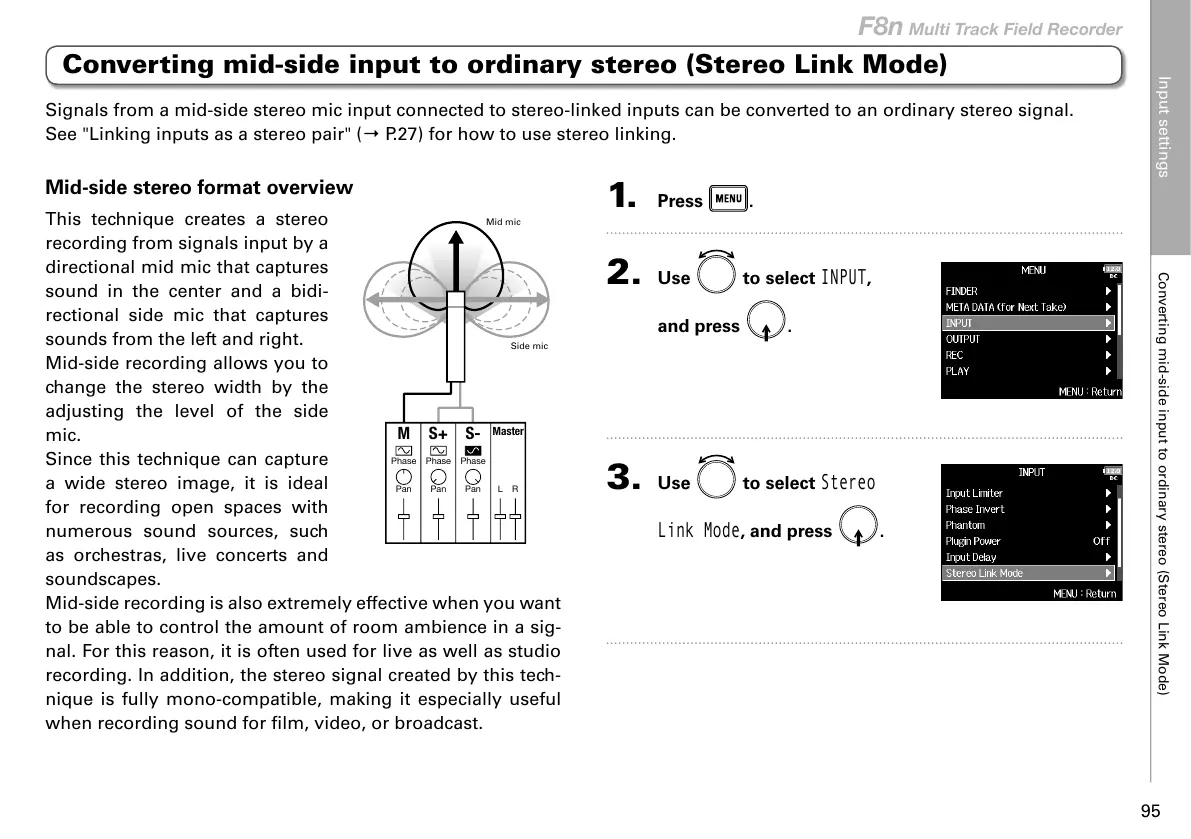
Mid-side stereo format overview
This technique creates a stereo
recording from signals input by a
directional mid mic that captures
sound in the center and a bidi-
rectional side mic that captures
sounds from the left and right.
Mid-side recording allows you to
change the stereo width by the
adjusting the level of the side
mic.
Since this technique can capture
a wide stereo image, it is ideal
for recording open spaces with
numerous sound sources, such
as orchestras, live concerts and
soundscapes.
Mid-side recording is also extremely effective when you want
to be able to control the amount of room ambience in a sig-
nal. For this reason, it is often used for live as well as studio
recording. In addition, the stereo signal created by this tech-
nique is fully mono-compatible, making it especially useful
when recording sound for film, video, or broadcast.
1. Press .
2. Use to select
INPUT
,
and press
.
3. Use to select
Stereo
Link Mode
, and press .
Signals from a mid-side stereo mic input connected to stereo-linked inputs can be converted to an ordinary stereo signal.
See "Linking inputs as a stereo pair" (→ P.27) for how to use stereo linking.



 To Next Page