247Security Inc. | 4400 North Point Parkway, Suite # 158, Alpharetta, GA 30022, USA | 1-866-693-7492 | www.247securityinc.com
USER MANUAL, ZEUS Pt
41
4.7 SENSOR CONFIGURATION MENU
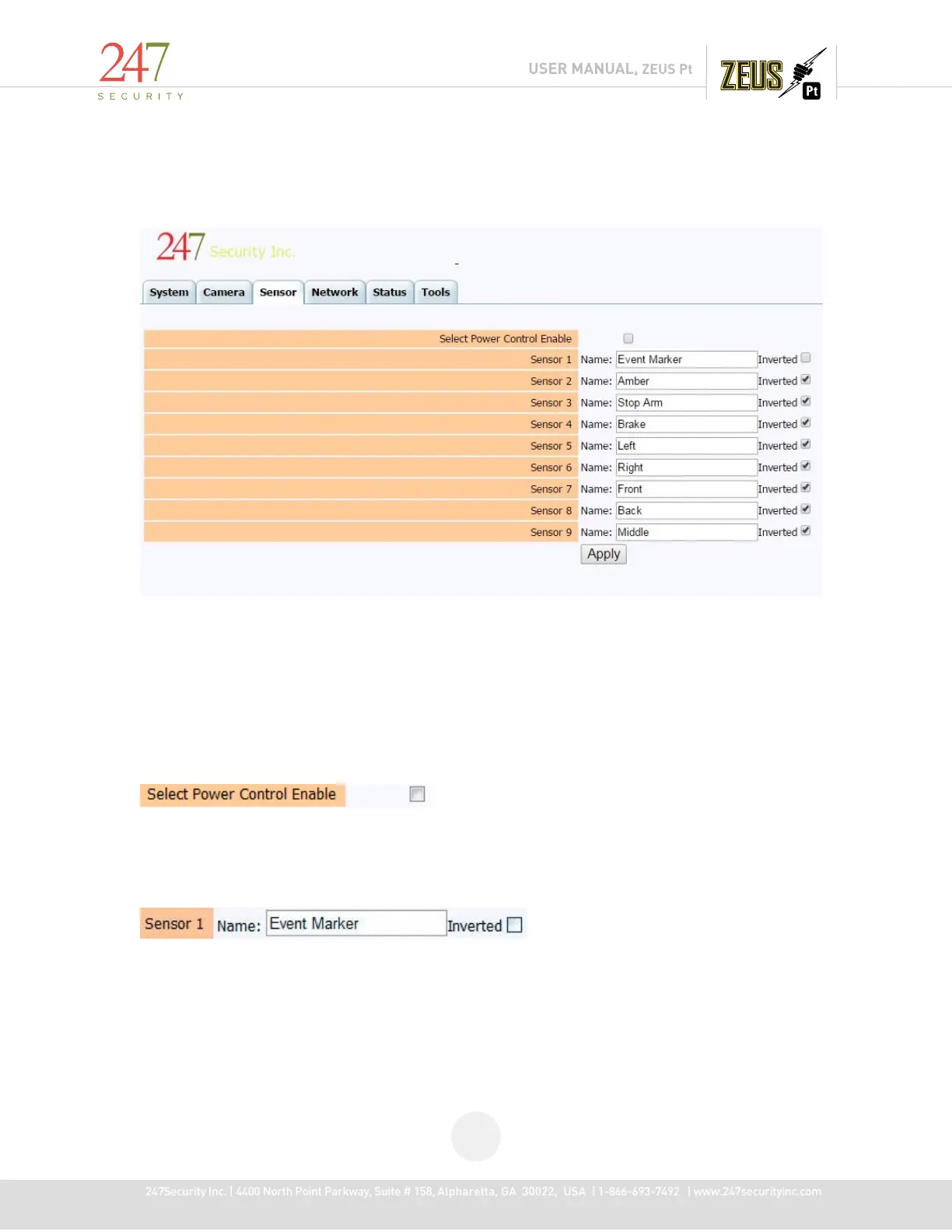
The ZEUS provides 9 digital inputs. The digital inputs are used to connect to any sensors that are
available in your vehicle. You can assign a unique name to all sensors listed in the menu. Shown in the
menu are the factory default settings. The sensor name will be recorded on your video file if OSD (On-
Screen-Display) is enabled.
“Inverted” defines how the sensor should work. For instance, if you check the box “Inverted” then
the ZEUS detects “0” as the active state of the sensor. If the check box is un-checked then the ZEUS
detects “1” as the active state of the sensor. Please make sure you understand how your sensors work
before connecting them to the digital inputs.
This option is checked; beside Power Ignition then system will assign Sensor 9 as Power Ignition
after rebooting. It means that the sensor 9 input (pin 8 on IO/ CANBUS) will behave identically to the
Ignition input, and cause the DVR to power up and record if sensor is triggered high. The system will
reboot every time this option is enabled or disabled.
This option lets you enter the sensor name for the specified digital input and select what the active
state of the sensor should be when triggered.



 To Next Page