Stacking the Units Together
27
the unit if you intend to place the unit directly on top of the
desk. If you are going to use the clip (see “
Stacking the
Internet Firewall with the Clip”), do not attach the feet to
the unit.
Stacking the Internet Firewall with the Clip
Use the clip to stack the Internet Firewall securely with
other OfficeConnect units.
CAUTION:
You can only stack up to a maximum of four
OfficeConnect units. You must stack smaller units above
larger units.
To fit the clip:
1
Place the Internet Firewall on a flat surface.
2
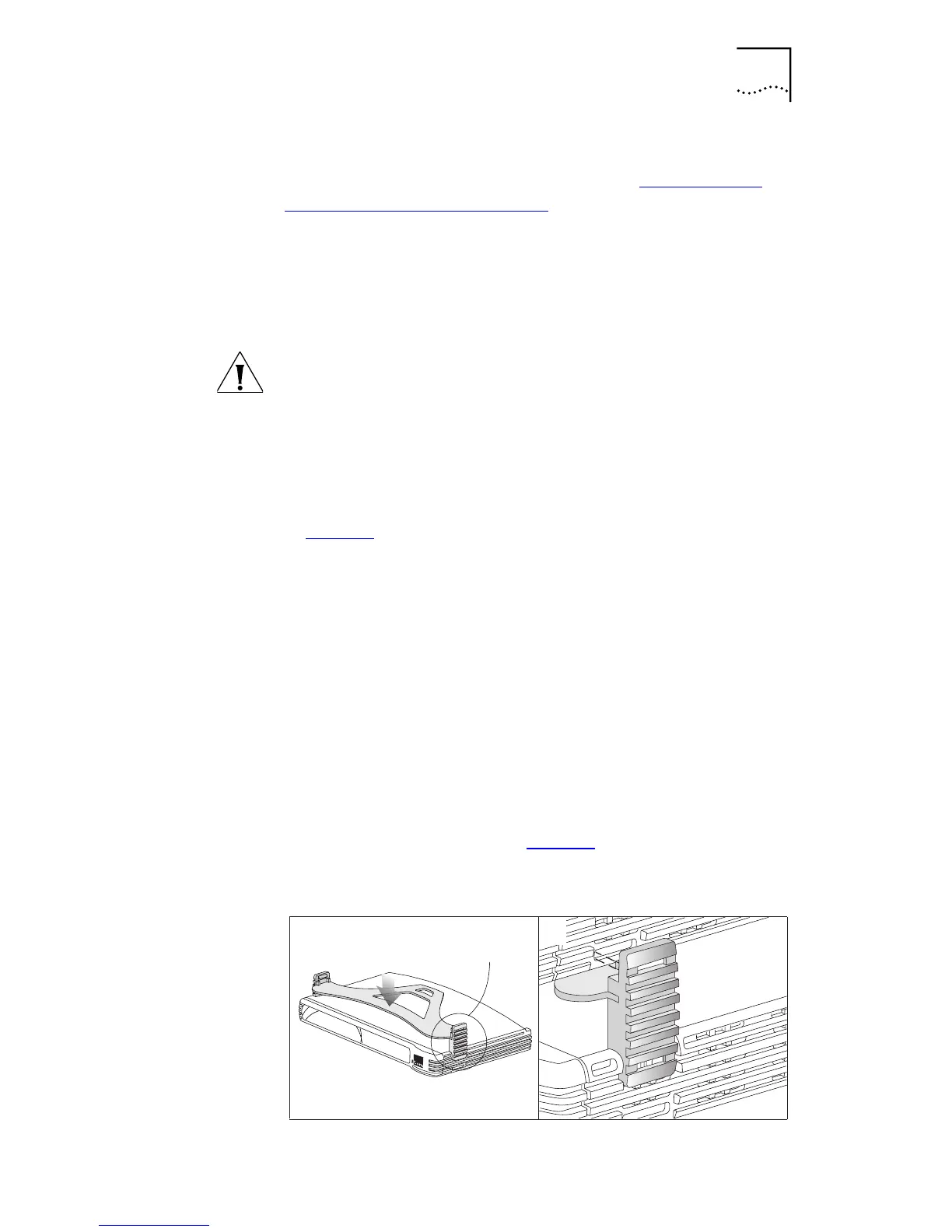
Fit the clip across the top of the Internet Firewall, as shown
in Figure 3
, picture 1, making sure that the longer sections
of the fastening piece are pointing downwards.
3
Align the fastening pieces over the slots found on each side
of the unit.
4
Push the clip down gently to secure it, making sure that
that fastening pieces snap into the slots on the unit.
To fit another unit:
1
Rest the second unit on top of the clip and align it with the
front of the unit below.
2
Press down gently on the unit to secure it onto the clip,
making sure that the fastening pieces fit into the slots in
the unit below, as shown in Figure 3
, picture 2.
Figure 3
Stacking Units Together
1
Fastening
Piece
2
Fastening
Piece



 To Next Page