Internet Firewall Front Panel
29
You can now connect the Internet Firewall to the network
and set it up.
Internet Firewall Front Panel
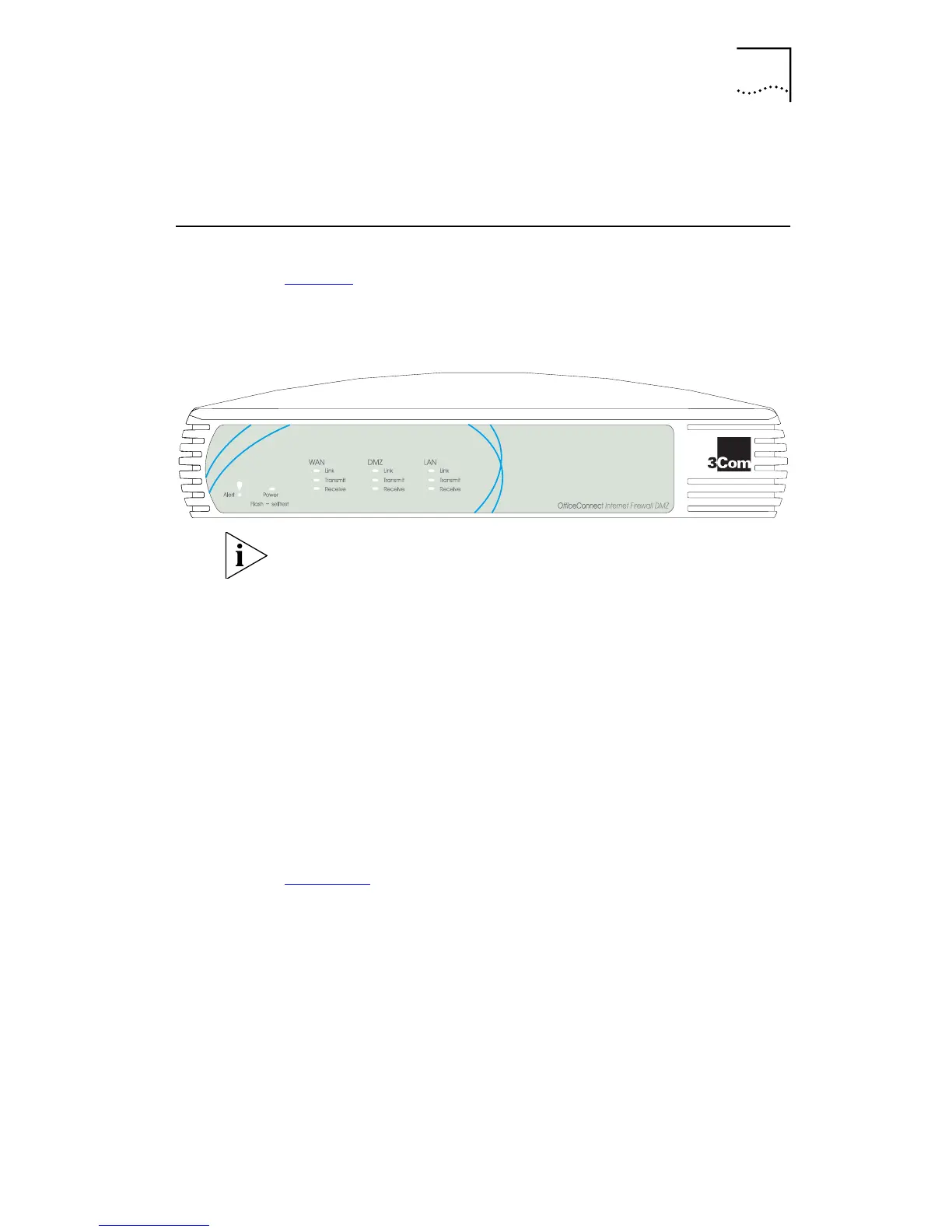
Figure 4 shows the front panel of the Internet Firewall
DMZ.
Figure 4
Internet Firewall DMZ Front Panel
The Internet Firewall 25 does not have DMZ LEDs.
The Internet Firewall front panel contains the following
LEDs:
Alert LED
Orange —
alerts you to the following:
■
A failure in the self-test the Internet Firewall runs when
switched on.
■
Potential attacks on your network.
■
An attempt to access a restricted Web site.
■
A hacker attack or access to a restricted service.
On permanently
— indicates a problem. Refer to
Chapter 6
.
Power LED
G
reen
— the unit is switched on.
Flashing
— self-test is running.
WAN, LAN and DMZ (Internet Firewall DMZ only)
status LEDs
Indicate the status of each 10BASE-T port:
■
Receive
Yellow —
indicates that data is being received on the
port.



 To Next Page