Attaching the Internet Firewall to the Network
31
Use a 10BASE-T cable with RJ-45 connectors. You can
connect this port to any Ethernet port on the Internet
access device, such as an OfficeConnect LAN Modem.
■
Uplink/Normal switch
This switch affects the operation of the port. See
“
Attaching the Internet Firewall to the Network” for
more information about setting the switch to normal or
uplink.
Unless you are configuring the Internet Firewall DMZ
for
intranet support, devices on the WAN port are not directly
accessible by users on the LAN. Do not attach servers or
any device other than the Internet access device to the
WAN port.
Attaching the Internet Firewall to the Network
Never connect two ports on the Internet Firewall to the
same physical wire. For example, never connect the LAN
and DMZ ports into the same device as this bypasses all
firewall functions.
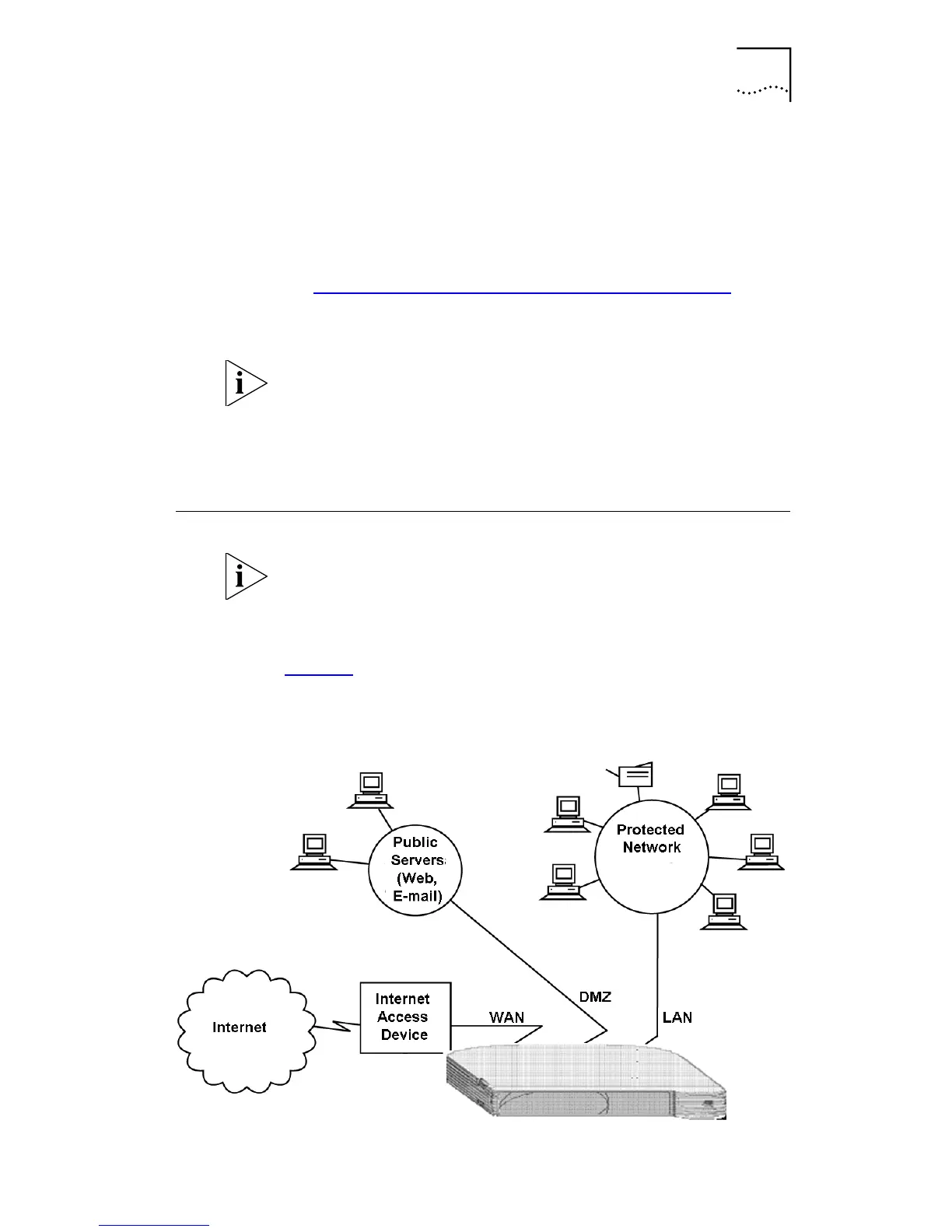
Figure 6
illustrates how the Internet Firewall is connected to
the network.
Figure 6
Network Connection Diagram



 To Next Page