673D Systems, Inc.
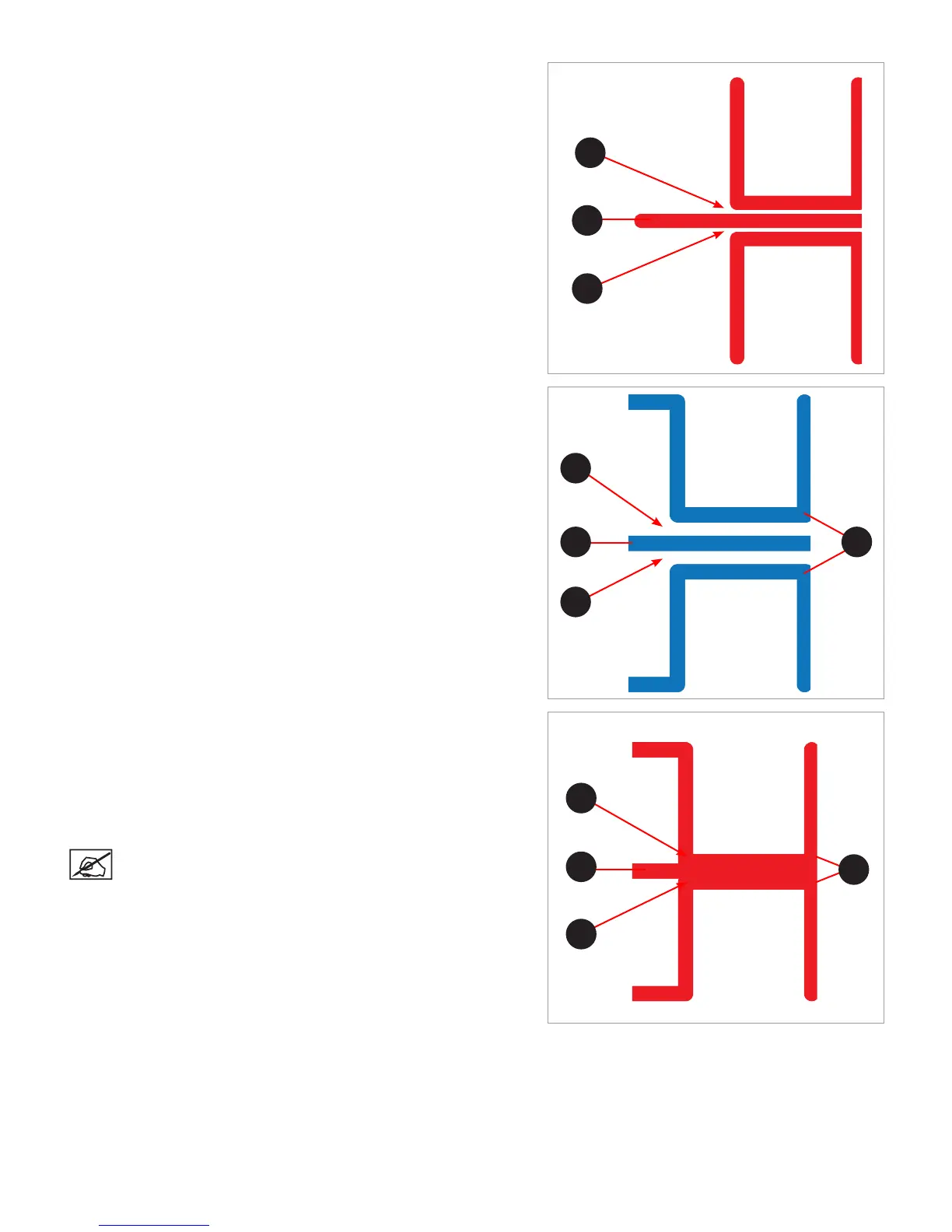
Incorrect Closed Z-Gap
If there is a gap (B) between the Closed Z-Gap bars and the baseline (A),
turn all three print pad adjustment knobs counter-clockwise (left) 1-step and
then print the le again to verify the lines touch. If the lines do not touch on
the second print, adjust the knobs again 1-step and reprint the le. Continue
to do this until the lines meet.
Correct Open Z-Gap
If there is a gap (B) between the Open Z-Gap bars (C) and the baseline (A)
and there is no gap between the Closed Z-Gap bars and the baseline, the
Z-Gap is correct.
Incorrect Open Z-Gap
If there is no gap (B) between the Open Z-Gap bars (C) and the baseline
(A), turn all three (3) print pad adjustment knobs clockwise (right) 1-step
and print the le again to verify that the lines do not touch. If they touch on
the second print, adjust all three (3) print pad adjustment knobs clockwise
(right) 1-step and reprint the le. Continue this procedure until there is a
gap.
NOTE: Once the Z-Gap is correct, reprint the le and check the
Level Gap.
A
B
B
B
B
A C
C
B
B
A












 To Next Page