603D Systems, Inc.
GENERAL CLEANING
Waste material from the printing process can accumulate inside the printer. Using a slightly damp, lint-free cloth, wipe the interior of the
CubePro including the print plate, the print pad, cartridge bays and anywhere else you might nd pieces of plastic waste material.
RISK OF SHOCK: DO NOT WIPE DOWN ANY ELECTRICAL COMPONENTS. ALWAYS KEEP AWAY FROM ALL
AREAS WHERE ELECTRONIC COMPONENTS ARE INSTALLED.
ADJUSTING THE JET WIPER ASSEMBLY
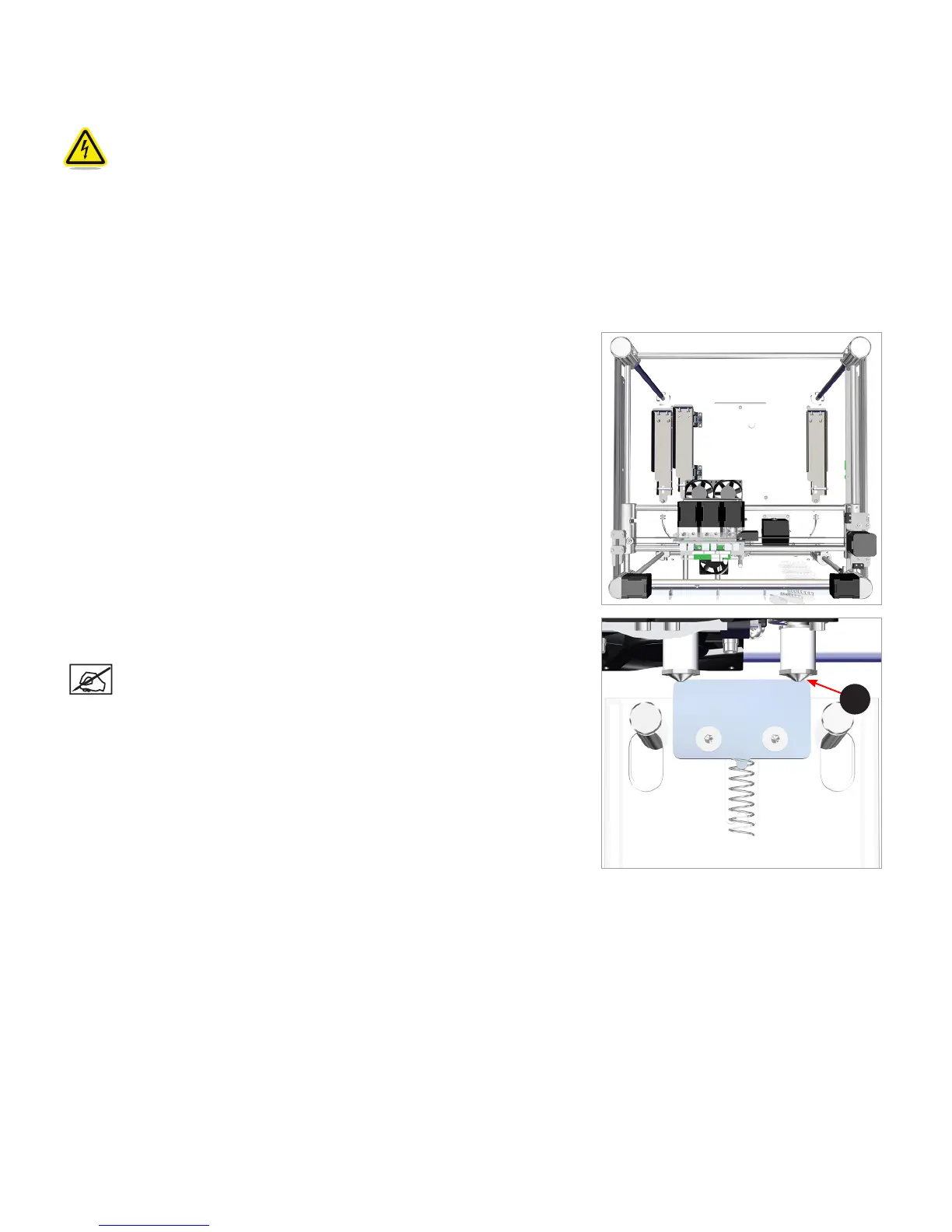
The jet wiper is designed to scrape the print jet tip, removing any waste material remaining after extrusion.
1. Remove the lid from the top of the printer.
2. Ensure the print pad is at its lowest position.
3. Power off the printer and disconnect it from utility power.
4. Holding the extruder assembly, gently position it over the jet wiper assembly.
5. Verify the wiper blade meets the tapered portion (A) of the print jet tip. If it does,
the jet wiper is properly adjusted. Proceed to step 8.
NOTE: If the wiper tip is too high, proceed to the next step. If the
wiper tip is too low, proceed to step 7.
A
View From Top












 To Next Page