/ actiNAS Manager · Network
Network
Device Configuration
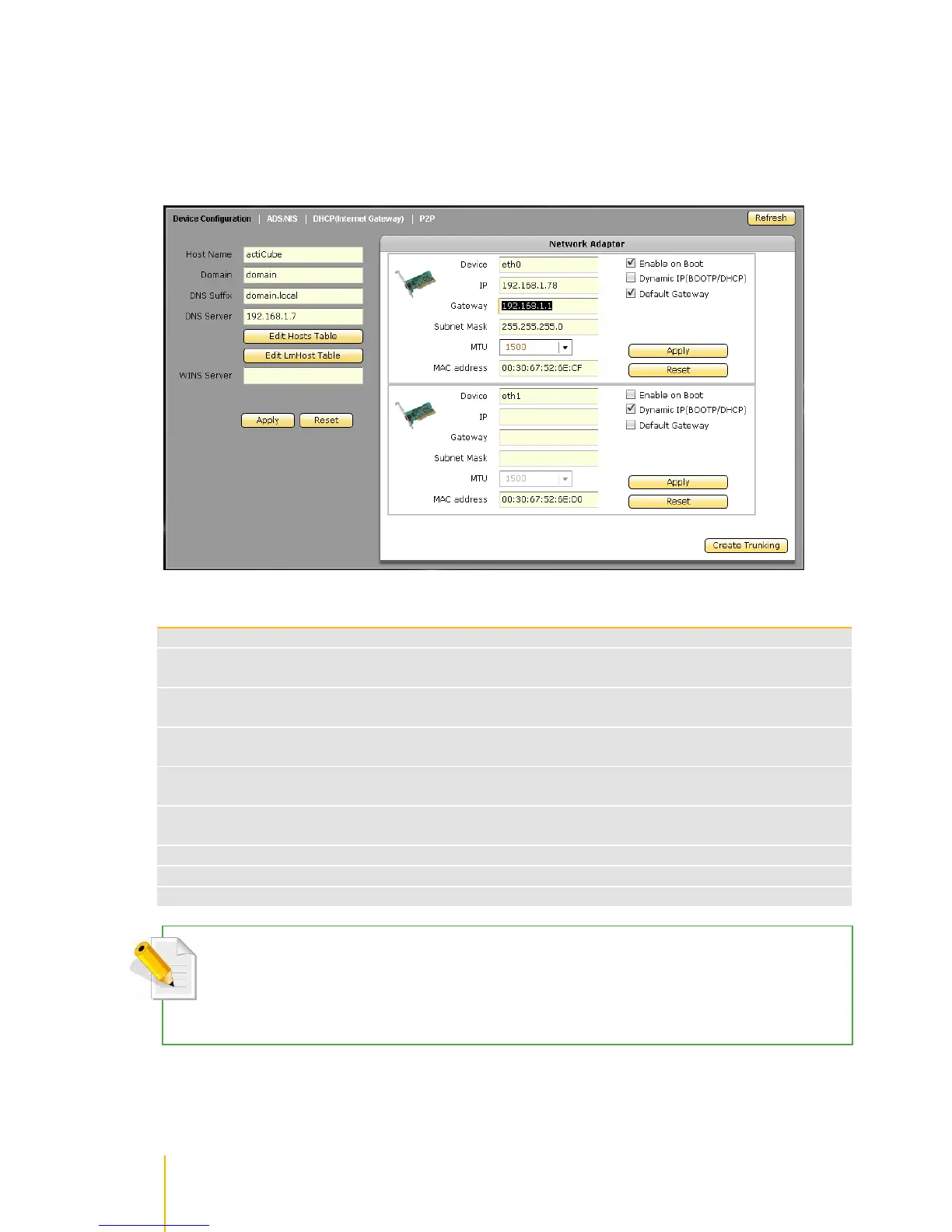
Click the Network icon to display the Network Device Configuration screen.
Device Configuration Options
The NetBIOS name of NAS. It should be unique
Enter the Windows domain name or workgroup name. For example: MYDOMAIN. Default is
Workgroup
The DNS suffix is the name appended to server name to complete the server‟s FQDN. For
example: MYDOMAIN.LOCAL
Enter the DNS Server IP address. DNS server is responsible for mapping the machine name
and IP address
Enter the WINS Server IP address. WINS Server is responsible for the setting NetBIOS
name resolution
Use this button to edit machine name and IP address mapping in the Hosts table. This is
optional
Use this button to define the resolution of NetBIOS in the Lmhosts table. This is optional.
Use this button to undo or clear any changes made
Use this button to save the changes made
NOTE: After you edit host table configuration and click OK, you still need to click Apply for changes to be saved.
NOTE: After you edit lmhost table configuration and click OK, you still need to click Apply for changes to be
saved.



 To Next Page