B
E
C
D
241
ADOBE ILLUSTRATOR CS2
User Guide
Art brush options
Direction Determines the direction of the artwork in relation to the line. Click an arrow to set the direction: to
placethe left side of theart is theend of thestroke; to placethe rightsideofthe artisthe endofthe stroke;
to place the top of the art is the end of the stroke; to place the bottom of the art is the end of the stroke.
Width Adjusts the width of the art relative to its original width.
Proportional Preserves proportions in scaled art.
Flip Along or Flip Across Change the orientation of the art in relation to the line.
Pattern brush options
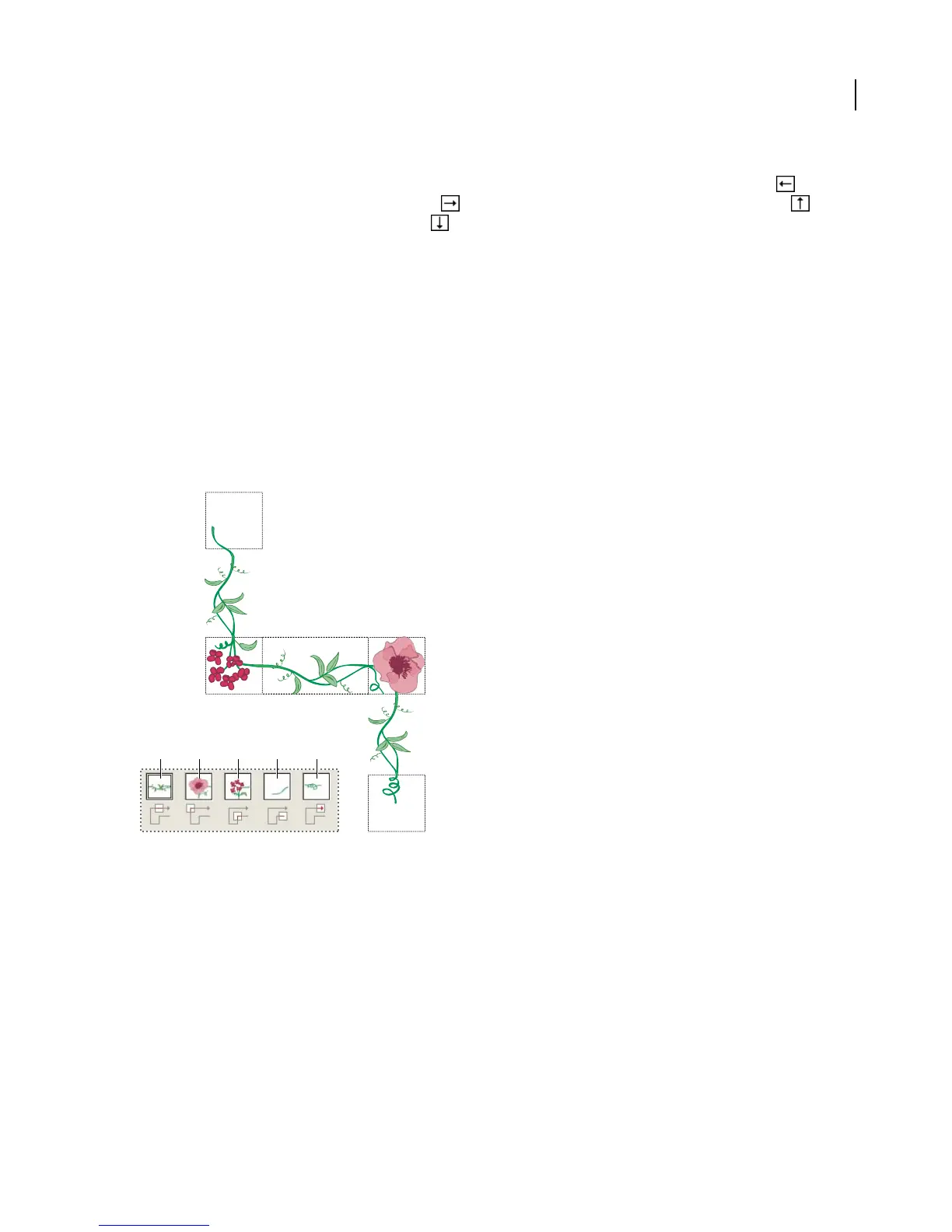
Tile buttons Let you apply different patterns to different parts of the line. Click a tile button for the tile you want to
define, and select a pattern swatch from the scroll list. Repeat to apply pattern swatches to other tiles as needed.
Note: Youmustadd thepattern tilesyou want to usetothe Swatches palettebeforeyou setpattern brushoptions.After
you create a pattern brush, you can delete the pattern tiles from the Swatches palette if you don’t plan to use them for
additional artwork.
EDCBA
A
Tiles in a pattern brush
A. Side tile B. Outer Corner tile C. Inner Corner tile D. Start tile E. End tile
Scale Adjusts the size of tiles relative to their original size.
Spacing Adjusts the space between tiles.
Flip Along or Flip Across Changes the orientation of the pattern in relation to the line.
Fit Determines howthe patternfitsonthe line: StretchToFit lengthensorshortensthe patterntiletofit theobject.
This option can result in uneven tiling. Add Space To Fit adds blank space between each pattern tile to apply the
pattern proportionally to the path. Approximate Path fits tiles to the closest approximate path without changing the
tiles. This option applies the pattern slightly inside or outside the path, rather than centered on the path, to maintain
even tiling.



 To Next Page