30
ADOBE ILLUSTRATOR CS2
User Guide
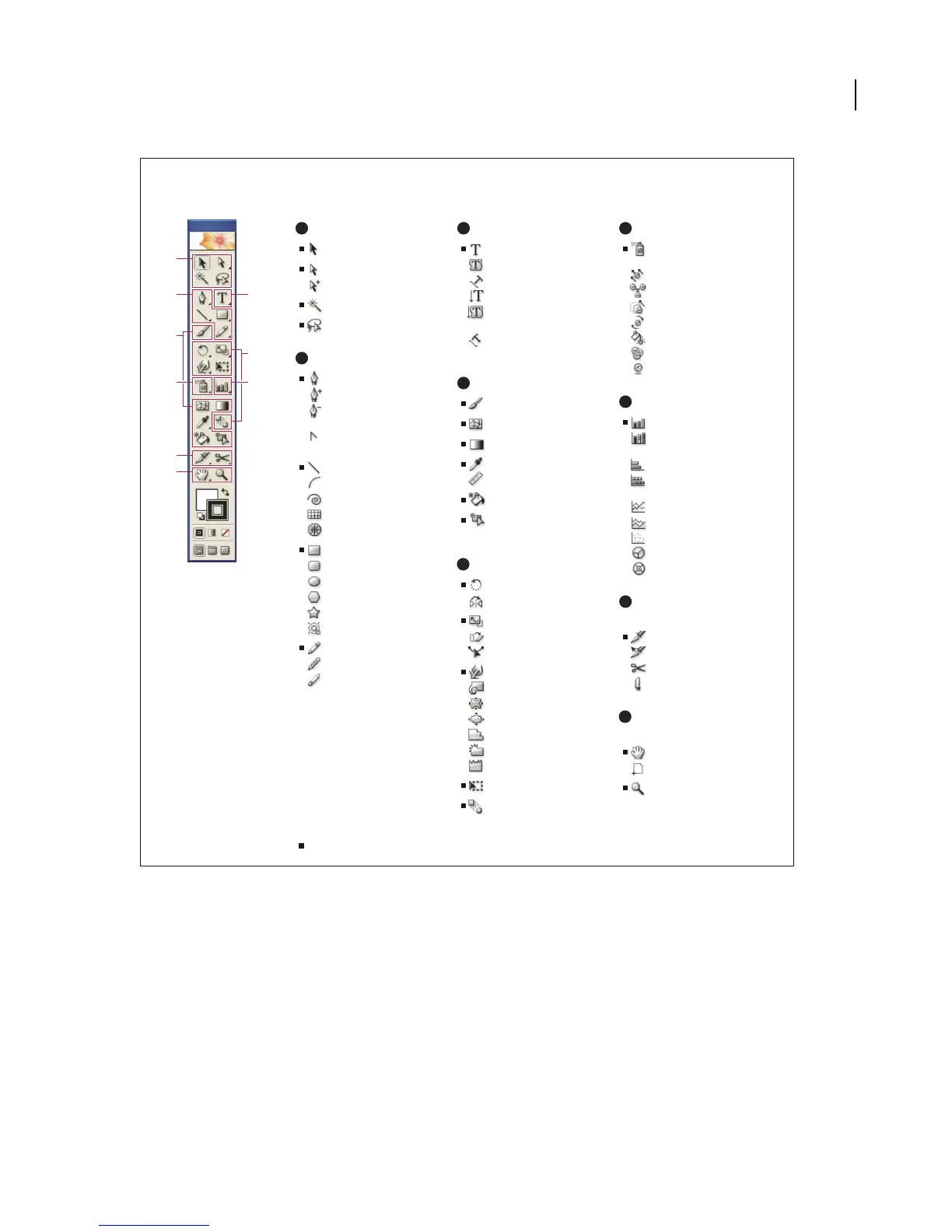
Toolbox overview
A
B
C
D
F
H
I
E
G
A
B
C
D
E
F
G
H
I
Indicates default tool * Keyboard shortcuts appear in parenthesis
Selection tools
Selection (V)
Direct Selection (A)
Group Selection
Magic Wand (Y)
Lasso (Q)
Drawing tools
Pen (P)
Add Anchor Point
Delete Anchor
Point
Convert Anchor
Point
Line Segment (\)
Arc
Spiral
Rectangular Grid
Polar Grid
Rectangle (M)
Rounded Rectangle
Ellipse
Polygon
Star
Flare
Pencil (N)
Smooth
Erase
Type tools
Type (T)
Area Type
Type On a Path
Vertical Type
Vertical Area
Type
Vertical Type
On a Path
Painting tools
Paintbrush (B)
Mesh (U)
Gradient (G)
Eyedropper (I)
Measure
Live Paint Bucket (K)
Live Paint Select
(Shift+L)
Reshaping tools
Rotate (R)
Reflect (O)
Scale (S)
Shear
Reshape
Warp (Shift-R)
Twirl
Pucker
Bloat
Scallop
Crystallize
Wrinkle
Free Transform (E)
Blend (W)
Symbol tools
Symbol Sprayer
(Shift +S)
Symbol Shifter
Symbol Scruncher
Symbol Sizer
Symbol Spinner
Symbol Stainer
Symbol Screener
Symbol Styler
Graph tools
Column Graph (J)
Stacked Column
Graph
Bar Graph
Stacked Bar
Graph
Line Graph
Area Graph
Scatter Graph
Pie Graph
Radar Graph
Slicing and cutting
tools
Slice (Shift+K)
Slice Select
Scissors (C)
Knife
Moving and zooming
tools
Hand (H)
Page
Zoom (Z)
See also
“Selection tool gallery” on page 262
“Drawing tool gallery” on page 145
“Type tool gallery” on page 361
“Painting tool gallery” on page 222
“Reshaping tool gallery” on page 290
“Symbolism tool gallery” on page 174



 To Next Page