462
ADOBE ILLUSTRATOR CS2
User Guide
See also
“About Flash graphics” on page 450
“About the Save For Web dialog box” on page 452
“To optimize and save web graphics” on page 452
Optimization options for SVG format
A
B
C
D
E
F
G
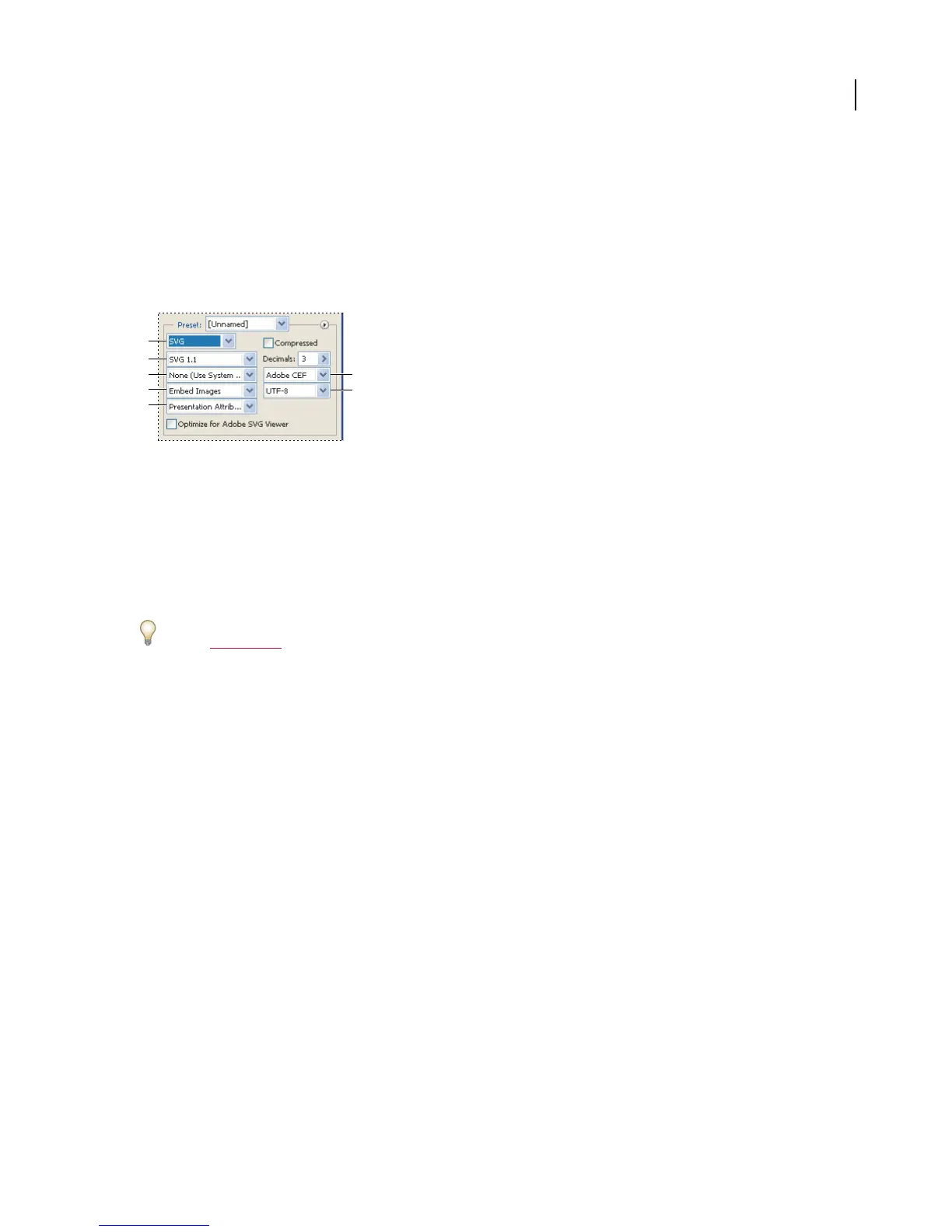
Optimization settings for SVG
A. File format menu B. DTD menu C. Font Subsetting menu D. Image Location menu E. CSS Properties menu F. Font Type menu
G. Encoding menu
Compressed Creates a Compressed SVG (SVGZ) file.
DTD Specifies the DTD (Document Type Definition) for the exported file.
• SVG 1.0 and SVG 1.1 Suitable forSVG filesthatwillbeviewedonadesktopcomputer. SVG1.1 is thefullversion
of the SVG specification, of which SVG Tiny 1.1, SVG Tiny 1.1 Plus, and SVG Basic 1.1 are subsets.
For additional information on SVG profiles, see the SVG specification on the World Wide Web Consortium (W3C)
website (
www.w3.org).
• SVG Basic 1.1 Suitable for SVG files that will be viewed on medium powered devices, such as handhelds. Keep in
mind that not all handhelds support the SVG Basic profile. As a result, selecting this option does not guarantee that
the SVG file will be viewable on all handhelds. SVG Basic does not support nonrectangular clipping and some SVG
filter effects.
• SVG Tiny 1.1 and SVG Tiny 1.1 Plus Suitable for SVG files that will be viewed on small devices, such as mobile
phones. Keep in mind that not all mobile phones support the SVG Tiny and SVG Tiny Plus profiles. As a result,
selecting either of these options does not guarantee that the SVG file will be viewable on all small devices.
SVG Tiny does not support gradients, transparency, clipping, masks, symbols, or SVG filter effects. SVG Tiny Plus
includes the ability to display gradients and transparency, but does not support clipping, masks, symbols, or SVG
filter effects.
Decimals Determines the precision of vector data in the SVG file. You can set a value of 1 to 7 decimal places. A high
value results in a larger file size and increased image quality.
Font Subsetting Controls which glyphs are embedded from the SVG file. Select None from the Subsetting menu if
you can rely on the necessary fonts being installed on end-user systems. Select Only Glyphs Used to only include
glyphs for text that exists in the current artwork. The other values (Common English, Common English + Glyphs
Used, Common Roman, Common Roman + Glyphs Used, All Glyphs) are useful when the textual content of the
SVG file is dynamic (such as server-generated text or user-interactive text).
Font Type Specifies how fonts are exported.
• Adobe CEF Uses font hinting for better rendering of small fonts. This font type is supported by the Adobe SVG
Viewer but may not be supported by other SVG viewers.



 To Next Page