ADPRO iFT Series Hardware Installation Manual
27817_08 21
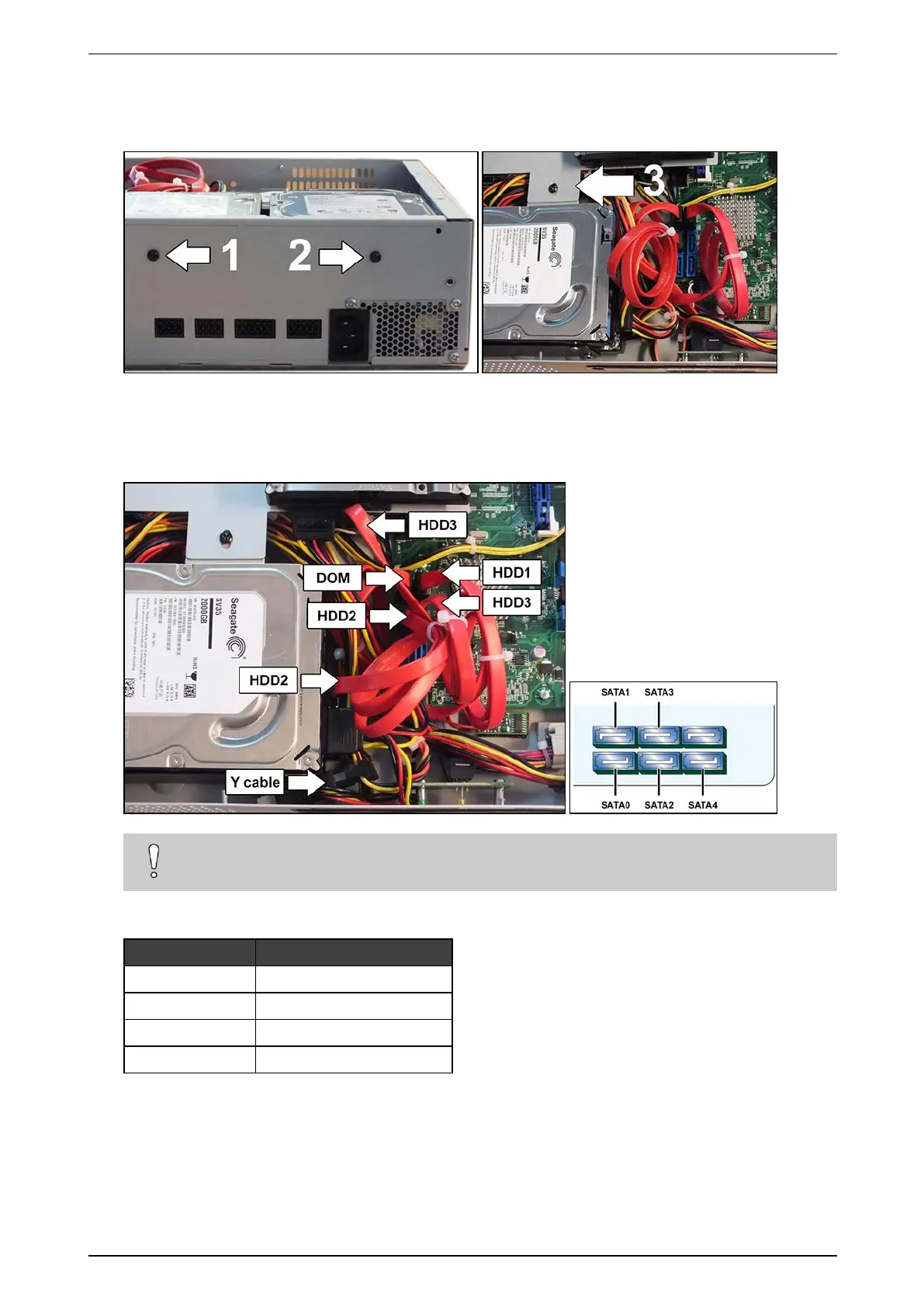
4. Mountthebracketusing3self-tappingscrews(#17362010):use2screwstofixthebrackettotherearofthe
device,andusethethirdscrewtofixthebrackettotheL-shapedbracketofthealreadyinstalledsecond
disk.
5. DisconnectthepowerSATAcablefromtheseconddisk,andplugintheYcable(#16520795).Thisprovides
powersupplyconnectionsforallthreedisks.
6. Connectdisk2tooneendoftheYcable,anddisk3totheotherend.
7. Connectharddisk3totheSATA3connectoronthemotherboardwiththeSATAcable(#16520877).
Caution!
DonotbendtheSATAcablestoosharplytopreventcabledamage.
ThetablebelowliststhecorrectdevicesandSATAconnectors:
Device SATA connector
DOM SATA0
HDD1 SATA1
HDD2 SATA2
HDD3 SATA3



 To Next Page