ADPRO iFT Series Hardware Installation Manual
27817_08 27
Note
Selectonlytwodisks,notthreeorfour.Ifyoudo,thesystemwillconfigurethethirdandfourth
diskassparediskswithintheRAID1configuration.Ifyouwanttoputdisk1and2inRAID1,
andalsodisk3and4,executethissteptwice:oncefordisk1and2,andoncefordisk3and4.
8. ChooseMake RAID 1 (mirror) from selected disks.
9. Whenmirroringhasfinished,chooseMain menu,andthenchooseReboot.
3.9.3 Retrieving RAID 1 Information
YoucanretrieveRAID1informationusingtheTelnetta,hd,raidcommand,orusingtheXOclientsoftware.
TocheckifdisksareinRAID1modeintheXOclientsoftware,proceedasfollows:
1. LaunchtheXOclientsoftware.
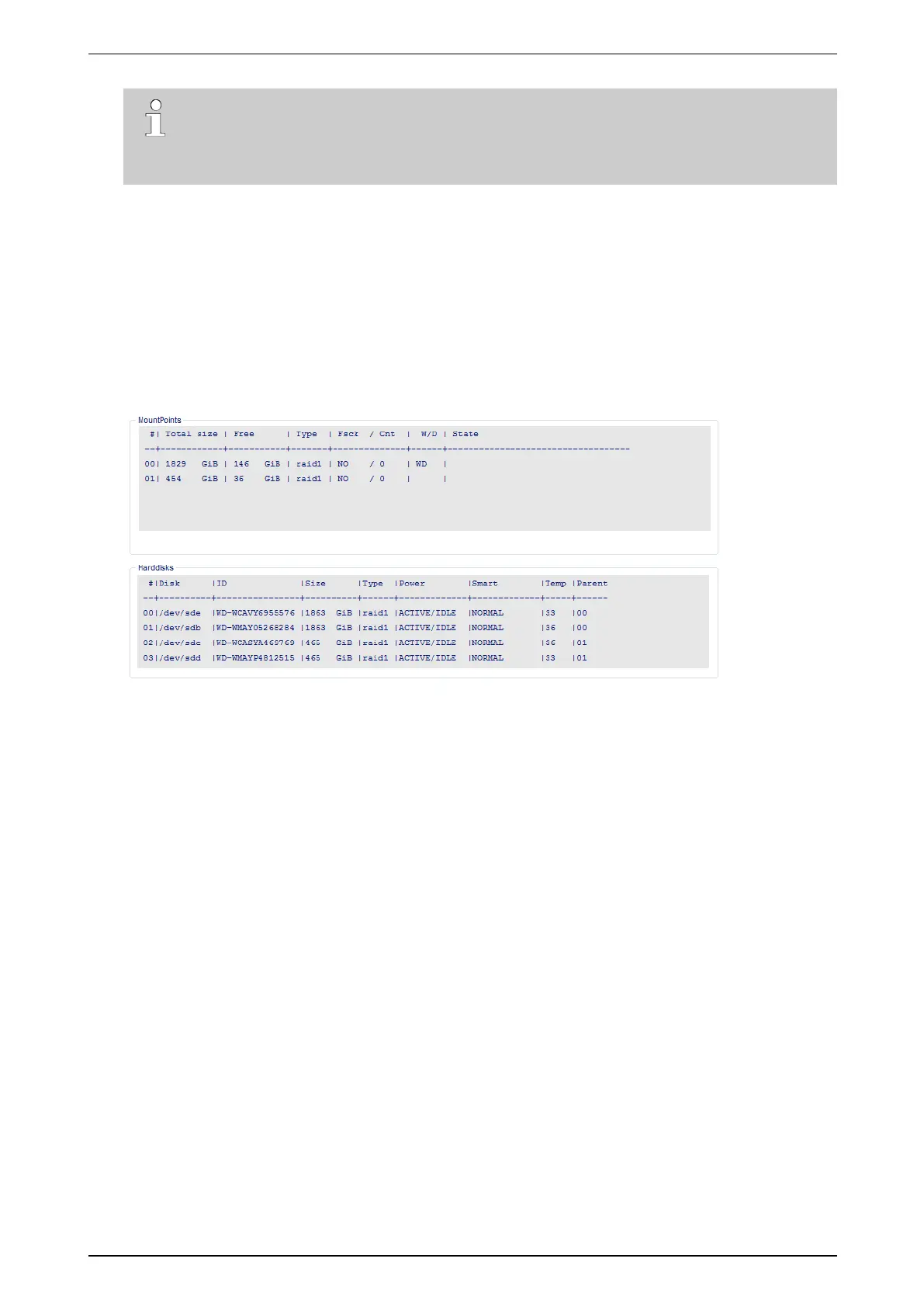
2. ChooseSystem >Maintenance >Harddisks.Thefollowingscreenappears:
TheMountPoints panedisplaysthemountpoints(=writingdisks).TheType columnindicateswhetherthe
mountpointisanormaldisk(disk)oraRAID1disk(raid1).
TheState columnwillindicatedegradedwhenoneoftheRAIDdisksisfaulty,andrecovering whenthesystem
isresynchronisingafterreplacingthefaultydisk.Itwillalsoindicatetheprogressoftherecoveryprocess.For
details,seetheXO Client Software User Manual(21796).
TheHarddisks panedisplaysthephysicalharddiskinformation.TheType columnindicateswhetherthediskis
anormaldiskoraRAID1disk.TheParent columnindicatesthecorrespondingmountpoint.
Theexampleaboveshowsadevicewith4disksandRAID1(twomountpoints).
3.10 Remote Formatting of Hard Disks
AsoffirmwareversionXO4.3,youcanformattheharddisksinyourXOdeviceremotelyusingthehardware
configurationtool.YoudonothavetousetheXOInstallermenu.IfyourXOdevicehasseveraldisks,youwill
formatallthedisks.
ToformattheharddisksinanXOdeviceremotely,proceedasfollows:
1. UsetheXOclienttobackupthenecessarydata:recordings,calibrationpictures…Fordetails,seetheXO
Client Software User Manual(21796).
2. Logontothehardwareconfigurationtool.Forinstructions,seeLogging on to the Hardware Configuration
Toolonpage38.



 To Next Page