AIMB-584 User Manual 66
Primary Display [ Auto ]
Select which of IGFX/PEG/PCI Graphics device should be Primary Display
Internal Graphics [ Auto ]
Keep IGD enabled based on the setup options.
Aperture Size [ 256MB ]
DVMT Pre-Allocated [ 32M ]
Select DVMT 5.0 Pre-Allocated (Fixed) Graphics Memory size used by the
Internal Graphics Device.
DVMT Total Gfx Mem [ 256M ]
Select DVMT5.0 Total Graphic Memory size used by the Internal Graphics
Device.
Gfx Low Power Mode [ Enabled ]
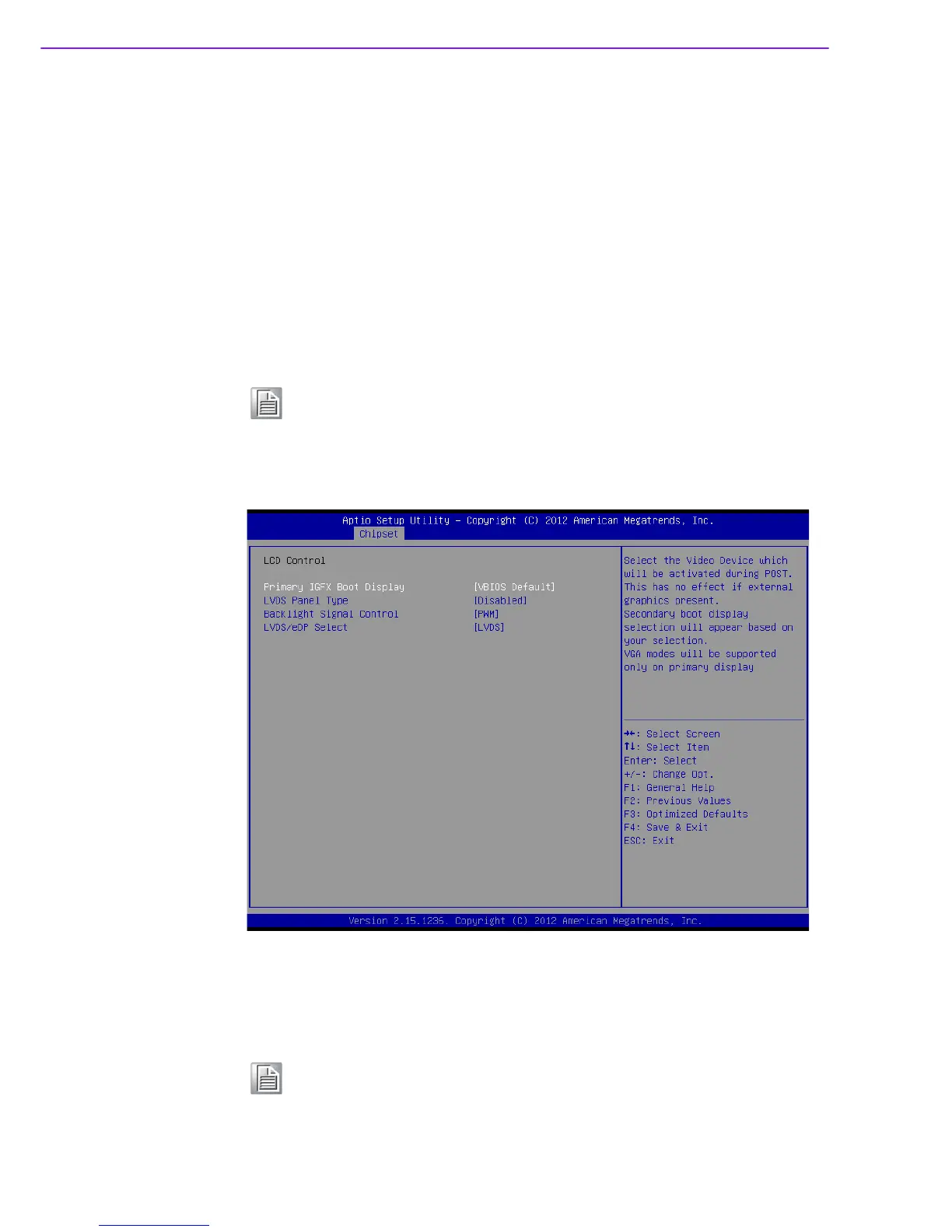
LCD control
Primary IGFX Boot Display [ VBIOS Default ]
Select the video device which will be activated during POST. Secondary boot
display selection will appear based on customer's selection.
Note! This option is applicable for SFF only.
Note! When BIOS set as " Auto", only CRT is supported as the single display
under DOS.













 To Next Page