Introduction
7
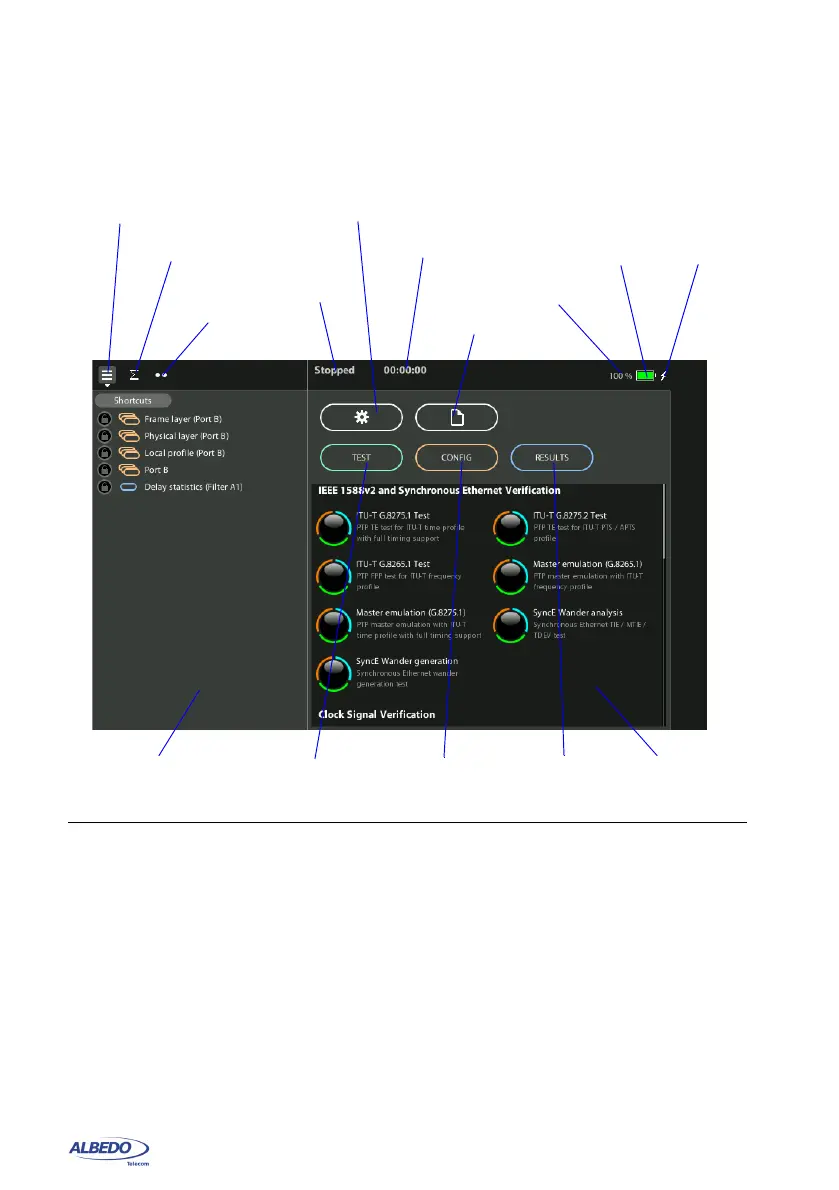
contains miscellaneous information. There are three buttons in the main panel to
enable the user to access to these resources:
• TEST: Contains configuration items related with general test configuration like test
scheduling, test setup, performance objectives settings, event insertion, and event
logging. Configuration of some special tests like the RFC 2544 or the eSAM or the
Ping / Traceroute is also done from this menu. Finally, setting of some special
operation modes like the PTP endpoint emulation is available in this menu as well
(only in units with the correct PTP or Synchronous Ethernet licenses installed)
• CONFIG: Provides access to the global operation mode and configures test ports
and other resources such as reference clock inputs and outputs, secondary inter-
faces, etc. The setup menu can be used to configure the test ports A and B.In
units with the correct software options installed, it may also include menus to con-
figure the E1 / T1 and other test interfaces.
Figure 1.4: xGenius home panel.
Auxiliary panel
Direct access
to results
Direct access
to files
Main panel
Direct access
to configuration
Battery
charge icon
Test status
Elapsed time
Navigation tab
Direct access
Battery charge
indication
DC power
indication
Summary tab
to system
Direct access
to test
LEDs tab



 To Next Page