A
L
B
E
D
O
T
e
l
e
c
o
m
-
J
o
a
n
d
’
À
u
s
t
r
i
a
,
1
1
2
-
B
a
r
c
e
l
o
n
a
-
0
8
0
1
8
-
w
w
w
.
a
l
b
e
d
o
t
e
l
e
c
o
m
.
c
o
m
User Guide
8
• RESULTS: This item enables the user to browse test results. Most of them are not
available if a measurement has not been previously started but there are some
exceptions to this rule. The Results panel also contains access to the Event logger
browser, that enables the user to display graphically miscellaneous events and
performance metrics.
There are two additional buttons in the main panel not directly related with testing tasks
but with test unit management. These are the File and System buttons and they have
the following purpose:
• File: File management menus. Includes configuration, report and trace file man-
agement. Files can be deleted, copied, exported or imported.
• System: Provides platform management tools. For example language selection,
screensaver configuration and others.
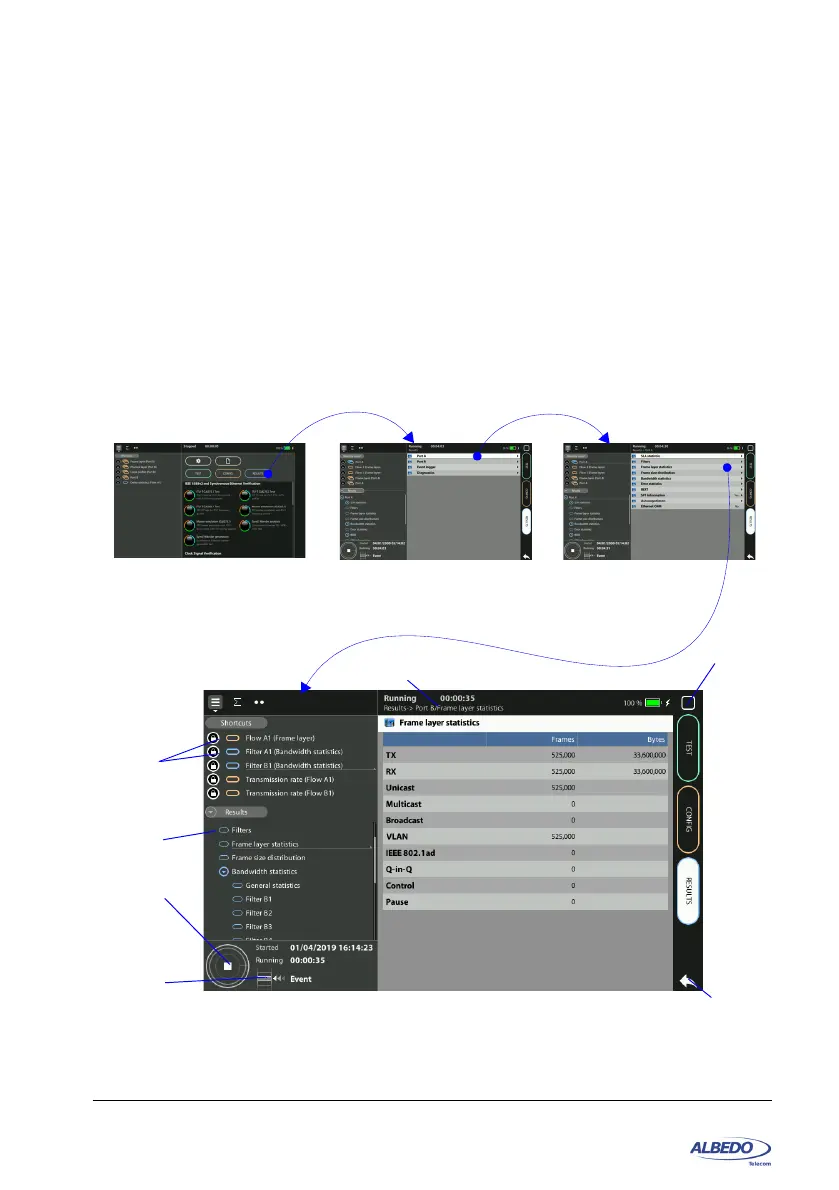
Figure 1.5: Access to a results table from the home panel in three different steps. In this
case the test results are represented as a table, including a header (frames, bytes), a
results list (TX, RX ,...) and different counters.
Navigation
history
Home Home -> Results
Home -> Results / Port A
Home -> Results / Port A / frame layer statistics
Menu
hierarchy
Home
button
Back
button
Current
panel
Run
button
Event
insertion
button



 To Next Page