Cable Tests
63
xGenius may optionally include support for PoE and PoE+ measurement. The unit is
compatible both endpoint and pass-through measurements. If the tester is connected
in endpoint mode, it replaces the PD and it is capable of measuring the PoE / PoE+
voltage as generated by the PSE. In pass-through mode, the measurement includes
voltage, current and power. The correct test procedure is as follows:
1. Connect the equipment either in endpoint or pass-through mode (See section
2.2).
1. From the Home panel, go to CONFIG,
The port configuration panel is displayed.
2. Select Mode to enter in the mode selection menu
3. Choose Ethernet endpoint, IP endpoint or IP through.
4. Go to Port A.
The port specific settings for Port A are now displayed.
5. Go to Physical layer to enter in the physical settings configuration panel.
6. Configure the PoE setting to On.
Once configured, you can check the test results by following these steps:
1. From the Home panel, go to CONFIG,
The port configuration panel is displayed.
2. Go to Port A.
The port specific settings for Port A are now displayed.
3. Select the PoE results menu and make sure that the status is Measuring.
4. Check the Voltage result in endpoint mode or Voltage and Polarity, Current and
Power for your PoE / PoE+ alternative in pass-through mode.
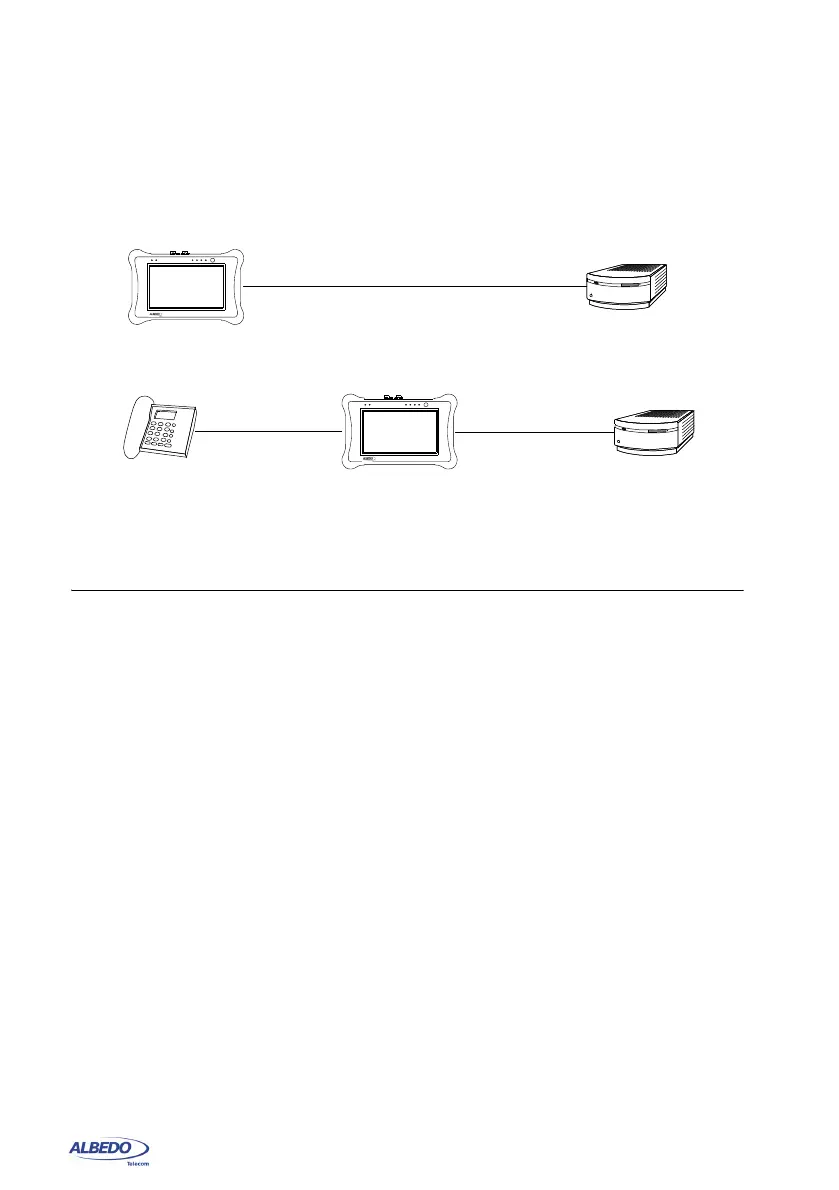
Figure 3.4: Connection of xGenius to measure PoE / PoE+: (1) The test unit replaces the
PD. The unit measures only voltage, (2) The test unit is connected between the PD and
the PSE, In this case it measures voltage, current and power.
Test unit
Port A
PD
Port B
(b)
PSE
Test unit (PD)
Port A
(a)
PSE
xGenius
xGenius



 To Next Page