©2019 ALL-TEST Pro, LLC All Rights Reserved 58 Rev 06/20/2019
SETUP
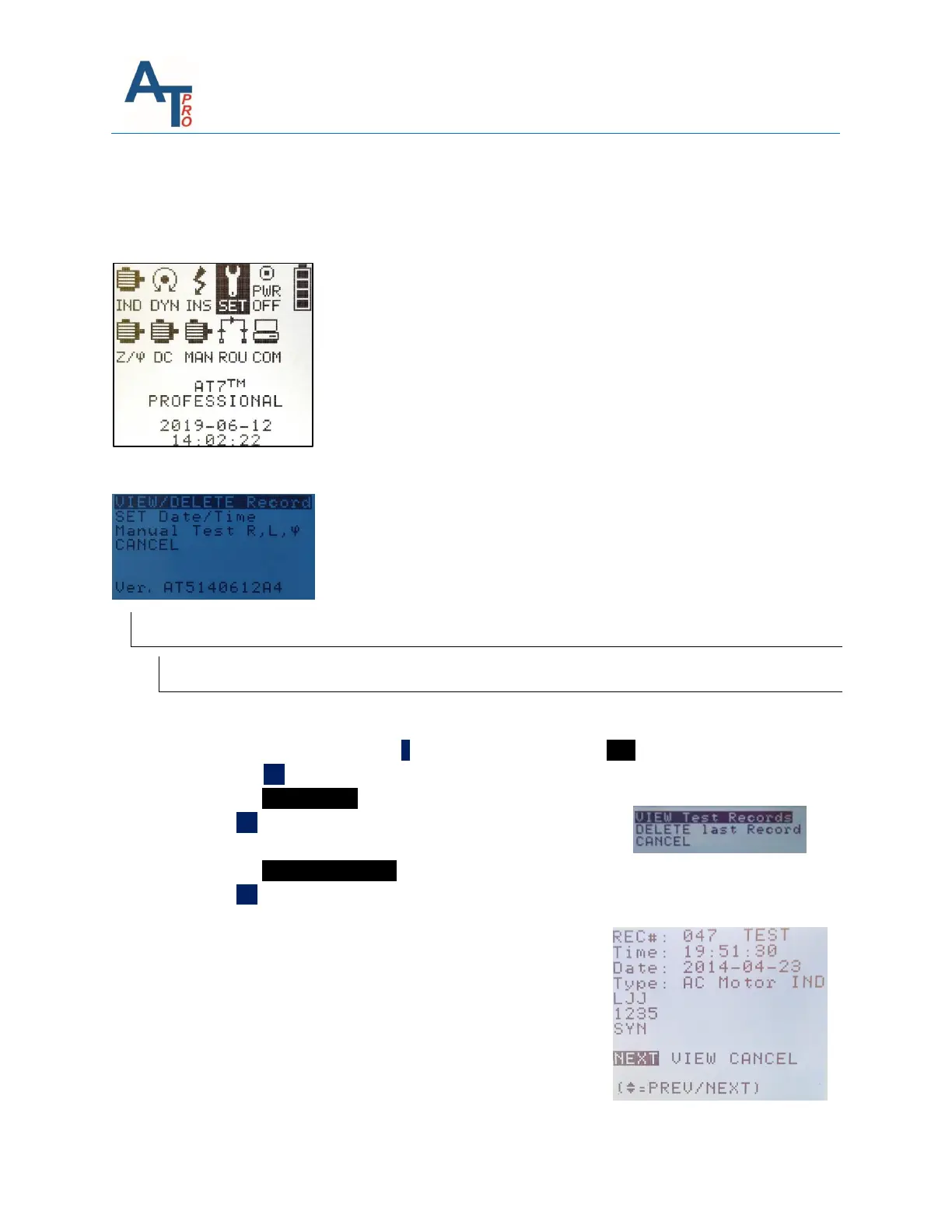
SET- provides direct access to view or delete previously stored test data, set the date and time of the
instrument or to make manual measurement of Resistance (R), Inductance (L), & Phase Angle (ϕ).
Pressing “OK” key when “SET” is highlighted will show up the following screen:
VIEW/DELETE Record
Viewing Saved Test Data
To view any data stored in the instrument:
1. From the Main Menu; press ˃ key 3 times to highlight the SET function
2. Press the OK key, this will display the Setup Menu
3. Highlight VIEW/DELETE record
4. Press OK key, this will display VIEW Test Records Display
screen
5. Highlight VIEW Test Records
6. Press OK key, this will display the last Motor data test set stored in the instrument memory.
This displays the REC #, and identifies the Motor data test as
a TEST or REF data set.
• Time: Time the Motor Test was performed
• Date: Date the Motor Test was performed
• Type: Type of Motor data set



 To Next Page