Programming the Cooldown Step Type
The Cooldown Step Type allows the owner to program the pa-
rameters during the cooldown steps of a cycle. After selecting the
desired Cycle Step number and pressing START (enter), XXCLdn
will appear in the display. Press the NORMAL 40 (∧) or the
DELICATES COLD (∨) keypad to scroll through the options and
START (enter) to select a value.
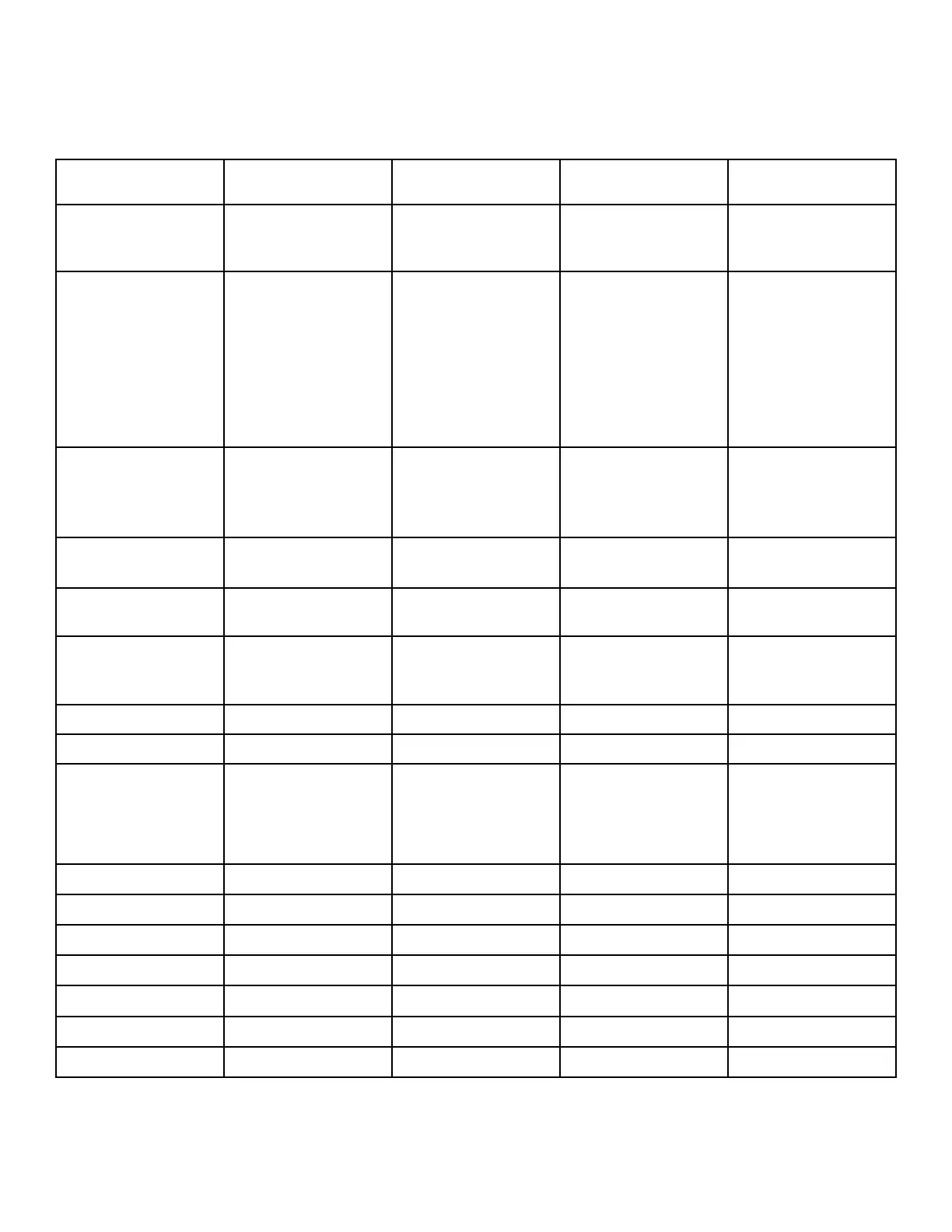
Step Type Diplay A Display B Values Description
XXCLdn
Cooldown Step Type
(XX is step number, step
type is flashing)
En diS XXCL01 EnAbLE, diSAbL,
dNod 1, dNod 2
Step Enable/Disable
Choosing dNod 1 and
dNod 2 will enable
the step if the cycle
modifier is chosen and
set to be enabled in Cy-
cle Modifier Program-
ming CNP-.
StAtUS XXCL02 PrEWSH, WASH,
rinSE1, rinSE2,
rinSE3, rinSE4,
SPin
Status LED: The corre-
sponding LED on the
control will be lit dur-
ing this step.
W tEMP XXCL03 g Cool, 50 - 160
(°F), 10 - 71 (°C)
Cooldown Temperature
tyPE XXCL04 PLU Co, no Wri
Plumbing Code/No
Wrinkle
rAtE XXCL05 no, 0.5 - 12.5 (°F/
Min), 0.3 - 6.9 (°C/
Min)
Cooldown Rate
rotAtE XXCL06
3-255 Motor On Time (s)
PAUSE XXCL07
3-255 Motor Off Time (s)
SPEEd XXCL08 no rot, LoW Ag,
rEg Ag
10 - 50 RPMs (0.03 -
0.77 G Force)
Rotation Speed
rEvErS XXCL09 rEv on, no rEv
Reversing
u tEMP XXCL10 CoLd, WArM, Hot
Valve Temperature
drAin1 XXCL16 oFF, on
Drain
oUtP 1 XXCL19 oFF, on
External Output #1
oUtP 2 XXCL20 oFF, on
External Output #2
oUtP 3 XXCL21 oFF, on
External Output #3
oUtP 4 XXCL22 oFF, on
External Output #4
Table 18
Programming Control
©
Published by permission of the copyright owner -
DO NOT COPY or TRANSMIT
82 Part No. 805405ENR5




 To Next Page