Hold Step Custom Messages CNESS-
This option allows the owner to program the machine to display a
custom hold step message when a hold step is programmed.
1. Control must be in Manual Mode. Refer to How to Enter the
Manual Mode.
2. Press the NORMAL 40 (∧) or the DELICATES COLD (∨)
keypad until Prog appears in the display. Press the START
(enter) keypad, and AtS 1 will appear in the display.
3. Press the NORMAL 40 (∧) or the DELICATES COLD (∨)
keypad to scroll through the programmable options until
CNESS- appears in the display.
4.
When CNESS- appears in the display, press the START (en-
ter) keypad. There are two programmable Hold Step Custom
Message options.
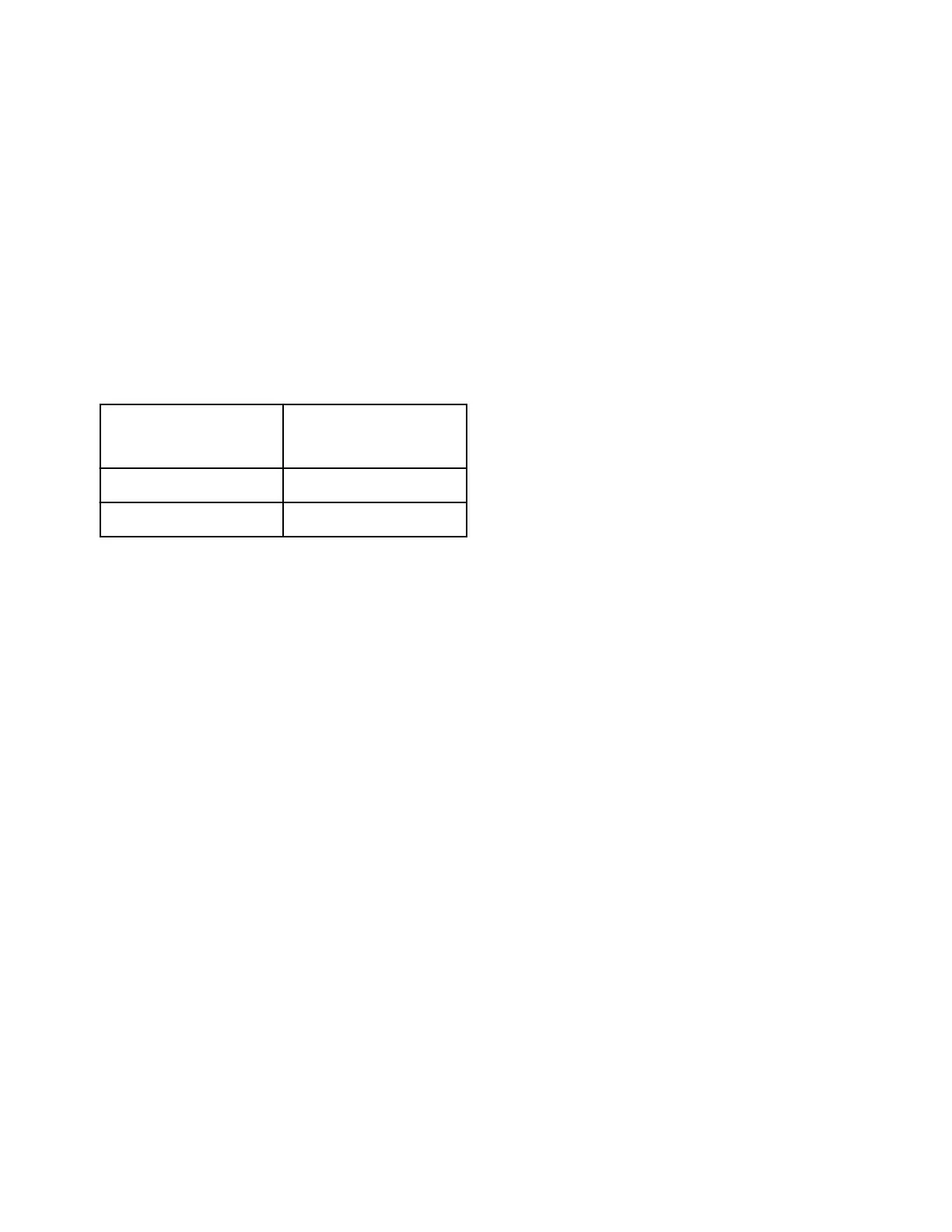
Display
Hold Step Custom
Message Options
CNESS1
Custom Message #1
CNESS2
Custom Message #2
Table 23
5. Press the NORMAL 40 (∧) or the DELICATES COLD (∨)
keypad to change the current option.
6. Press the START (enter) keypad to change the first of six pro-
grammable characters.
NOTE: To go back to the current programmable op-
tion without changing the value, press the DELI-
CATES 30 (<) keypad.
7. Press the NORMAL 40 (∧) or the DELICATES COLD (∨)
keypad to change the active character and the START (enter)
keypad to enter the value of the character and advance to the
next character.
8. Press the START (enter) keypad when the correct value ap-
pears in the display. The new value is saved and the next op-
tion will appear in the display.
Programmable Cycle Time Display
PCyCtd
This option allows the owner to program the machine to display a
chosen cycle time in minutes instead of the calculated cycle time.
The cycle time display will not pause for fills or heating. The dis-
play will switch to 01 if the end of the cycle is reached before the
time display reaches 01. If the time displayed reaches 01 before
the end of the cycle, the display will pause at 01 until the cycle
ends.
In order to use this option, the owner must set the programmable
cycle time in a cycle to a value greater than 0. Refer to How to
Enter Cycle Programming CyCLE-.
1. Control must be in Manual Mode. Refer to How to Enter the
Manual Mode.
2. Press the NORMAL 40 (∧) or the DELICATES COLD (∨)
keypad until Prog appears in the display. Press the START
(enter) keypad, and AtS 1 will appear in the display.
3. Press the NORMAL 40 (∧) or the DELICATES COLD (∨)
keypad to scroll through the programmable options until
PCyCtd appears in the display.
4.
When PCyCtd appears in the display, press the START (en-
ter) keypad. The current Cycle Time Display value will ap-
pear in the display.
on = Cycle time displayed as programmed
oFF = Calculated remaining cycle time is displayed (factory de-
fault setting)
5. Press the NORMAL 40 (∧) or the DELICATES COLD (∨)
keypad to change the current value.
6. Press the START (enter) keypad when the correct value ap-
pears in the display. The new value is saved and the next op-
tion will appear in the display.
No Cycle Time Display nCyCtd
This option allows the owner to program the machine to display
no cycle time instead of the cycle time being displayed, a single
dashed line will move horizontally across the display for the en-
tire cycle.
1. Control must be in Manual Mode. Refer to How to Enter the
Manual Mode.
2. Press the NORMAL 40 (∧) or the DELICATES COLD (∨)
keypad until Prog appears in the display. Press the START
(enter) keypad, and AtS 1 will appear in the display.
3. Press the NORMAL 40 (∧) or the DELICATES COLD (∨)
keypad to scroll through the programmable options until
nCyCtd appears in the display.
4.
When nCyCtd appears in the display, press the START (en-
ter) keypad. The current No Cycle Time Display status will
appear in the display.
on = Option Enabled
oFF = Option Disabled (factory default setting)
5. Press the NORMAL 40 (∧) or the DELICATES COLD (∨)
keypad to change the current status.
6. Press the START (enter) keypad when the correct value ap-
pears in the display. The new value is saved and the next op-
tion will appear in the display.
Number of Balance Attempts with No
Loss of Time bAL At
This option allows the owner to program the machine's number of
balance attempts with no loss of time. If the machine needs to re-
balance for any reason, time will pause for additional balance at-
tempts when this parameter is greater than 1. A value of 1 allows
Programming Control
©
Published by permission of the copyright owner -
DO NOT COPY or TRANSMIT
87 Part No. 805405ENR5






 To Next Page