Programming the Hold Step Type
The Hold Step Type allows the owner to pause a cycle at a specif-
ic type to allow user interaction with the cycle, generally to add a
chemical. After selecting the desired Cycle Step number and
pressing START (enter), XXHoLd will appear in the display.
Press the NORMAL 40 (∧) or the DELICATES COLD (∨) key-
pad to scroll through the options and START (enter) to select a
value.
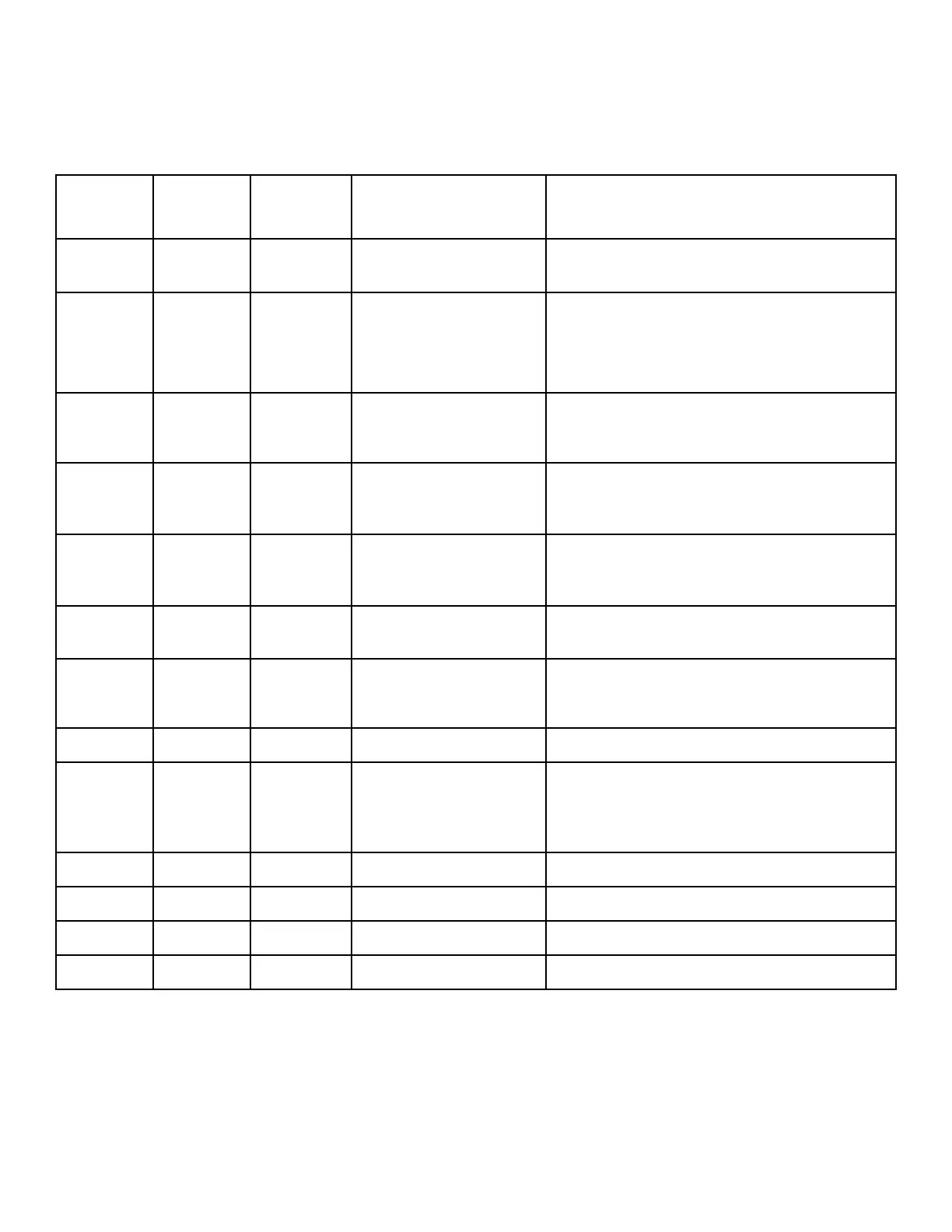
Step
Type Diplay A Display B Values Description
XXHoLd Hold Step Type (XX is step number, step type is
flashing)
En diS XXHo01 EnAbLE, diSAbL, dNod
1, dNod 2
Step Enable/Disable
Choosing dNod 1 and dNod 2 will enable the step
if the cycle modifier is chosen and set to be enabled
in Cycle Modifier Programming CNP-.
StAtUS XXHo02 PrEWSH, WASH, rinSE1,
rinSE2, rinSE3,
rinSE4, SPin
Status LED: The corresponding LED on the control
will be lit during this step.
NinUtE XXHo03
0-2 Step Minutes: If Programmed Cycle Time Display is
enabled and set to a value greater than zero, it will
override this time.
SECond XXHo04
0-59 Step Seconds: If Programmed Cycle Time Display is
enabled and set to a value greater than zero, it will
override this time.
AUdioP XXHo05
0-20 Audio Pattern: The audio will stop once a key is
pressed or the door is opened.
NESSAg XXHo06 LoAd, CHEN, SoAP,
bLEACH, SoFtnr, SoUr,
StArCH, CUStN1, CUStN2
Display Message
StArtP XXHo07 StrtCy, UnLoCK
Door Lock State
AUrESN XXHo08
0-255 Automatic Resume Minutes: Cycle will resume au-
tomatically after the programmed time only if the
step was programmed to have the door remain
locked.
oUtP 1 XXHo12 oFF, on
External Output #1
oUtP 2 XXHo13 oFF, on
External Output #2
oUtP 3 XXHo14 oFF, on
External Output #3
oUtP 4 XXHo15 oFF, on
External Output #4
Table 22
While in the Hold Step, a message is used to indicate what inter-
action the machine is waiting for. The Hold step can be program-
med to either hold water and keep the door locked or to evacuate
water and unlock the door. In both cases a Start key press will al-
low the cycle to resume.
This step may be used to allow the machine to be rinsed out be-
fore adding the next load. An additional vend could be charged
by having a Modifier Key programmed to enable steps to perform
this functionality by setting the steps as Mod 1 or Mod 2. Refer to
Cycle Modifier Programming CNP-.
Programming Control
©
Published by permission of the copyright owner -
DO NOT COPY or TRANSMIT
86 Part No. 805405ENR5






 To Next Page