RS2310002 Rev. 1 A–2
Baking
1. Open oven door to confirm nothing is stored in oven
cavity and set racks to proper height.
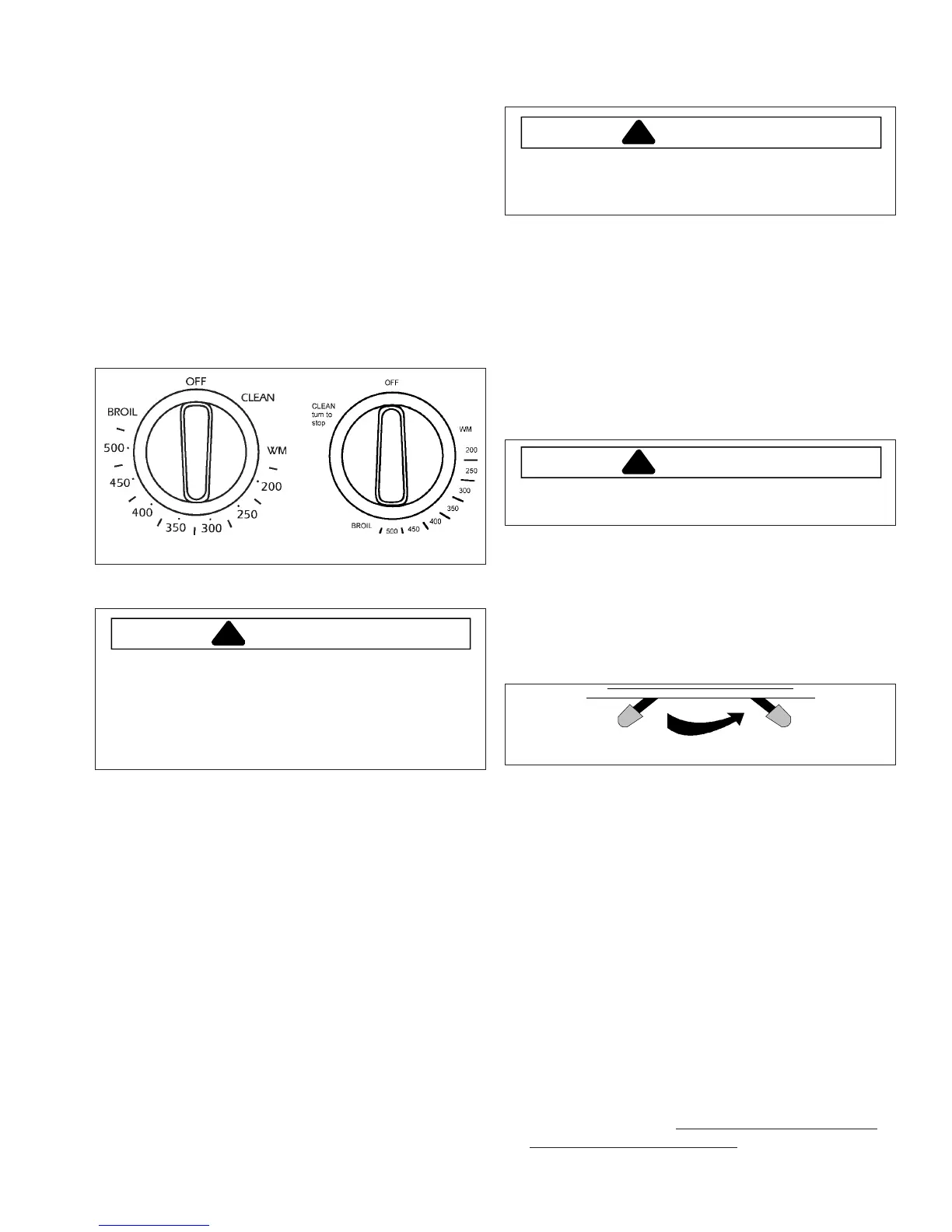
2. To preheat oven, turn oven thermostat knob to
desired temperature . See knob below.
• Oven indicator light glows.
• When indicator light turns off, oven has reached
desired temperature. During cooking, indicator
light turns off and on when oven cycles to maintain
temperature.
• For delicate baking allow oven to cycle at least 2
times.
3. Place food in oven.
4. After cooking time elapses, remove food and turn
oven thermostat knob to “OFF”.
Thermostat Knob
Broiling
WARNING
To avoid risk of fire, do not line the broiler grid with
foil.
• Foil may trap grease on top of grid close to burner
causing a fire.
• Never leave oven unattended while broiling.
Overcooking may result in a fire.
Broiling Tips
• Remove excess fat from meat before broiling. Cut
edges of meat to prevent curling.
• Place food on a cold ungreased broiling pan. If pan is
hot, food sticks.
• Fish sould be broiled with skin side down. All food
except fish should be turned at least one time. Begin
broiling with skin side down.
• Season meat after it has browned.
• Broiling does not require preheating.
• If food is not browned enough, cook on a higher rack
position. If food is too browned, cook on a lower rack
position.
1. Center food on broiling grid and pan, and place in
oven.
2. Turn oven thermostat knob to
BROIL
.
• Oven indicator light glows.
3. After broiling, remove food and turn oven thermostat
knob to
OFF
.
Self-Cleaning
CAUTION
To avoid risk of personal injury, do not touch oven
vents or areas around vents during self-cleaning.
These areas can become hot enough to cause burns.
• A small amount of smoke is normal when cleaning.
Excessive smoke may indicate there is a faulty gasket
or too much food residue has been left in oven. Move
birds and small animals susceptible to fumes or
smoke to another room.
• Oven should be cleaned before it gets too dirty. Wipe
up large spills before self-cleaning.
• Do not use cleaning cycle if oven light cover is not
properly in place.
1. Prepare oven for self-cleaning.
WARNING
To avoid risk of smoke damage or fire, clean excess
spills from oven interior.
• Remove oven racks and all cooking utensils from
oven.
• Clean excess spills from oven interior.
• Remove items from range top and backguard.
These areas can become hot during self-cleaning
cycle.
2. Move oven door lever located above oven door to
right to lock oven door.
Unlocked Locked
3. Turn oven thermostat knob to
CLEAN
position.
4. Press
CLEAN START
pad.
• Self-clean and oven indicator light glow. If oven
indicator does not glow check oven door lever.
• Self-clean cycle lasts for approximately 3½ hours.
After 3½ hours oven turns off. There is no signal
at the end of cleaning cycle.
5. Turn oven thermostat knob to
OFF
position when
finished.
• After oven has cooled, door can be unlocked and
opened.
• To aviod damaging door lock, do not force lever to
unlocked position.
Interrupt Self-Clean Cycle
1. Push
CLEAN CANCEL
pad and turn oven thermostat
knob to
OFF
position.
2. When oven has cooled to a safe temperature, unlock
and open oven door. Do not force handle, damage
will occur to latch mechanism. If handle will not open
allow 1/2 hour for cool down and try again.
Programming Instructions



 To Next Page