RS2310002 Rev. 1 C–2
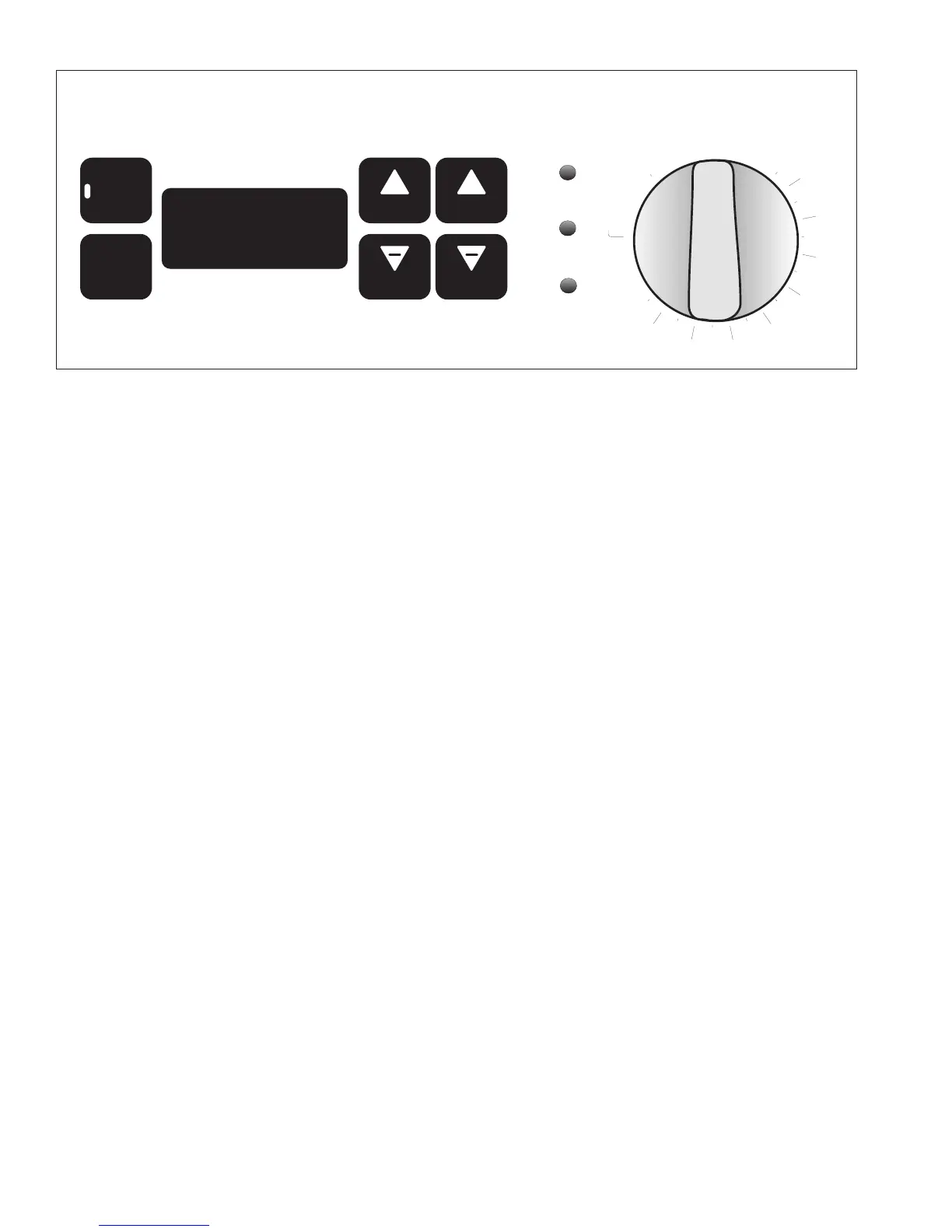
Electronic Oven Control Pads and Lights
TIMER
pad selects timer feature. Timer can be set up to
11 hour 59 seconds. Timer does not control oven
operation. Timer light flashes when timer is being set
and glows when timer is counting down. Timer light
allows user to identify timer mode quickly and easily.
CLOCK
pad is pressed to set clock and turn clock
display on and off.
HRS
pads increase or decrease time by hours.
MIN pads increase or decrease time by minutes.
OVEN
light glows when oven is on. Light flashes after
self-clean cycle turns off as a reminder to turn
temperature knob to
OFF
.
LOCKED
light glows when oven door is locked and oven
is set for self-cleaning. After self-clean cycle,
light flashes. Unlatch oven door and turn temperature
knob to
OFF
.
PREHEATED
light glows when oven reaches selected
temperature.
Temperature knob controls oven temperature, self-
clean, and broil. Push-to-turn knob prevents accidently
turning oven on.
Time display shows the time-of-day and timer minutes.
Setting Electronic Clock
Electronic clock has 3 modes—Clock displayed, set
clock (flashing), and clock not displayed. Press
CLOCK
pad to advance through modes.
When power is connected or restored, display flashes
until pad is pressed or temperature knob is turned.
Reset clock.
1. Verify display is flashing.
• If display does not flash, press
CLOCK
pad
repeatedly until display flashes.
2. Press
HRS
+ or - pad to set hours and
MINS
+ or -
pad to set minutes.
3. Press
CLOCK
pad to save time-of-day.
• Clock saves time-of-day approximately 60
seconds after time is entered if
CLOCK
pad is not
pressed.
Turning Off/On Clock Display
Press
CLOCK
pad until display is blank. Clock retains
time while not displayed. To turn on display, press
CLOCK
pad until time-of-day displays and is not
flashing.
Setting Electronic Timer
The minute timer is a timer only. Electronic timer does
not control bake, broil, or self-clean function. Timer can
be set up to 11 hours and 59 minutes.
1. Press
TIMER
pad.
2. Press
HRS
+ or - pad to set hours and
MINS
+ or -
pad to set minutes.
• Timer begins counting down automatically after
time is entered.
• To view clock while timer counts down, press
CLOCK
pad. To view timer again, press
TIMER
pad.
3. Press
TIMER
pad again to cancel.
Resetting and Canceling Timer
To reset or cancel timer, display must show remaining
time. If display does not show remaining time, press
TIMER
pad.
To reset the time when remaining time is displayed,
press the
HRS
+ or - pad to set hours and
MINS
+ or -
pad to set minutes until new time displays.
To cancel timer when remaining time is displayed or
signal after time elapses, press
TIMER
pad.
TIMER
CLOCK
+
HRS
+
MINS
HRS
MINS
OFF
WM
500
BROIL
25
450
550
PREHEATED
OVEN
400
350
300
200
LOCKED
CLEAN
Programming Instructions



 To Next Page