39
Recall Results
8. Recall Results
The Urilyzer 100 has memory for 1000 (PRO 3000) measurements. Every result
is automatically saved after the analysis in an indexed database. The database
enables you to search, view, print and transfer patient test results.
By default the analyzer warns the user to free up memory (erase data) 30 records
before the limit. The analyzer can also be set up to use circular memory. For
more information on database settings see
11.7 Database management.
You can access the database either
a.) from the Measurement screen by pressing Data,
b.) from the Main screen by pressing Database.
8.1 List view
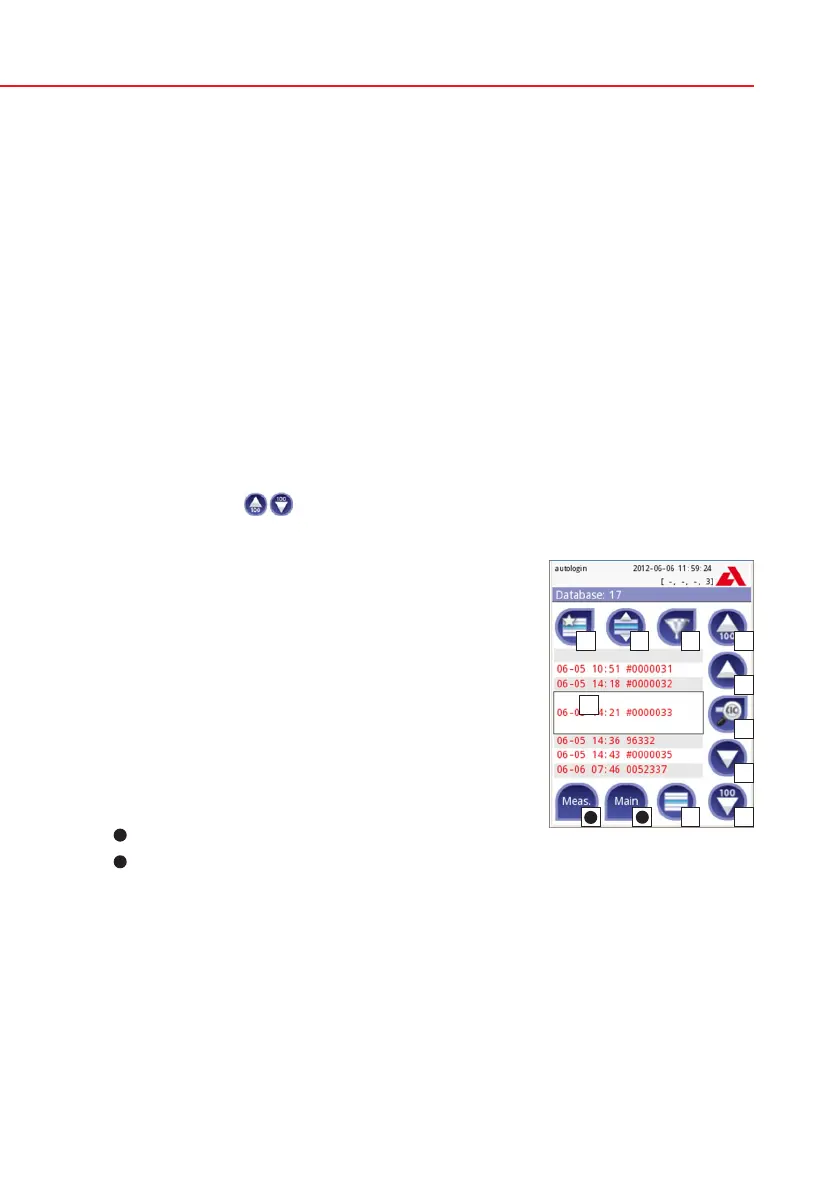
The Database screen shows the results in chronological order. The most recent
test result is displayed at the bottom of the screen. Use the up and down arrow
keys to scroll through the list of tests. To move the position in the list by 100
records use the
buttons.
Legend
Results list
Actions with selected records
Switch: Select records by movement
Filter
Move up by 100 records in the list
Move up by 1 record in the list
View item
Move down by 1 record in the list
Move down by 100 records in the list
Action: select actual record
11
Go to Main menu
12
Go to Measurement menu
Color coding of the results in the list:
Black: Negative result
Red: Positive result
Ochre: Failed result
If you enter from the Measurement screen, an automatic predefined filtering
is applied and only the results measured on that day are listed. This is marked
with the button. If you enter from the main menu, no filtering is automatically
executed.
Database - List view
11
12


 To Next Page