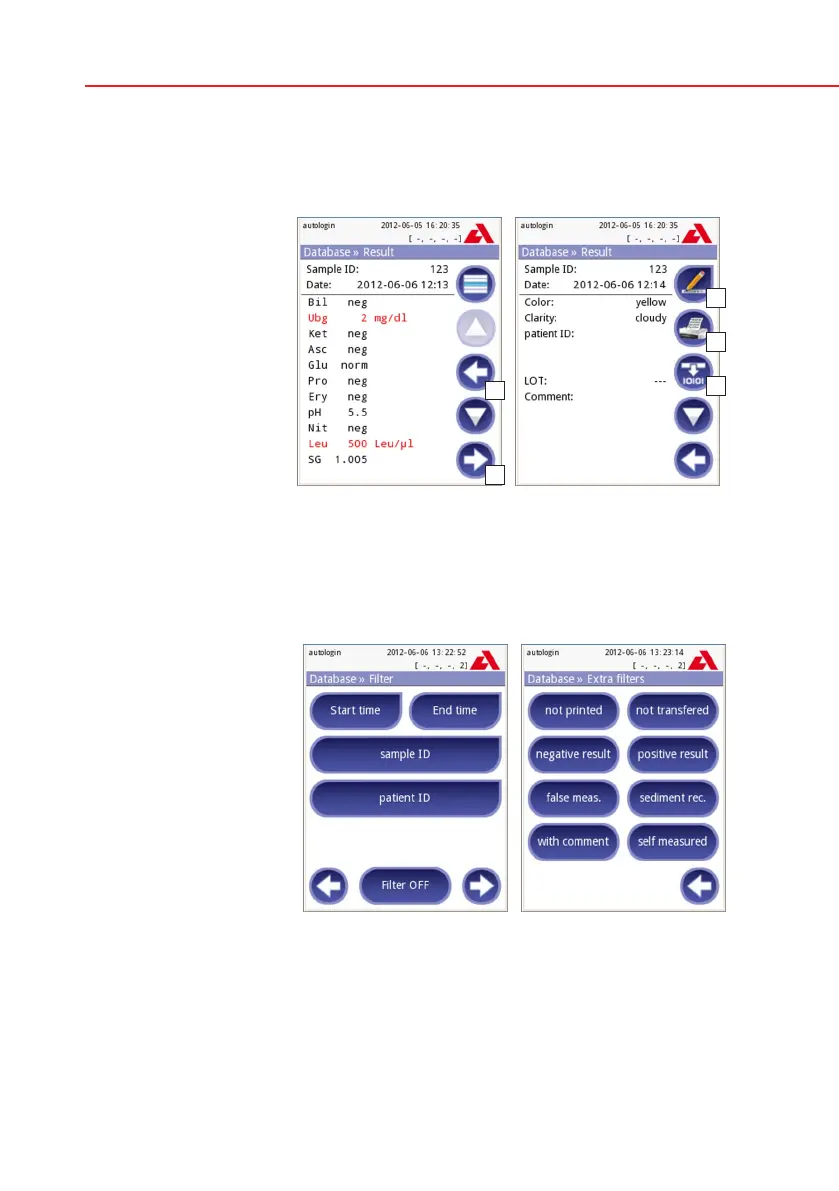
To view details of a patient result, touch the View button. The first page of the
patient’s result will be displayed on the screen.
8.2 Result view
The pad results are
listed on the first page.
You can use the up and
down navigation buttons
to move between the re-
sults. Press Return to
go back to the list view.
To view the second page
of the result, press the
More button. On the
second page the action
buttons are displayed
for the record: Edit,
Print, Send for
output.
The Edit button is only available if the result has not been printed or transferred
yet.
8.3 Filtering: How to find specific results
To narrow down the list of
results Urilyzer 100 fea-
tures a sophisticated filter-
ing engine. The following
parameters can be used
to set filtering criteria:
• Date&Time
• SampleID
• PatientID
• Status:
– not printed
– not transferred
• Values:
– negative
– positive
– sediment recommendation
– false
– with comment
– self measured
To activate a filter, press the desired button.
Result 1/2
Result 2/2
Database » Filter



 To Next Page