4.2.6 Powering down
Do not remove the power cable while the instrument is operating, otherwise the
data may be corrupted or the system may be compromised.
Before turning the analyzer off, always ensure that there is no strip on the test
strip tray and that the tray is clean.
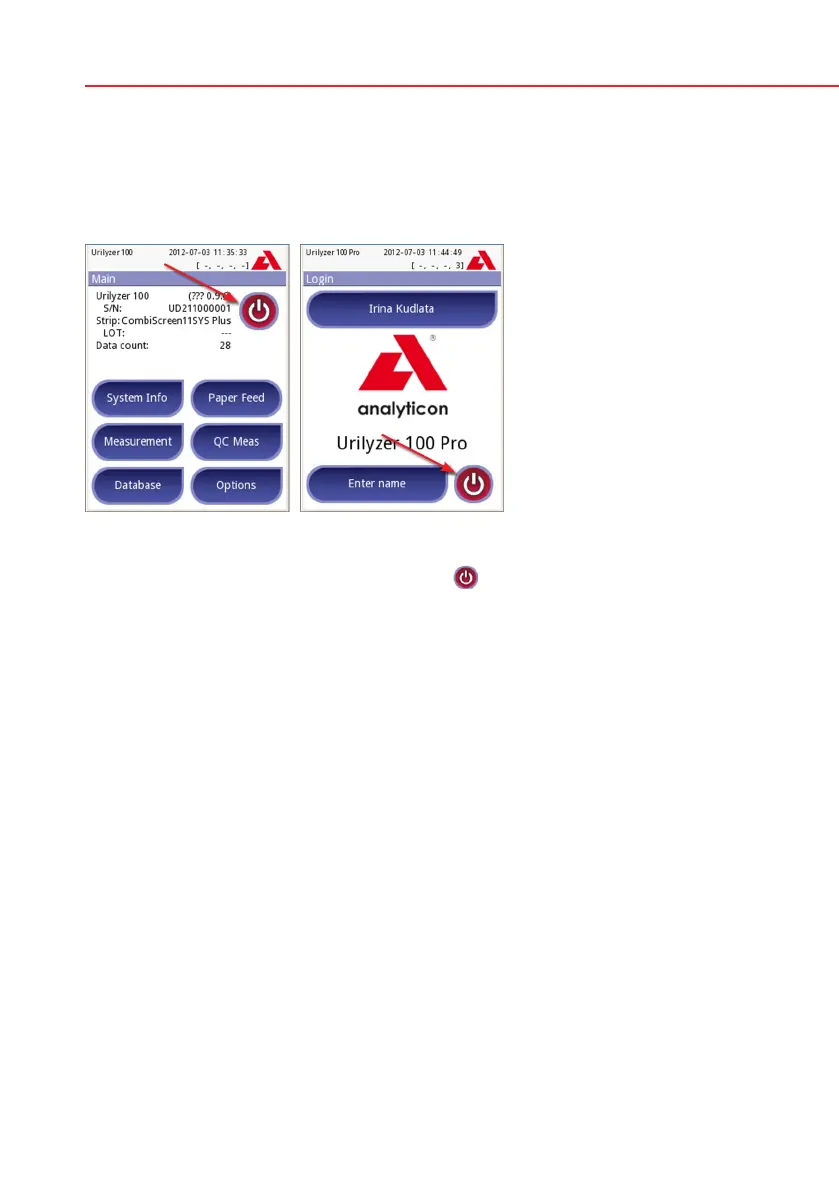
The analyzer is switched off by pressing the
button on the Main or on the
Login (Pro) screen. The test strip tray will retract into the analyzer.
We recommend that the analyzer be switched off at the end of each working day
and that the mains adapter be unplugged from the AC wall socket.
If necessary, the analyzer can also be switched off by holding down the On/Off
button for at least 5 seconds. Please note that this feature should be used in
case of system freeze or LCD failure. In this case the test strip tray will not be
retracted.
4.3 Analyzer software updates
From time to time Analyticon will add new features and make improvements to
the Urilyzer 100 analyzer software.
Updating the software is a simple procedure, but for the upgrade to work prop-
erly, it is important to follow the instructions below precisely.
A previously prepared USB flash drive is required for the upgrade.
Either you will receive an already prepared USB flash drive from your local
distributor or you will have to upload the update files manually to a USB flash
drive if you received the software update in electronically distributed package.
Instructions for preparation of the USB flash drive can be found in the next
chapter.
Power on the instrument and wait until the system is ready to use.
Powering down


 To Next Page