11. Instrument Settings
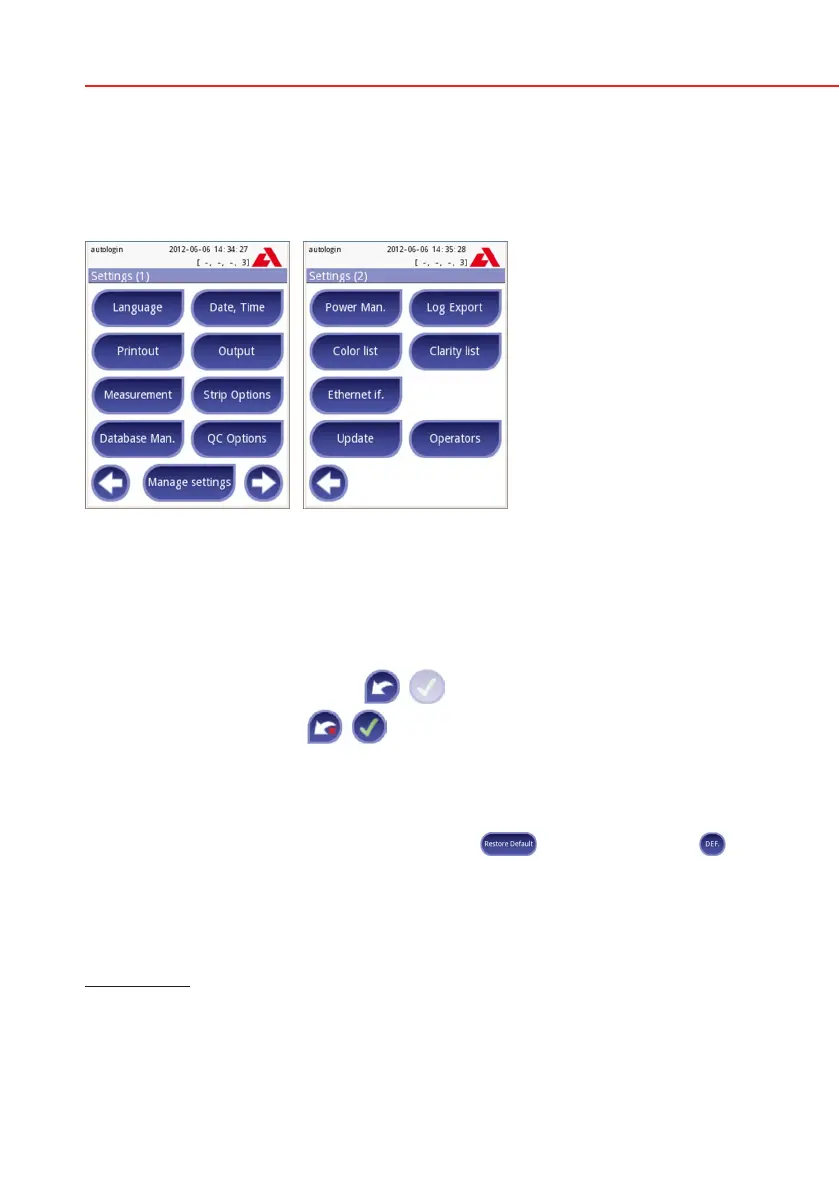
Your Urilyzer 100 analyzer allows you to change settings to suit your workplace
requirements. Instrument settings can be reached from Main»Options»Settings.
The list of available settings may vary according to authenticated user level.
To navigate between settings pages use the back and forward arrows.
Confirmation of changes
To confirm the performed changes on the User options or a Settings screen
first press Apply and leave the screen with Back.
No changes or changes are saved
Changes are still not saved
To cancel the modifications simply press Drop&Back before applying chang-
es.
Restoring default values
On each settings screen there is a button (named
Restore Default or
DEF.), which can be used to restore the default value(s) for that screen.
To restore ALL settings on the system level go to Manage Settings.
At system level the settings cannot be restored while printing or transfer is in
progress.
For Pro only: The settings can be restored based on the settings of supervisor
user, if the ‘Default by “supervisor” settings’ switch is active on Manage settings
page.
Settings 1/2 Settings 2/2



 To Next Page