12. Cleaning & Maintenance
As a general preventive action, always keep the outside of the Urilyzer 100
analyzer clean and free of dust.
12.1 Cleaning the analyzer
When the analyzer is turned off, wipe the outside (including the display) with
a damp (not wet) cloth and a mild detergent. Be sure that no liquid enters the
analyzer.
Do not use any type of solvent, oil, grease, silicone spray, or lubrication
on the analyzer.
Care should be taken to avoid liquid entering the printer compartment.
Recommended, tested cleaning agents: Isorapid (20 g Ethanol, 28 g 1-Propa-
nol, 0.1 g Quaternary ammonium compounds), Trigene Advance Laboratory
0.5, 1% solution, Barrycidal 33 2%
12.2 Cleaning the test strip tray
The test strip should be kept clean if the analyzer is
to operate properly.
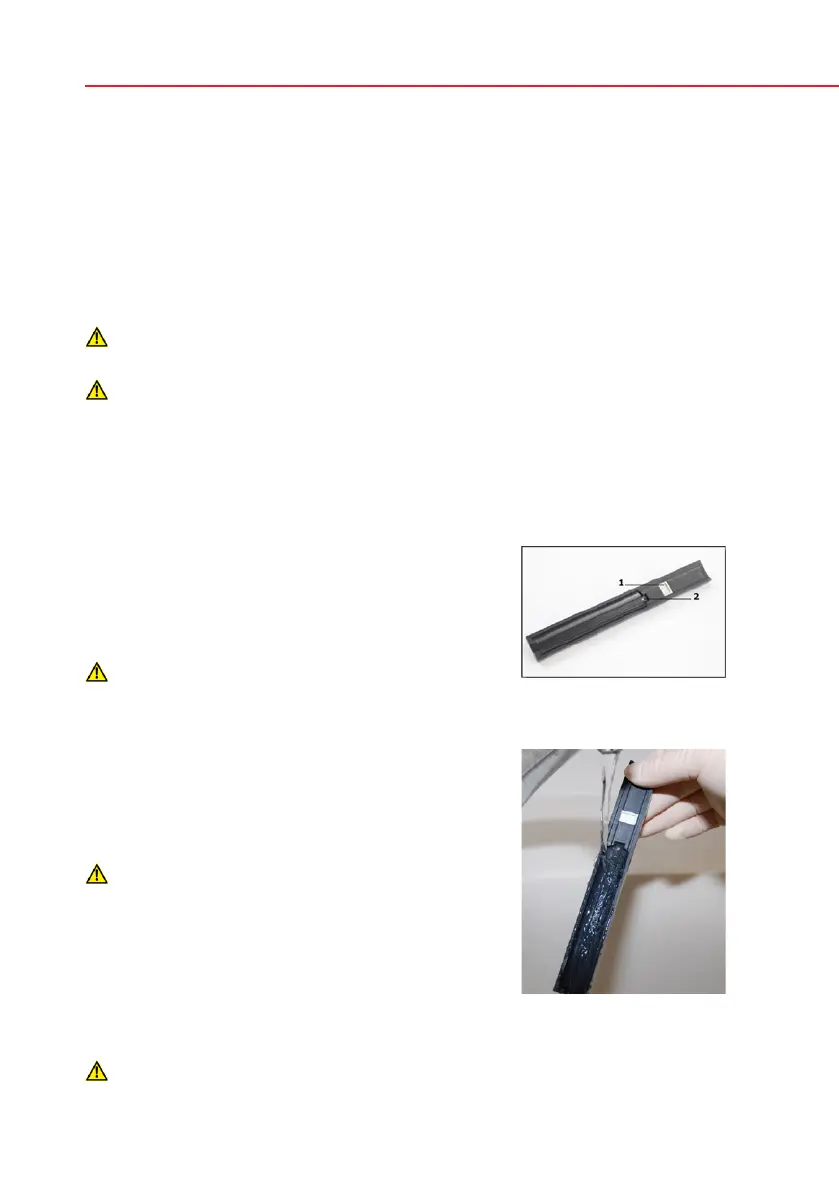
The reference pad (1) is integrated into the tray, the
transparent optical window (2) serves for automatic
strip recognition purpose.
Always wear protective gloves when han-
dling the test strip tray.
At the end of each day, clean the tray using the following procedure:
Turn off the Urilyzer 100 and slowly pull the test
strip tray out of the analyzer.
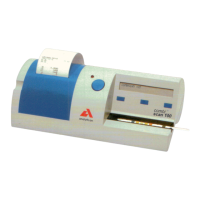
Rinse the contaminated parts of the test strip tray
under running water and then clean it with 70 %
isopropyl alcohol.
Care should be taken not to scratch the grey
reference pad.
Dry the tray with a lint-free wipe.
Reinsert the test strip tray into the analyzer by the
opposite the grey reference pad, with the reference
pad facing upwards. Push the tray firmly but slowly,
just over when the reference pad disappears in the
housing.
Ensure that the tray is completely clean and dry before reinserting.
Test strip tray
Rinsing tray



 To Next Page