11.14 Operators (Pro only)
The operators screen is used to manage the system security settings and to
manage the active operators.
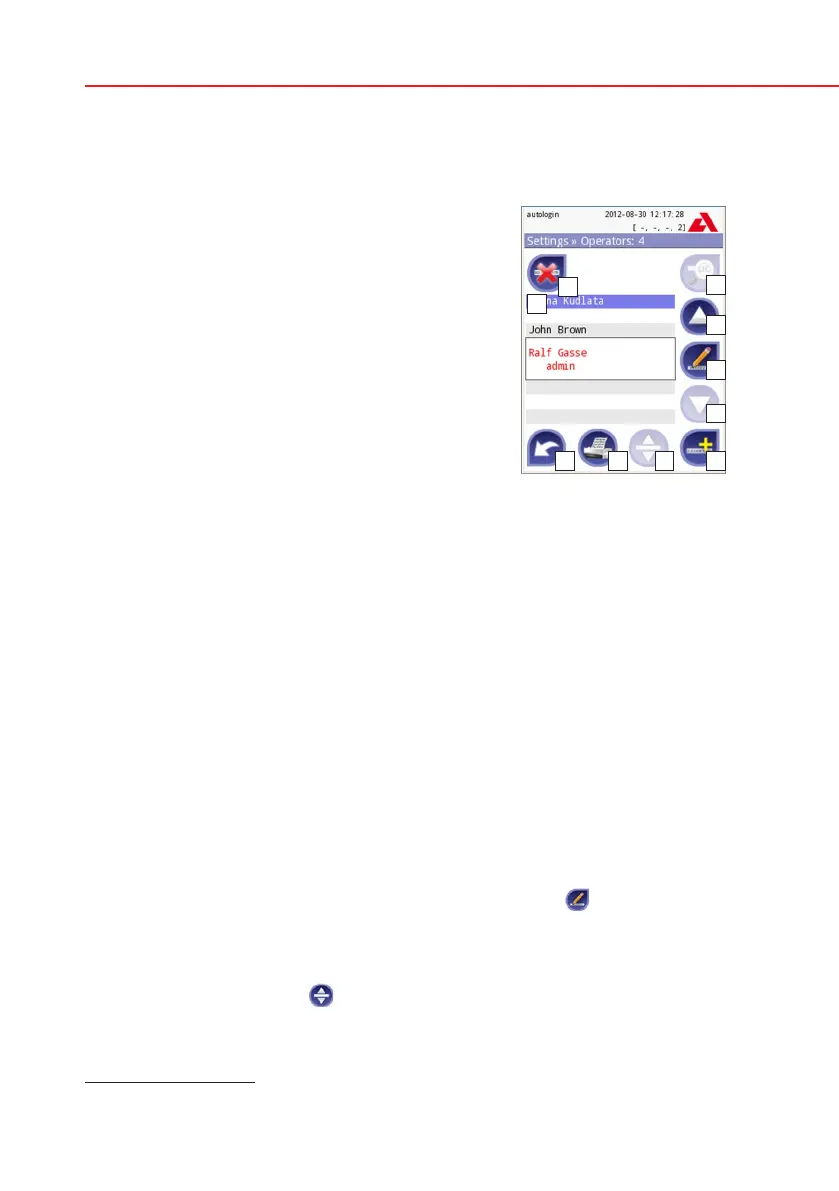
Legend
List of operators
Delete active operator
System security settings
(accessible for Supervisor group members)
Move up by one record in the list
Modify operator rights
Move down by one record in the list
Add new operator
Activate/deactivate movement*)
Print operators list
Go to Settings menu
By definition the user means someone who is operating the analyzer. By defini-
tion operator means a user identified by the analyzer, with a login name. Usually
each user is identified by an operator (login name and password).
Each operator’s access level can be defined separately. All operators are stored
in a database.
To add a new operator, press the Add new button.
Selected operator: Displayed information
In the list of operators the selected operator is marked with black borders and
the operator’s user group is also displayed. Operators belonging to the Adminis-
trator or higher group are marked with red text.
The user group of the selected operator is also displayed, followed with further
information in parenthesis. The meaning of the abbreviations is:
S: display self result only
L: may login without password (password is not mandatory for this operator)
D: login name may be displayed on the login screen
To modify the user rights of the selected operator press the
Edit button.
Listing operators on the login screen
If enabled, a maximum of four operators can be listed on login screen. The
operators who can be displayed on the login screen are marked with a blue
background. Use the Move
button to grab the selected operator and use the
up and down buttons to modify the order.
Operators
*) Move button is used only for ordering the operator list on the login screen.


 To Next Page