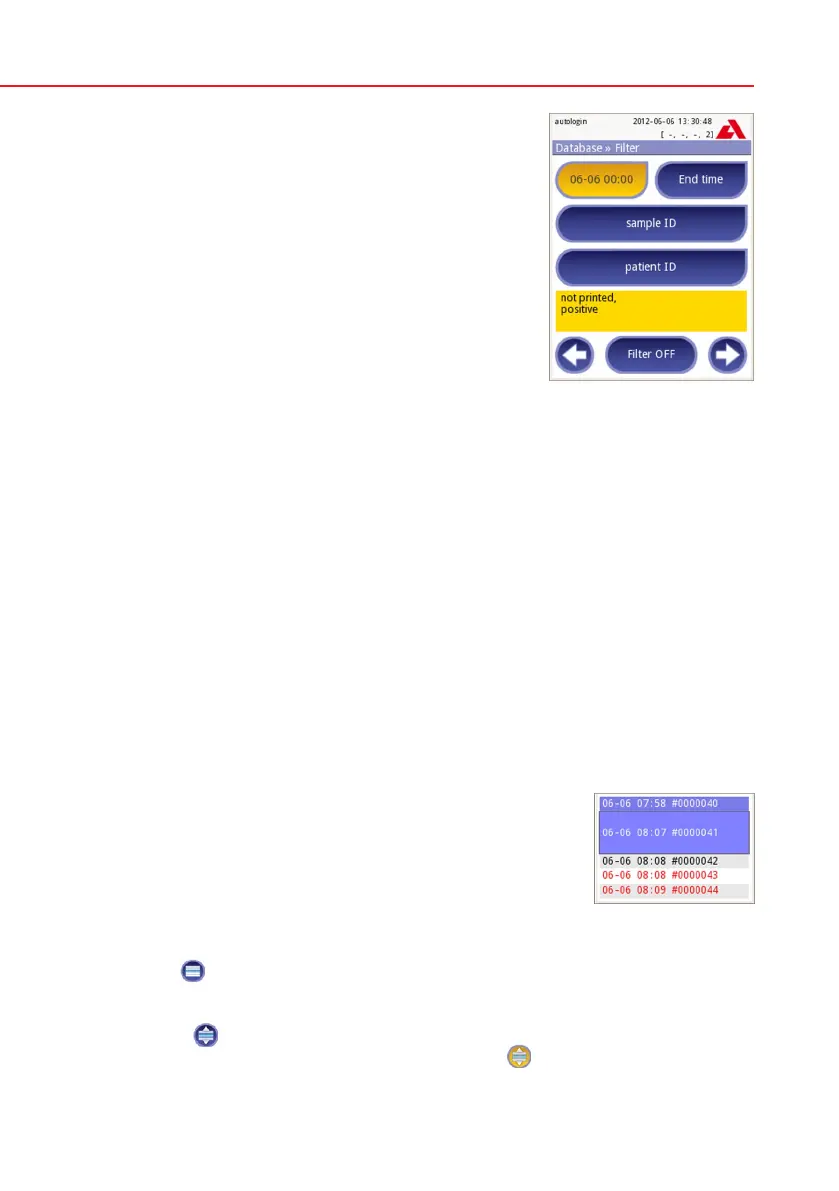
Active filters are labeled with orange background.
On the first page of the Filter screen, the active fil-
ters from the second page are listed above the navi-
gation buttons.
To switch off filtering press the Filter OFF button.
To return to the list of results, press Return.
Selecting the Date&Time
To select the filtering period, you can define the start and end Date&Time sepa-
rately on the Filter»Start time and Filter»End time screens.
When entering, the Day field is active. To change the value of the active field use
+ and – buttons. To modify which field is active use up and down arrows.
Today button will set the beginning/end of the current day.
Switch on button will set the exact time when the analyzer was switched on.
Press Cancel to discard the changes and return to the filtering overview screen
preserving the previous filtering value.
Press Apply to apply the changes and return to the filtering overview screen
Press Clear to clear the start/end filter and return to the filtering overview
screen.
8.4 Modifying the active selection of results
If a record is selected:
• inlistviewitsbackgroundisblue,
• in result view the background of Sample ID’s row is
blue.
The count of the selected results is displayed in parenthe-
sis at the content navigation bar (breadcrumb) in the list
and selection view.
Single selection
Use the
button to select/deselect a single record in the list view.
Multiple selection
Press the
buttontoactivatethe‘selectwithmovement’feature.Ifthisbutton
is activated (its background is changed to orange
) the state of the records will
be modified (will be selected/deselected) by moving up and down in the list view
according to the state of the selection button.
Active filters



 To Next Page