7.3 Full Test
The description of the required preparations and the testing process can be
found at 7.1 Quick Test.
This section only provides additional information on the data input process
presuming that all additional fields (sample ID, patient ID, color and clarity) are
enabled.
The data input is started after strip position check. The first screen appears when
the test strip tray is moved back to the home position.
The sequence of the data input is Sample ID Patient ID Color Clarity.
If a field is disabled at Settings»Measurement, the input screen won’t appear
for it.
Reading a sample ID or patient ID with barcode will automatically take you to
the next screen.
If you require further instruction regarding barcode reader or keyboard usage
see
5.3 Data input: Barcode reader.
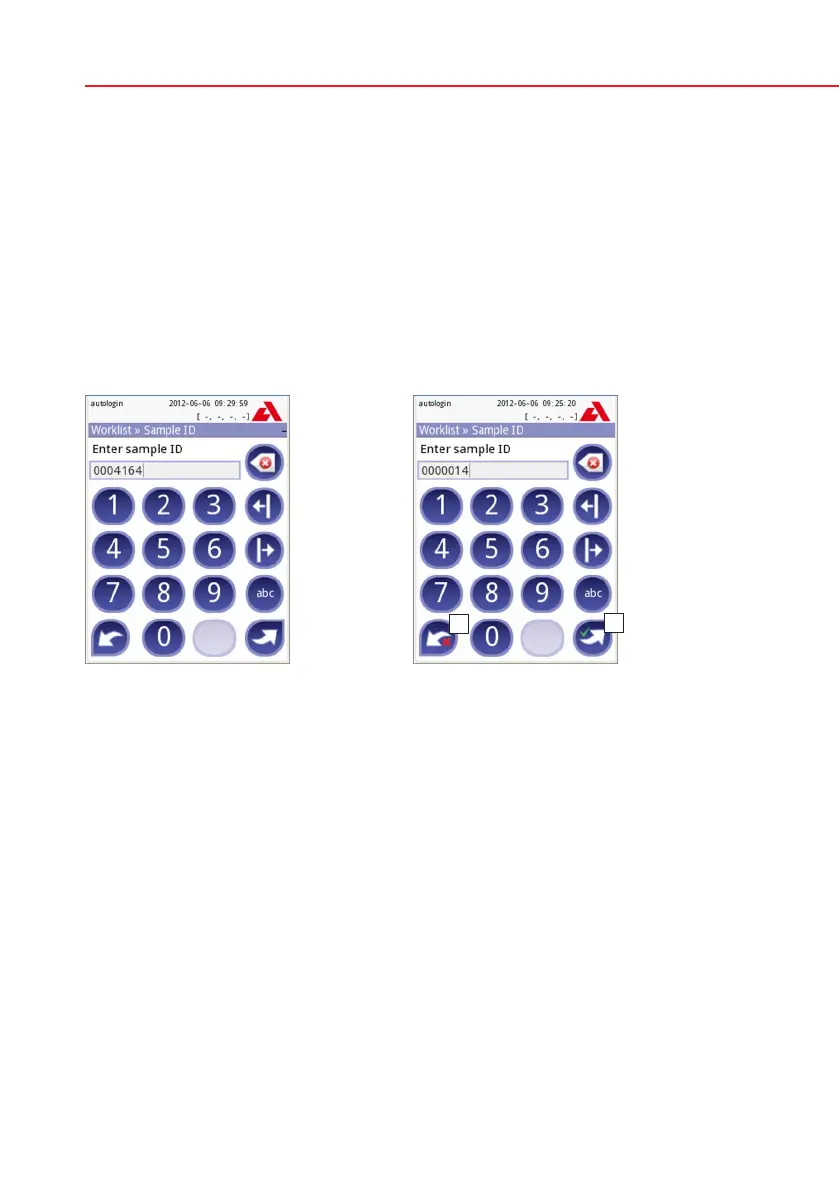
Sample ID: unique sample ID is as-
signed by default. To change it, use the
onscreen keyboard, the attached key-
board or the barcode reader. Maximum
14 characters. Sample ID must not be
empty.
Sample ID: Automatic ID was changed,
you can either cancel the change
(press Drop&Back) or apply it and
proceed to the next screen (press
Apply&Next)



 To Next Page