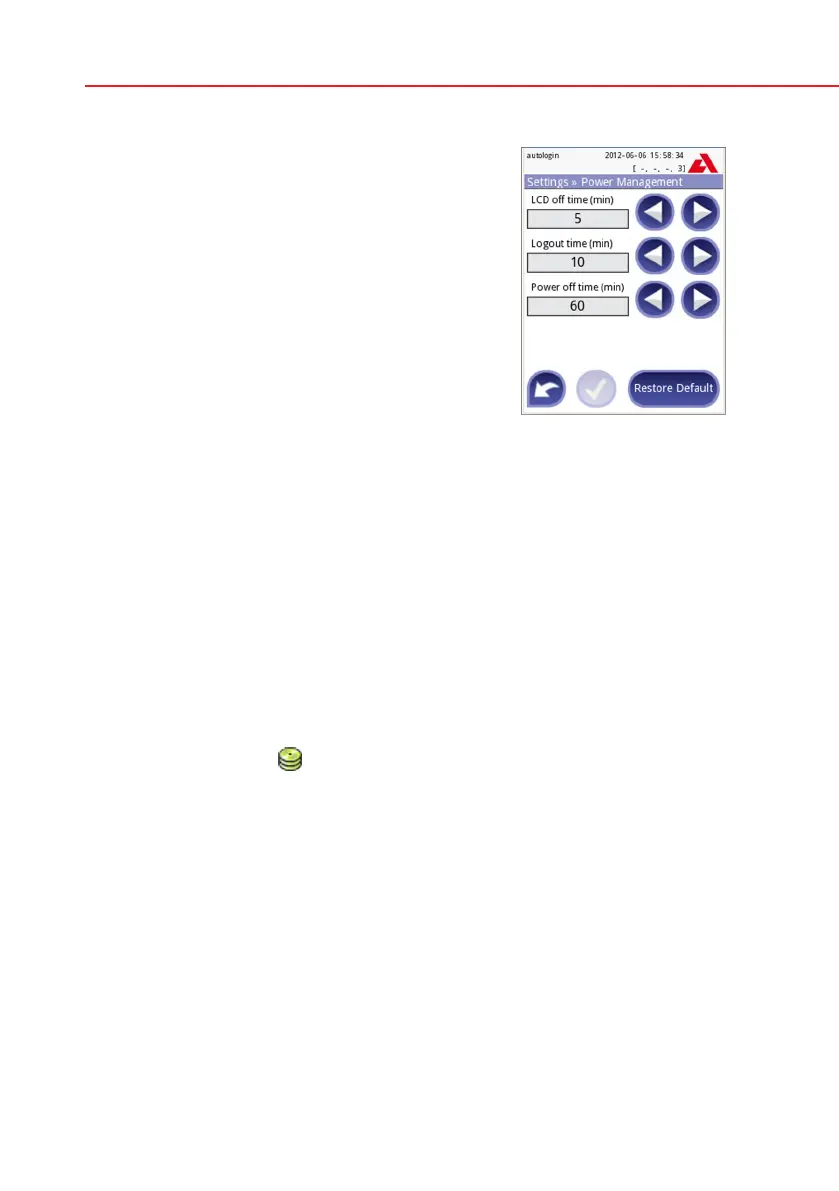
11.9 Power management
At the Power Management screen you can enable
and set the value in minutes for the following op-
tions:
• LCDofftime(startsscreensaver)
• Logouttime(logsouttheactiveuser)
• Powerofftime(switchesofftheanalyzer)
The analyzer will perform these activities if it has
been inactive for the given time.
Use the left, right arrows to change the values:
• LCDofftime:
Disabled, 5, 10, 15, …, 60
• Logouttime:
Disabled, 10, 20, 30, …, 120
• Powerofftime:
Disabled, 20, 40, 60, …, 180
The screensaver mode and the automatic power-off feature helps to reduce the
unnecessary power usage, thus reducing the economic footprint of the analyz-
er.
The automatic logout feature however gives an additional layer of security
( available for Pro units only).
11.10 Log export
To export the log files, analyzer settings and version information for diagnostic
purposes:
1) Plug the USB flash drive into one of the USB A connectors on the back of the
device. Wait until the
disk icon appears in the status line. The icon shows
that the USB flash drive was recognized by the system.
2) Push the Log Export button in the Settings (2) screen.
3) An information window appears (Log export is in progress. Please wait.). When
the information disappears, the log export is finished.
4) Remove the USB flash drive.
11.11 Editing color and clarity list (Pro only)
The Urilyzer 100 Pro units allow the possibility to customize the urine color and
clarity list values according to standard lists determined by your facility’s policy.
The color list can be edited at the Settings»Color list screen, while the clarity list
can be edited at the Settings»Clarity list screen.
Power Management screen



 To Next Page