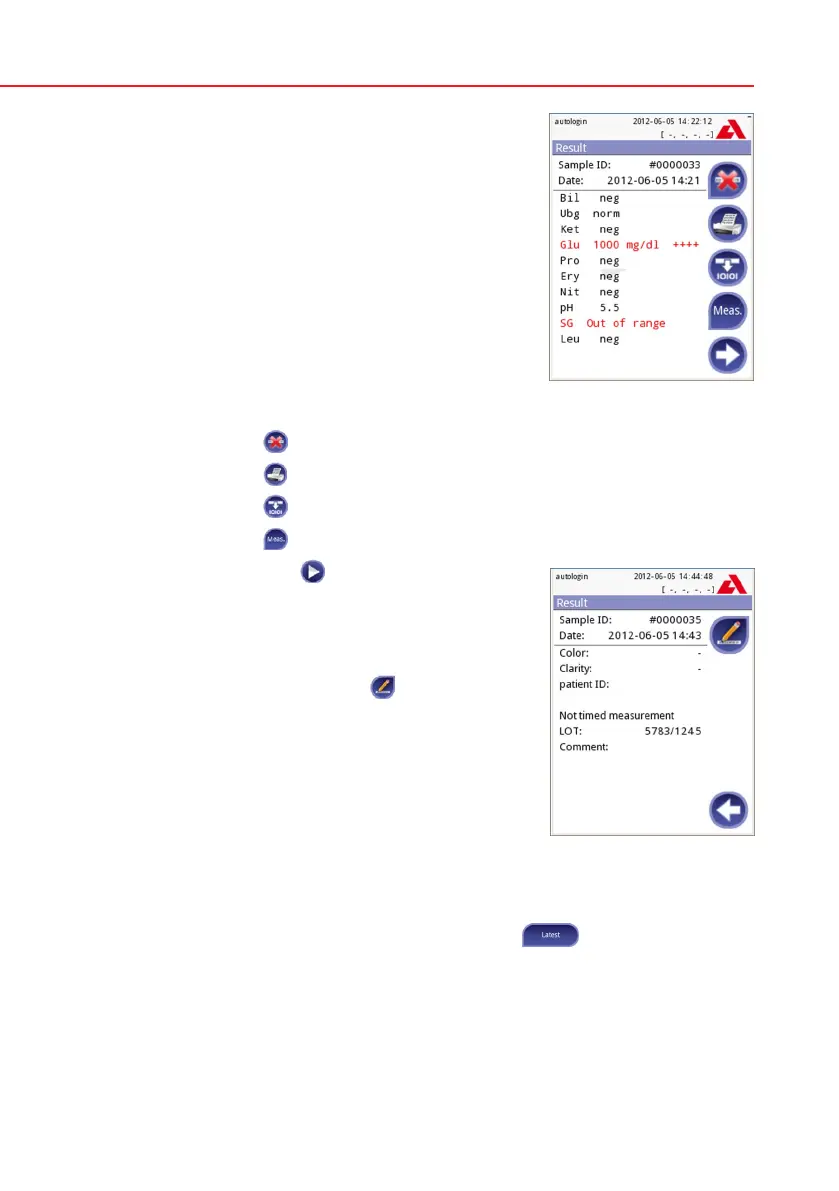
After approx. 60 seconds the pad results will be dis-
played on the screen.
If Autostart is ON: The result screen will be dis-
played until you remove the test strip from the tray.
Once the strip is removed, the display automatically
returns to the Measurement screen.
If Autostart is OFF: The result screen will be dis-
played for approximately 5 seconds –while display-
ing a circle animation – then the display will return
to the Measurement screen (if no error occurred
during the readout). If you touch the display while
the circle animation is running, the system will not
automatically return back.
On the Result screen:
• Bypressingthe
Delete button the result can be deleted
• Bypressingthe
Printer symbol the result can be printed
• Bypressingthe
Transfer button the result can be transferred
• Bypressingthe
Meas. button the system goes back to the measurement
• Bypressingtheright
arrow the additional fields
of the result are showed
– Color, clarity, Patient ID, Strip LOT and com-
ment
– On the second result screen the result can
be edited by pressing the
Edit button (if it
wasn’t printed or sent already)
At the Measurement screen another analysis may be started by applying the
next test strip.
The latest result can be reviewed by selecting the
Latest button on the
Measurement screen.
Result (1)
Result (2)



 To Next Page