18. Setpoint Setting
Set setpoint values for batch weighing and check weighing.
Select a setpoint setting method (SP F-01) from the following.
0: Key switches, RS-232C or RS-422/485 (Setpoint input not used) (default)
1: 5-digit input from external devices
2: 16-digit input from external devices
Refer to “14. OPTION-03 RS-422/485” for the setting procedure of the RS-232C or RS-422/485.
Refer to “11. SETPOINT INPUT” for the setting procedure using 5-digit or 16-digit input from external
devices.
18.1. Setting Using Key Switches
Operation
Normal mode
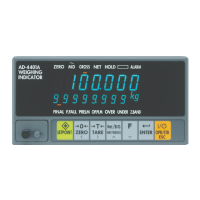
SETPOINT key Goes to the item selection mode.
Item selection
ENTER key
Selects the blinking item in the lower status display and goes to the inputting
mode of the item.
TARE key Shifts the blinking item in the lower status display to the right.
ZERO key Shifts the blinking item in the lower status display to the left.
ON/OFF key Returns to the normal mode.
Setpoint input
ENTER key Saves the setpoint and returns to the item selection mode.
TARE key Shifts the blinking digit to the right.
ZERO key Shifts the blinking digit to the left.
NET/GROSS key Increases the blinking digit by one.
Function key Decreases the blinking digit by one.
ON/OFF key Cancels the setpoint and returns to the item selection mode.


 To Next Page