Power ON
20. Initialization
20.1. Parameter Initialization
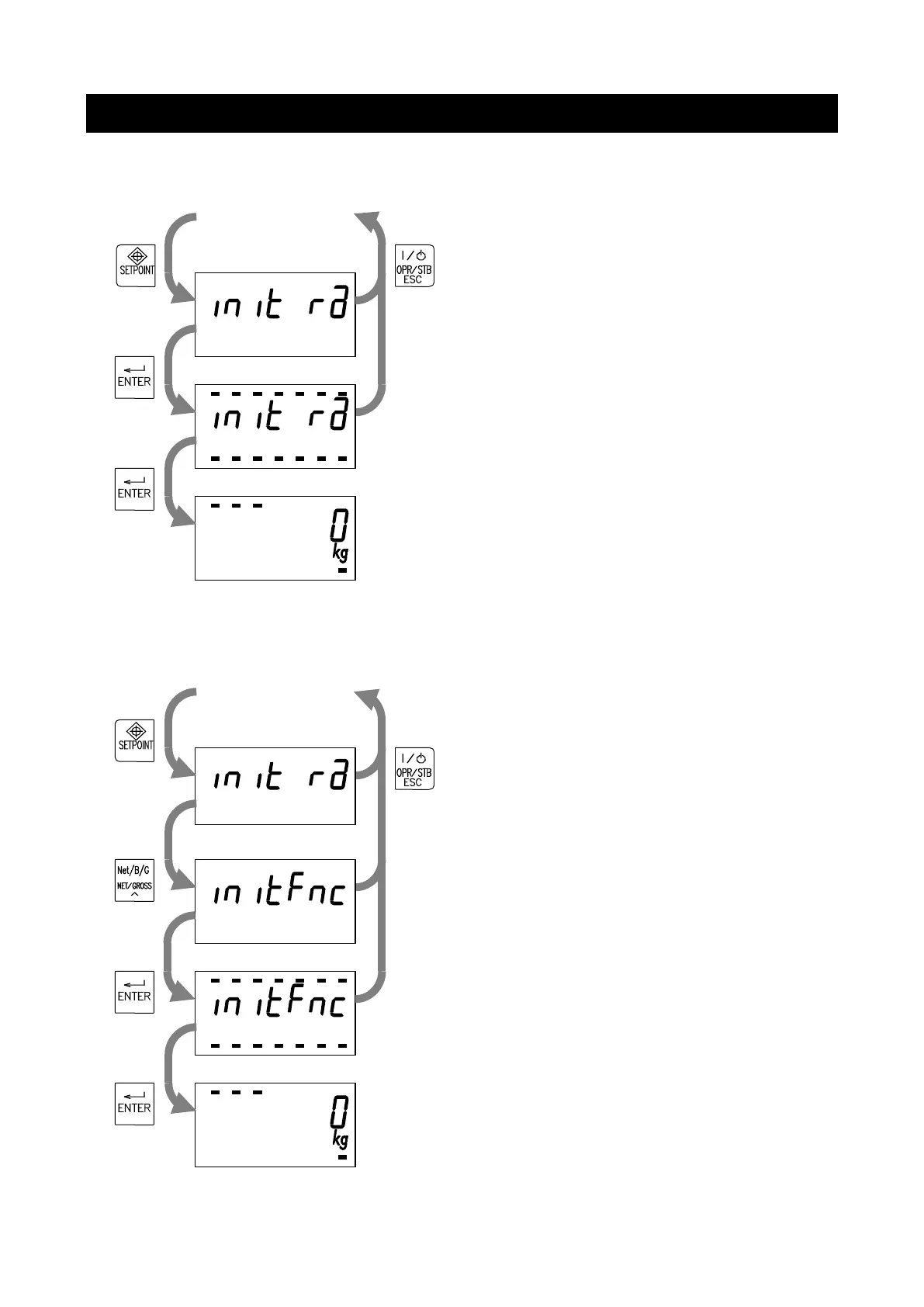
While holding the SETPOINT key, turn the AD-4401
ON.
With the display shown to the left, press the ENTER
key.
With the display shown to the left, hold the ENTER
key for three seconds or more to initialize the
parameters below.
Zero setting value, tare value, status in the main
display, normal mode/OFF mode status, total weight,
number of accumulations, setpoint values, normal
/loss-in-weight batching status
20.2. General Function Initialization
While holding the SETPOINT key, turn the AD-4401
ON.
With the display shown to the left, press the
NET/GROSS key.
With the display shown to the left, press the ENTER
key.
With the display shown to the left, hold the ENTER
key for three seconds or more to initialize the
parameters described in 19.1. and general functions.
Power ON


 To Next Page