Whether you are performing all calibrations or just a subset, perform calibrations for
the QuantStudio
™
6 and 7 Flex Systems in the following sequence.
Not
e: A normalization calibration is not required for the 96-well plate blocks (0.1-mL
or 0.2-mL) or the 384-well plate block.
Start
▼
ROI calibration (page 41)
▼
Background calibration (page 45)
▼
Uniformity calibration (page 49)
▼
Dye calibration (page 53)
▼
Normalization calibration (TaqMan
®
Arr
ay Card only) (page 59)
▼
Verify the instrument performance (page 62)
(RNase P instrument verification)
▼
Finish
You can use the Instrument Console of the QuantStudio
™
Real-Time PCR Softw
are to
view the calibration status of an instrument.
1.
In the QuantStudio
™
Real-Time PCR Software Home tab, click
Instrument
Console.
2.
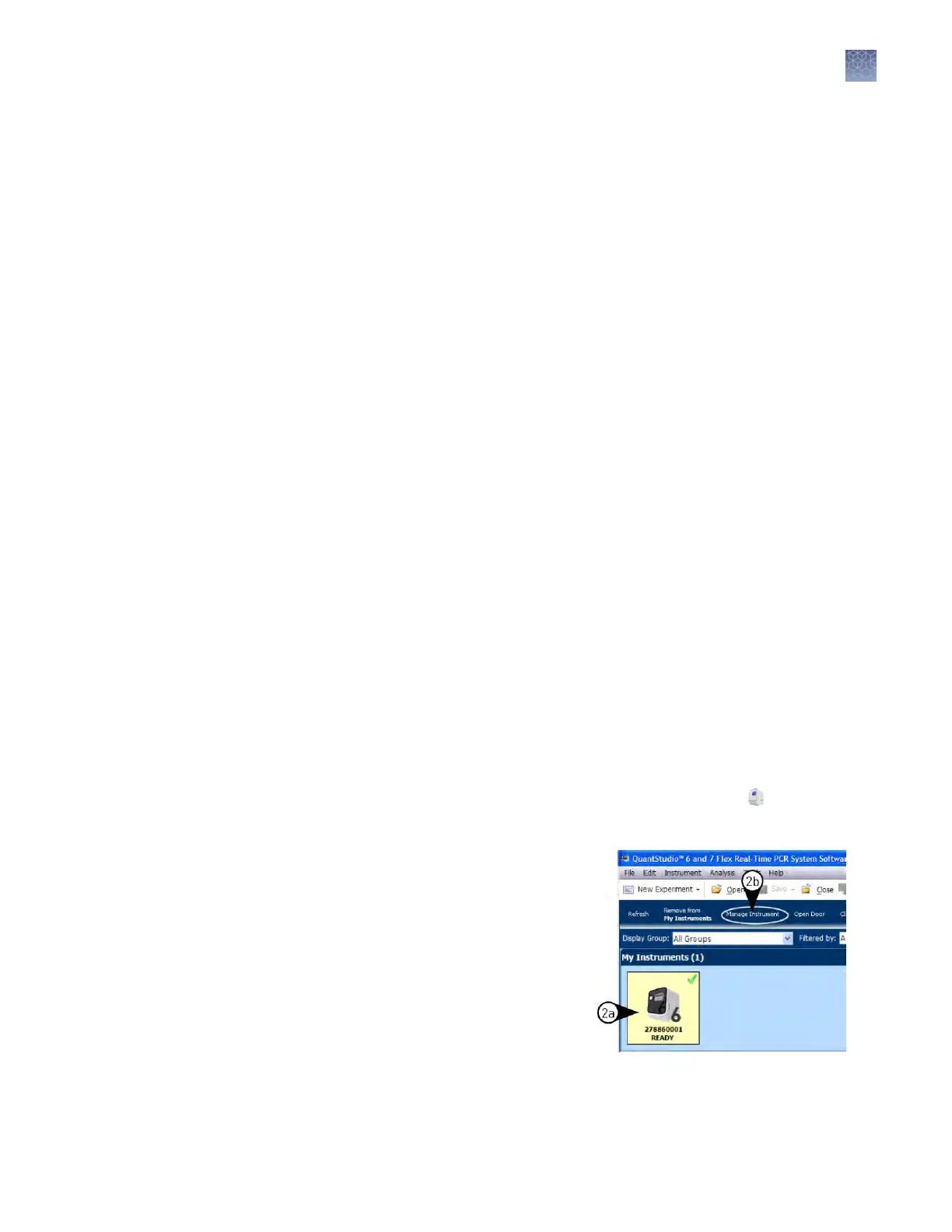
From the Instrument Console open
the Instrument Manager.
a.
Select y
our instrument icon
from the My Instruments
group.
b.
Click Manage Instrument.
Note: If the Manage Instrument
option is inactive, connect your
instrument to the My Instruments
group.
Calibration
workflow
View the
c
alibration status
of an instrument
Chapter 2 Calibrate the instrument
Calibration overview
2
QuantStudio
™
6 and 7 Flex Real-Time PCR Systems v1.6 Maintenance and Administration Guide
29












 To Next Page